Managing Calls and Videoconferences | 38
RADVISION | User Guide for SCOPIA XT5000 Series Version 3.0
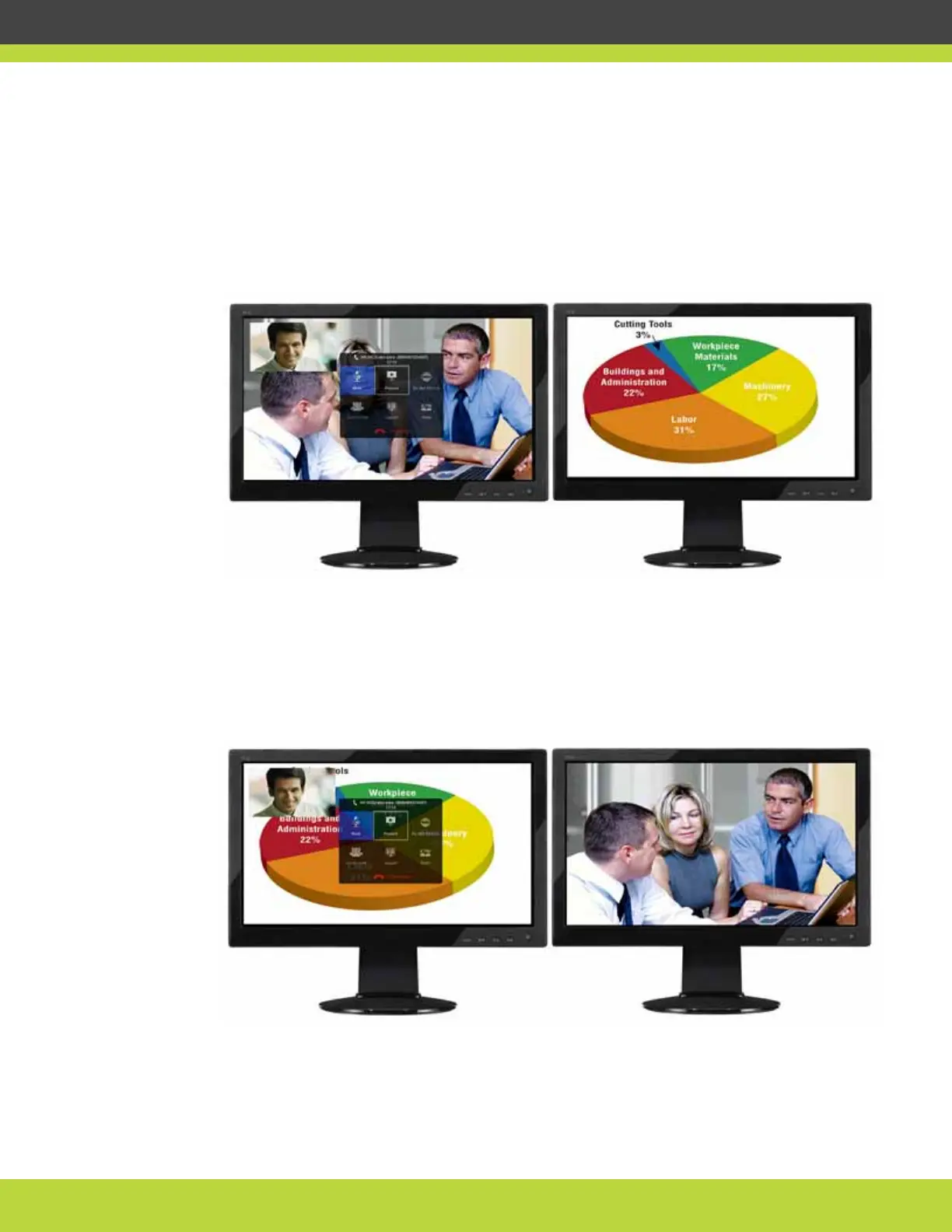
• Configuring to HD1 (Menu & Video Rx) + HD2 (Present). See Figure 7-5 on page 38. The main
monitor (HD1) shows the system menus, the received video, and local video. The local video
is in a small overlapping window, also called a PIP (Picture in Picture) view. The auxiliary
monitor (HD2) shows the presentation (local or remote), if available. The audio is
automatically enabled on HD1. This is the default configuration.
Figure 7-5 Menu, received video, and local video on HD1 and presentation on
HD2
• Configuring to HD1 (Menu & Present) + HD2 (Video Rx). See Figure 7-6 on page 38. HD1
shows the system menus, the presentation (local or remote) if available, and the local video
in a small overlapping window. HD2 shows the received video. The audio is automatically
enabled on HD1.
Figure 7-6 Menu, presentation, and local video on HD1 and received video on
HD2
• Configuring to HD1 (Present) + HD2 (Menu & Video Rx). See Figure 7-7 on page 39. HD1
shows the presentation (local or remote), if available. HD2 shows the system menus, the
received video, and the local video in a small overlapping window.


 To Next Page
 Loading...


