4 ESP-LX+ & LXi+ Installation, Programming, & Operation Guide
Controls, Switches, and Indicators
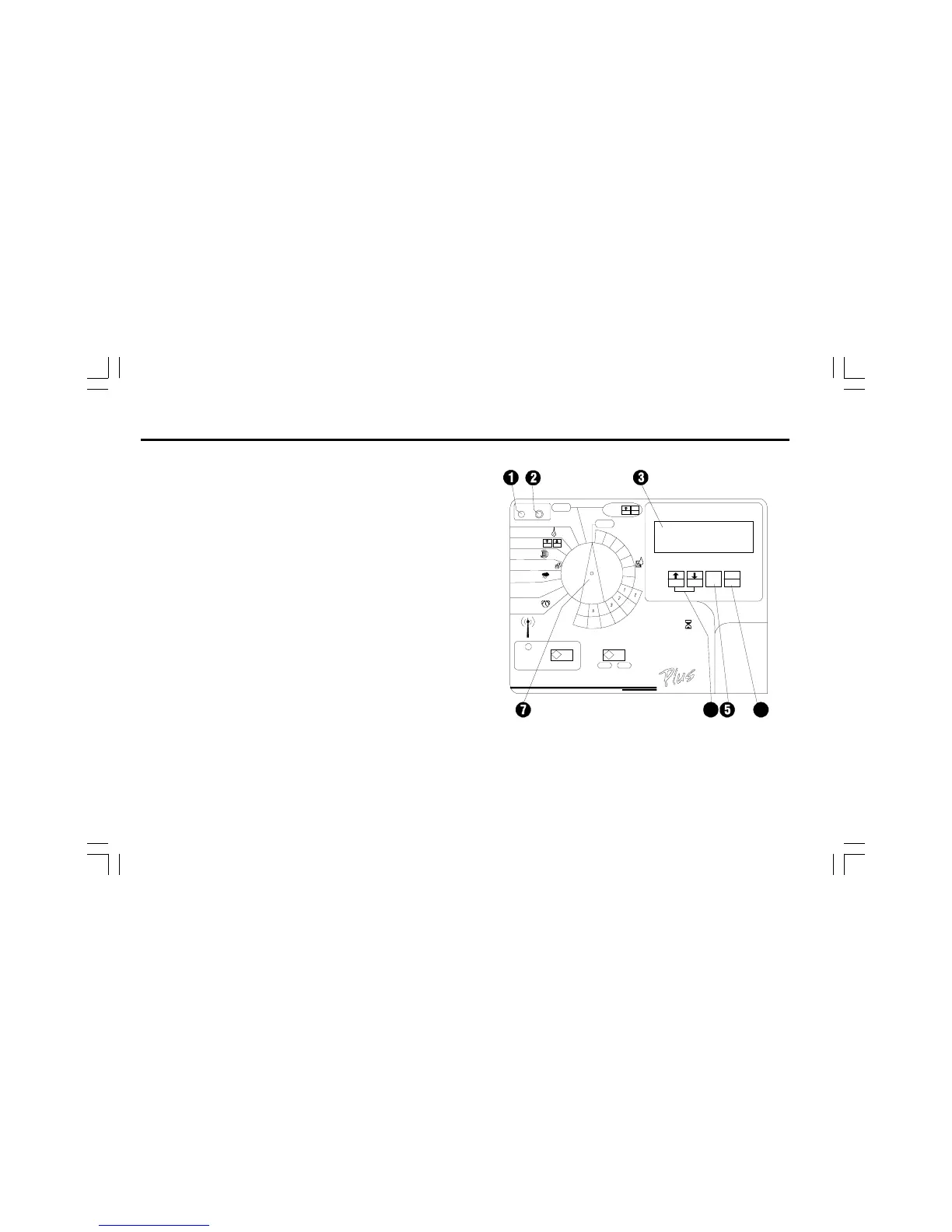
This illustration shows the controls, switches, and indicators on
ESP-LX+ and LXi+ controllers, including:
➊ Fault LED flashes when the controller senses a station
short circuit.
➋ Clear Fault Button used to turn off the Fault LED and
clear the flashing LCD Error indicator after the fault has
been corrected.
➌ LCD Display during normal operation, displays the time
of day; during programming, shows the result of your
commands; during watering, shows the station that is
running and the minutes remaining in its run time (when
program dial is set to the AUTO position).
➍ Manual Start / Advance Button used to start a program
manually or to manually advance watering from one
station to the next. Also used to make program changes.
➎ PGM Button used to select watering program A, B, C, or
D-drip.
➏ Arrow / ON-OFF Buttons used to set times and days, and
to make program changes.
Programming Dial used to turn the controller off and on,
and for programming.


 To Next Page