Weather Station - Model “PRO”
Nov., 2001 Page 30
Model “PRO”- Weather Station
Cozz GT27145B
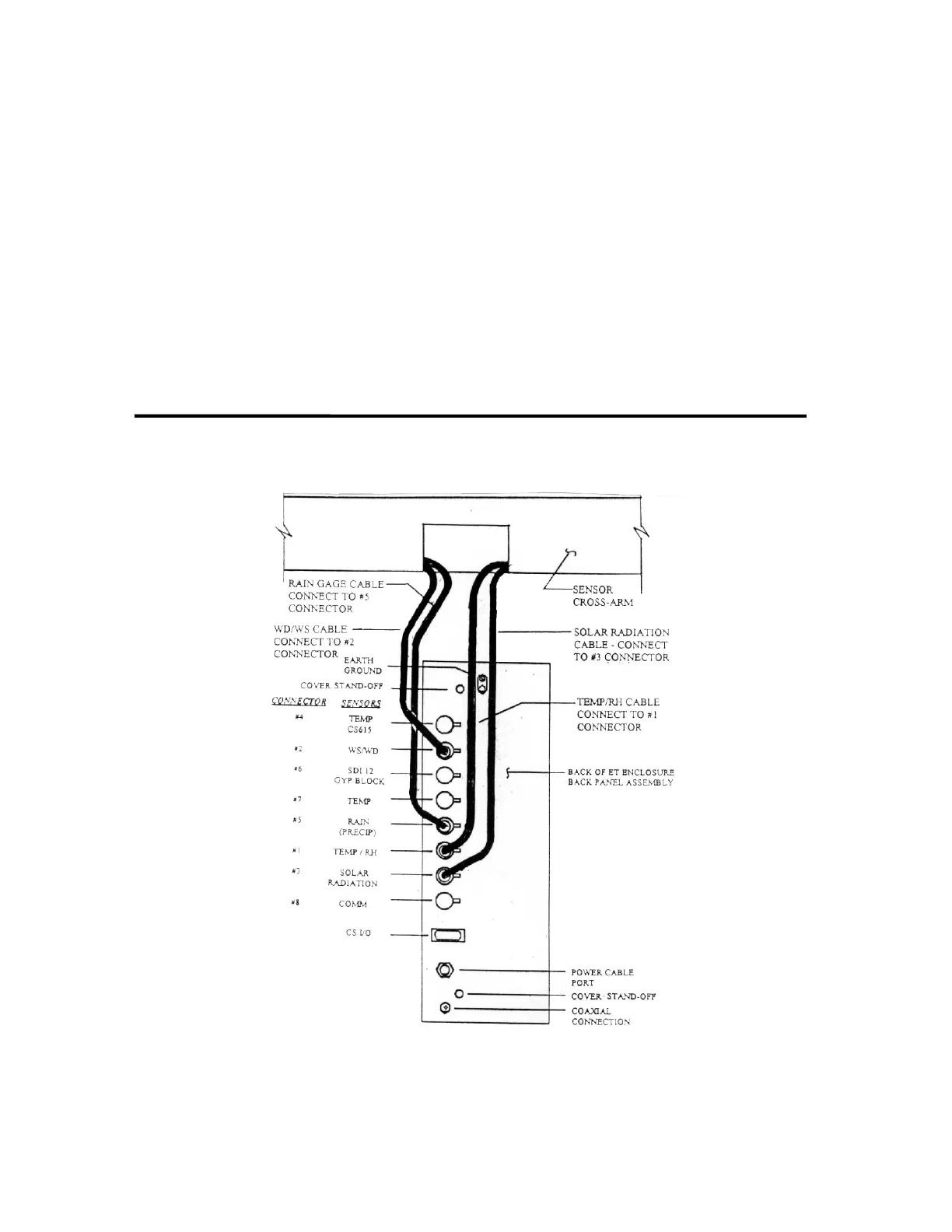
The Sensor Cables exit from the center
back of the Cross-Arm. The cables
need to be routed down the back of the
Enclosure and plugged into the
connectors on the back panel of the
Enclosure as follows:
Solar Radiation #10105 cable -
connect to #3 connector [labeled
“SOLAR RADIATION”]
Rain #10094 cable - connect to #5
connector [labeled “RAIN
(PRECIP)”]
Temp/RH #10090 cable - connect
to #1 connector [labeled
“TEMP/RH”]
WD/WS (Wind Direction/Wind
Speed) #10408 cable - connect to
#2 connector [labeled “WS/WD”]
Making sure that all cables are properly
enclosed behind the cover - replace the
cable cover. Be sure that you do not
pinch any of the cables between the
cover and the back panel of the
Enclosure.
FIGURE 15 - SENSOR CABLE CONNECTIONS



 To Next Page