Weather Station - Model “PRO”
Model “PRO” - Weather Station
Page
55
Nov., 2001
GT27145B Cozz
First: Check that the RAD Short Haul
Modem, at the central computer
location, is working correctly.
This can be easily done by using
the following method.
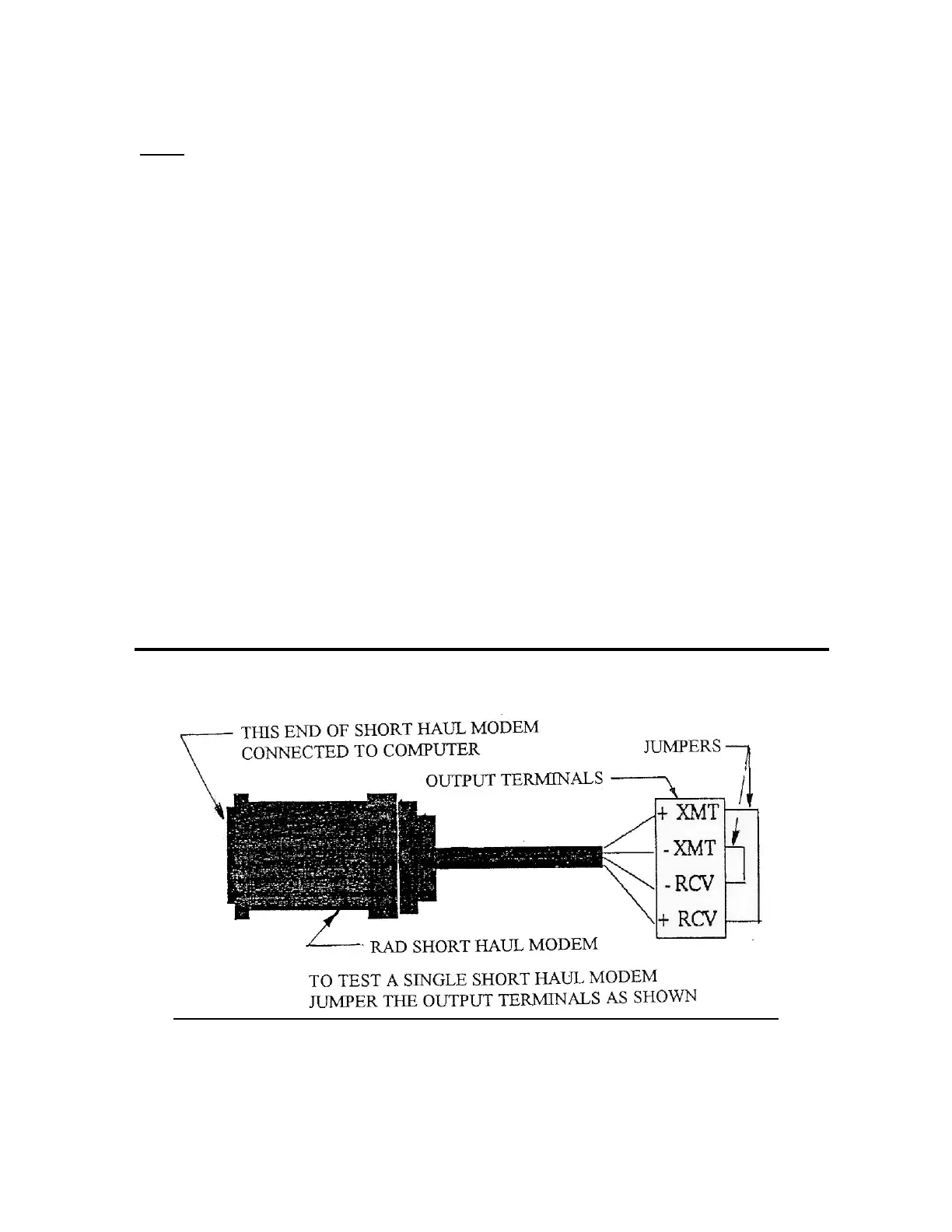
• Jumper the output terminals of
the RAD SRM-5A Short Haul
Modem, located at the computer,
as shown in FIGURE 26 below.
• Using a working (“Good”) RAD
SRM-5A Short Haul Modem
connect the communication wires
together at the weather station
end as shown in FIGURE 26
below.
• With the Rain Bird Weather
Software, go to the Main Menu
and set the “capital lock” on the
keyboard of the computer.
• Be sure to configure a direct connect
weather station.
• Press a capital [W] from the Main
Menu screen.
• If a security number is asked for use
[6275].
• Choose a direct connect station and
the screen will go “BLANK”.
• Assuming you have connected the
output terminals of the modem as
shown in FIGURE 25 below, what
you type will be echoed back to the
computer screen. Testing the short
haul modem in this way will verify
that it is working properly. If you
do not see the characters, that you
type, on the screen then the Short
Haul Modem has a problem or the
COM port and needs to be replaced.
FIGURE 25 - TEST OF SHORT HAUL MODEM



 To Next Page