Weather Station - Model “PRO”
Model “PRO” - Weather Station
Page
53
Nov., 2001
GT27145B Cozz
420
57
• Make sure the modem is properly
configured and cabled.
If still no response, contact your local
Rain Bird distributor.
-99999 Displayed in an input location.
• Make sure the battery voltage is
between 9.6 and 16 VDC.
• Make sure the Range parameter in
the measurement instruction covers
the full scale voltage output by the
sensor.
Unreasonable results displayed in an
input location.
• Inspect the sensor for damage and/or
contamination.
• Make sure the sensor is properly
wired to the datalogger.
• Check the multiplier and offset
parameters in the measurement
instruction.
6999 or 99999 stored in final storage.
Final Storage format limitations are
exceeded (no number larger than 6999 in
low resolution, or 99999 in high
resolution is stored). Change the
datalogger program.
USING A LAPTOP
COMPUTER
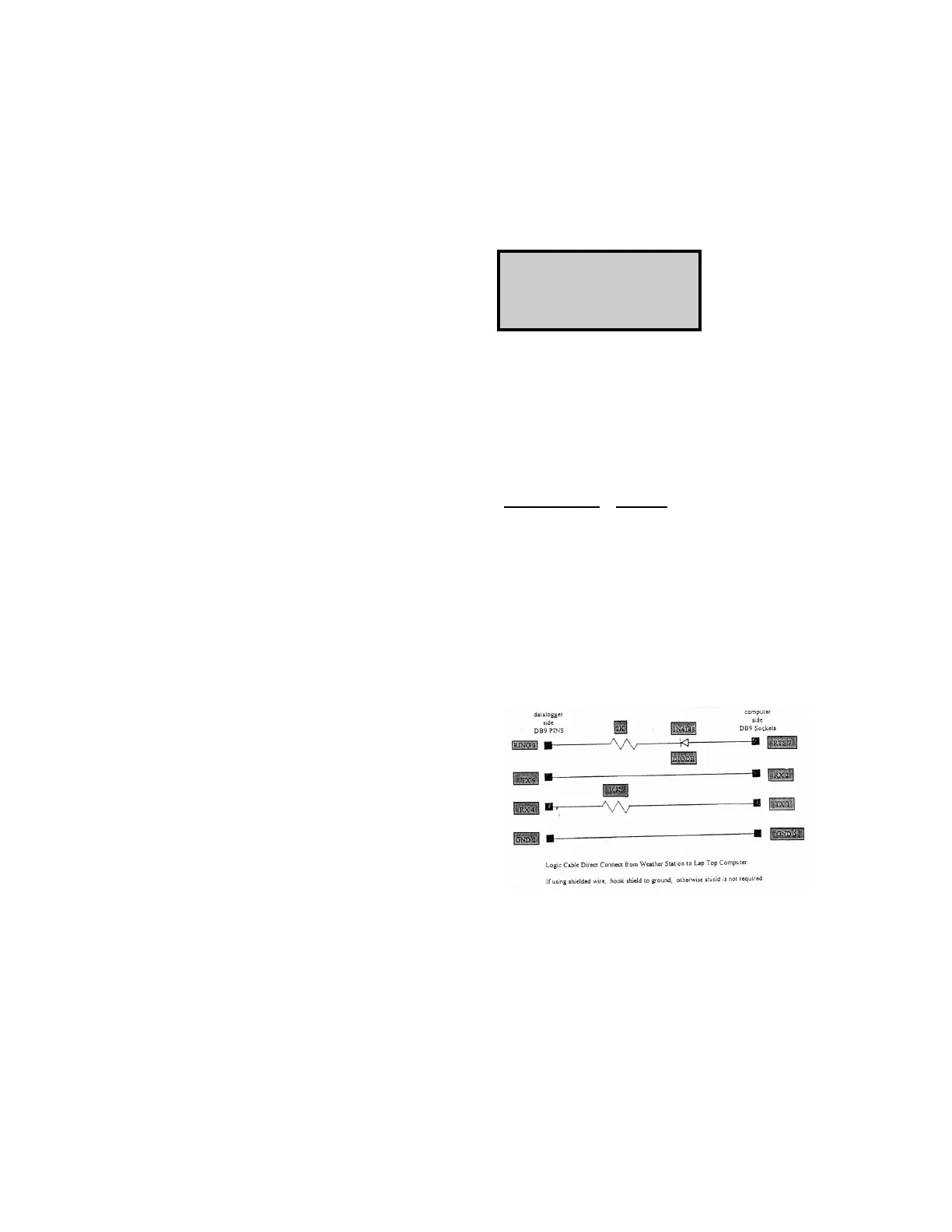
When a Laptop computer is being used
to check the weather station it is
necessary to use a Serial cable between
the computer and the weather station, as
configured in FIGURE 24 shown below.
CAUTION ! Before “plugging” the
serial cable and computer into the Serial
I/O connector on the back panel of the
Enclosure - make certain that you have
disconnected the 9-pin ribbon cable from
the Short Haul Modem or the Phone
Modem. If you fail to do so, it is a
high possibility that you will damage the
modem.
FIGURE 24 - CONFIGURATION
OF SERIAL CABLE
• Connect the Laptop computer, using
the serial cable as shown in FIGURE
25, to the Serial I/O connector on
the back panel of the Enclosure - the
same as shown for the Keyboard
Display in FIGURE 24.



 To Next Page