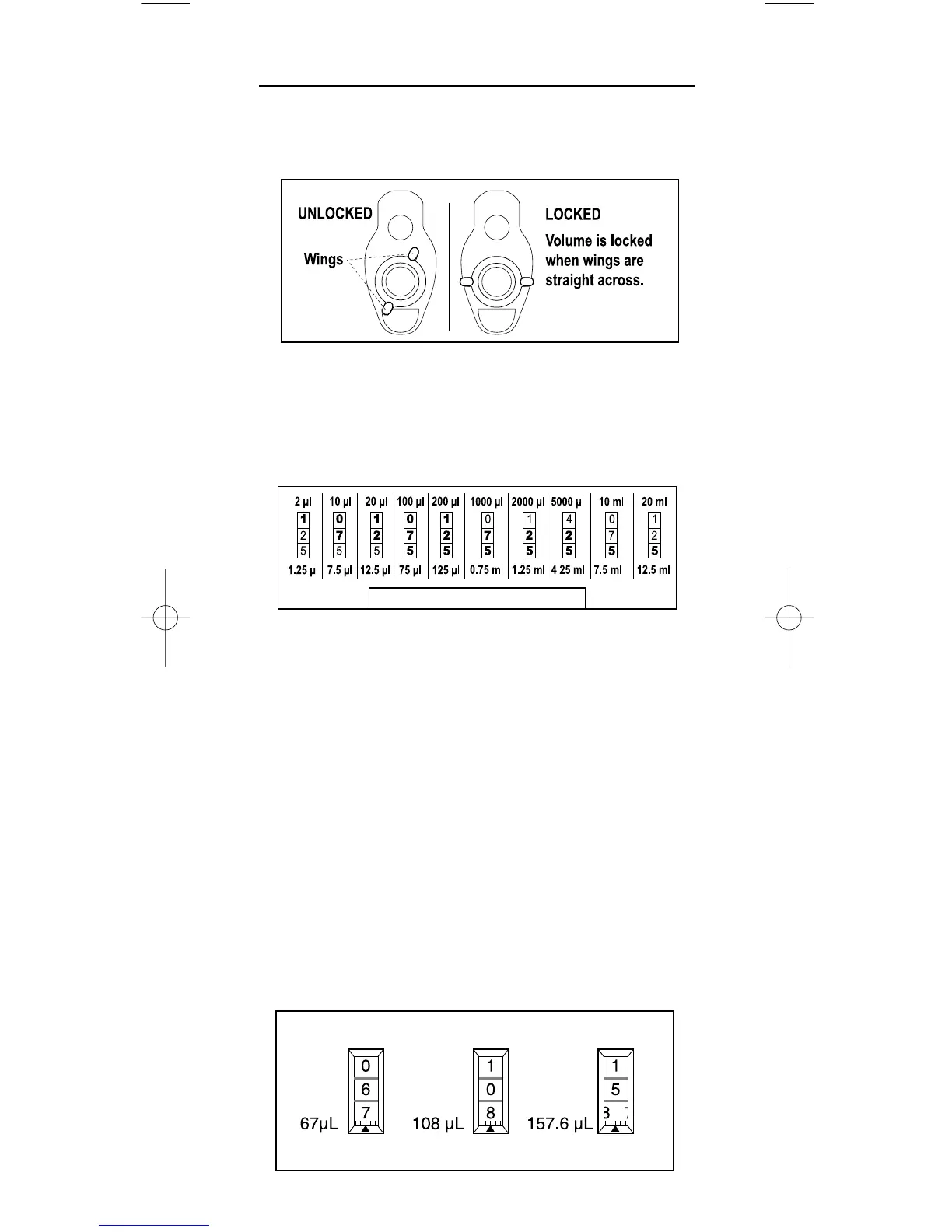
Setting Volume
1. Turn the volume lock counter-clockwise to the position
shown at left below so the volume setting mechanism is
unlocked and free to turn.
2. With the mechanism unlocked, orient Pipet-Lite so you
are looking at the digital volume indicator, then rotate the
plunger button to change volume – counter-clockwise to
increase, and clockwise to decrease volume.
The volume indicator is read from the top down.
2–20 µL: Black – µL. Red – tenths, hundredths of µL.
100–200 µL: All digits black – whole µL.
1000–5000 µL: Red – mL. Black – tenths, hundredths of mL.
10 mL: Red – mL. Black – tenths of mL
20 mL: Red – mL. Black – tenths of mL.
3. To eliminate errors due to mechanical backlash: when set-
ting the desired volume, first turn the knob
1
⁄
3 turn above
the desired volume. Then turn the knob slowly clockwise
until the desired volume is displayed. Always dial down to
the desired volume.
4. Turn the volume lock clockwise (see diagram above) to
prevent accidental changes to the volume setting.
Example volumes for the 200 µL model are shown below
(note the intermediate setting at the right).



 To Next Page