480 MULTIMEDIA
NOTE:
Many features of this system are speed depen-
dent. For your own safety, it is not possible to
use some of the touchscreen features while the
vehicle is in motion.
Exposure To Radio Frequency Radiation
The internal wireless radio operates within
guidelines found in radio frequency safety
standards and recommendations, which reflect
the consensus of the scientific community. The
radio manufacturer believes the internal
wireless radio is safe for use by consumers. The
level of energy emitted is far less than the
electromagnetic energy emitted by wireless
devices such as mobile phones. However, the
use of wireless radios may be restricted in some
situations or environments, such as aboard
airplanes. If you are unsure of restrictions, you
are encouraged to ask for authorization before
turning on the wireless radio.
Care And Maintenance
Touchscreen
Do not press the touchscreen with any hard
or sharp objects (pen, USB stick, jewelry,
etc.), which could scratch the touchscreen
surface!
Do not spray any liquid or caustic chemicals
directly on the screen! Use a clean and dry
microfiber lens cleaning cloth in order to
clean the touchscreen.
If necessary, use a lint-free cloth dampened
with a cleaning solution, such as isopropyl
alcohol or an isopropyl alcohol and water
solution ratio of 50:50. Be sure to follow the
solvent manufacturer's precautions and
directions.
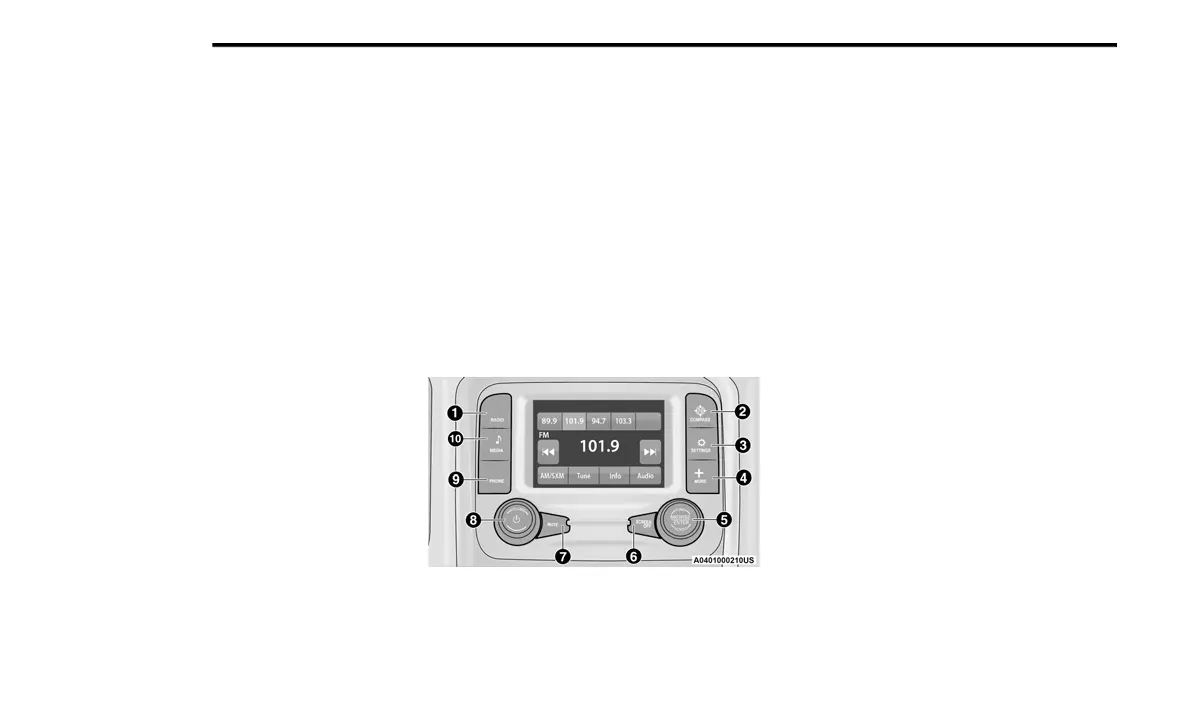
UCONNECT 3 WITH 5-INCH DISPLAY
Introduction
Uconnect 3 With 5-Inch Display
1 — RADIO
Push the RADIO button on the faceplate to enter
Radio Mode. The different tuner modes; FM/
AM/SXM (if equipped), can be selected by
pressing the corresponding buttons on the
touchscreen in Radio Mode.
2 — COMPASS
Push the COMPASS button on the faceplate to
display the current direction of the vehicle.
3 — SETTINGS
Push the SETTINGS button on the faceplate to
display the customer programmable features.
4 — MORE
Push the MORE button on the faceplate to
access additional options.
5 — ENTER/BROWSE & TUNE/SCROLL
Push the ENTER/BROWSE button to accept a
highlighted selection on the screen. Rotate the
TUNE/SCROLL rotary knob to scroll through a
list or tune to a radio station.
6 — SCREEN OFF
Push the SCREEN OFF button to turn the
touchscreen off. To turn the touchscreen back
on, press the screen.
20_DT_OM_EN_USC_t.book Page 480



 To Next Page