MULTIMEDIA 493
STEERING WHEEL AUDIO CONTROLS — IF
EQUIPPED
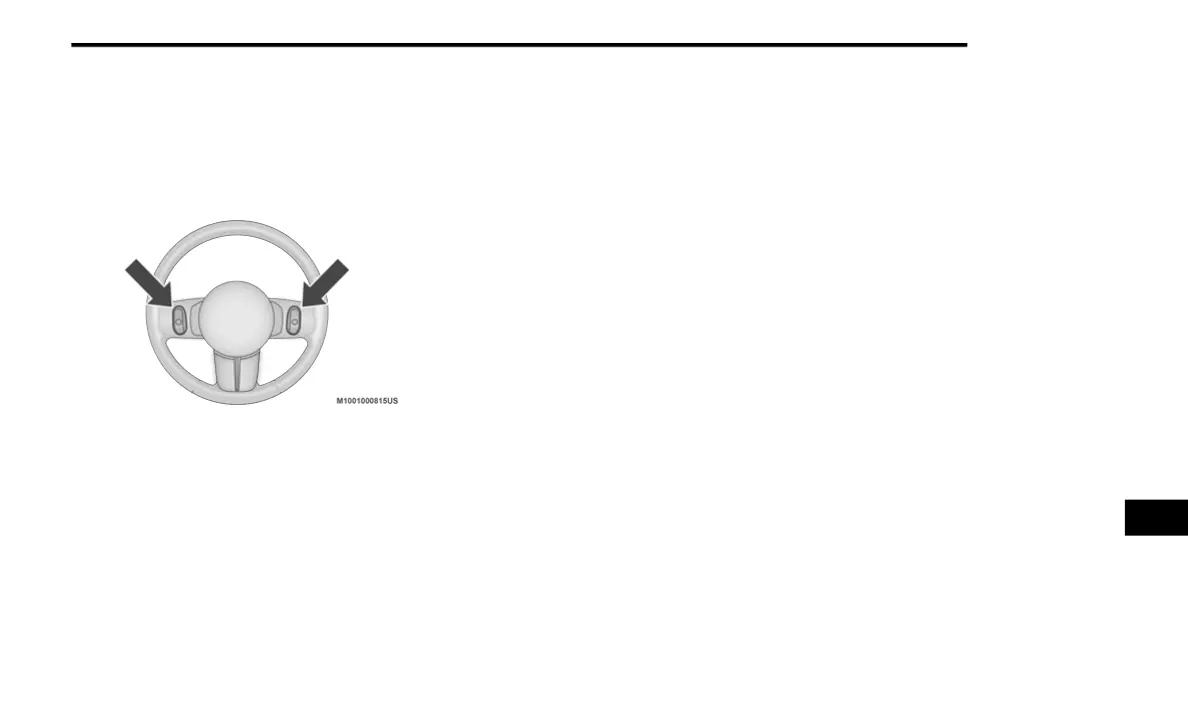
The remote sound system controls are located
on the back surface of the steering wheel.
Reach behind the wheel to access the switches.
Steering Wheel Audio Controls (Rearview Of Steering
Wheel)
The right hand control is a rocker type switch
with a push-button in the center. Pushing the
top of the switch will increase the volume, and
pushing the bottom of the switch will decrease
the volume.
Pushing the center button will make the radio
switch between the various modes available
(AM/FM/SXM or Media etc.).
The left hand control is a rocker type switch with
a push-button in the center. The function of the
left hand control is different depending on
which mode you are in.
The following describes the left hand control
operation in each mode.
Radio Operation
The button located in the center of the left-hand
control will tune to the next preset station that
you have programmed in the radio preset
button.
Media Mode
Pushing the top of the right-hand switch once
will go to the next track on the selected media
(AUX/USB/Bluetooth®). Pushing the bottom of
the right-hand switch once goes to the
beginning of the current track, or to the
beginning of the previous track if it is within
eight seconds after the current track begins to
play.
NOTE:
While In Media Mode, the center button on the
left rocker switch is nonfunctional.
IPOD®/USB/MP3 CONTROL — IF EQUIPPED
Located on the center stack, just below the
instrument panel, is the main media hub. There
are four total USB Ports: Two Mini-USBs (Type C)
and two Standard USBs (Type A). There is also
an AUX Port located in the middle of the USB
Ports.
Plugging in a smartphone device to a USB Port
may activate Android Auto™ or Apple CarPlay®
features, if equipped. For further information,
refer to “Android Auto™” or “Apple CarPlay®” in
the Owner’s Manual Supplement.
NOTE:
Two devices can be plugged in at the same
time, and both ports will provide charging capa-
bilities. Only one port can transfer data to the
system at a time. A pop-up will appear and allow
you to select the device transferring data.
9
20_DT_OM_EN_USC_t.book Page 493



 To Next Page