GETTING TO KNOW YOUR VEHICLE 53
Dimmer Control
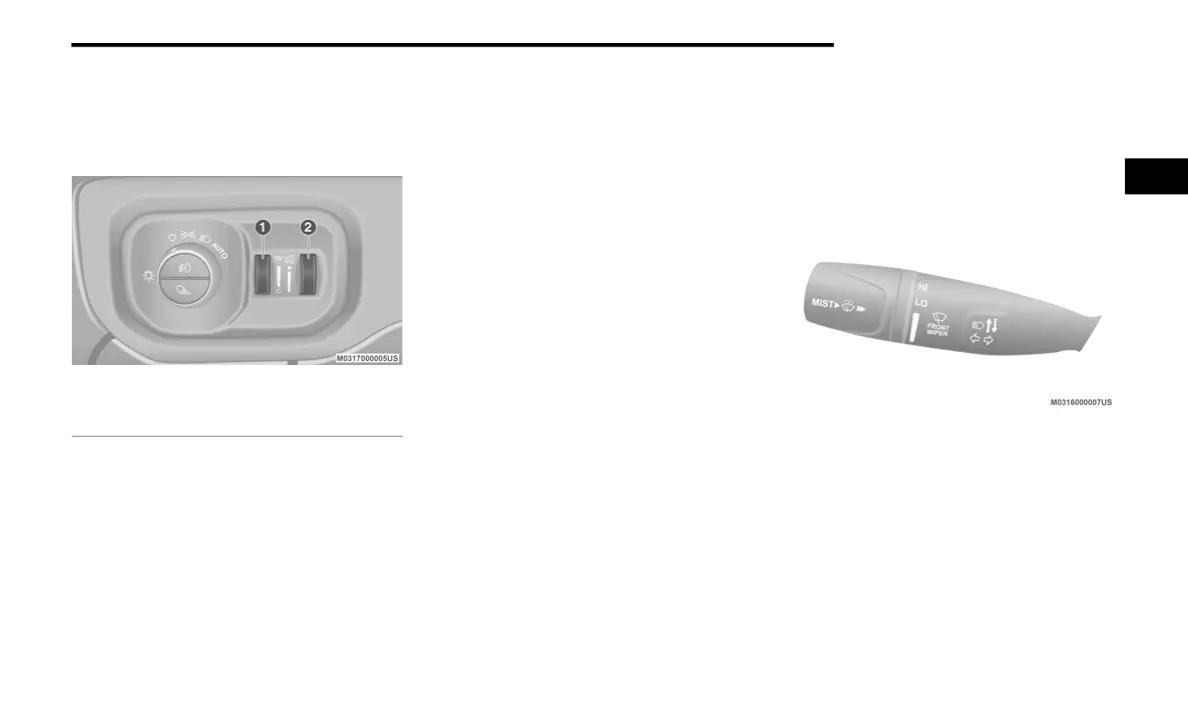
The dimmer controls are inboard and adjacent
to the headlight switch located on the left side
of the instrument panel.
Dimmer Controls
With the parking lights or headlights on, rotating
the right dimmer control upward will increase
the brightness of the instrument panel lights.
Rotating the left dimmer control will adjust the
interior and ambient light levels.
NOTE:
The dimming of the touchscreen is programmable
through the Uconnect system. Refer to “Uconnect
Settings” in “Multimedia” for further details.
Illuminated Entry
The courtesy lights will turn on when you use the
key fob to unlock the doors or open any door.
This feature also turns on the puddle lamps
located beneath the outside mirrors (if
equipped).
The lights will fade to off after approximately
30 seconds, or they will immediately fade to off
once the ignition switch is placed in the ON/
RUN position from the OFF position.
The front courtesy overhead console and door
courtesy lights will not turn off if the Dome ON
button on the overhead console is pushed.
The illuminated entry system will not operate if
the Dome Defeat button on the overhead
console is pushed.
NOTE:
If your vehicle is equipped with Illuminated
Approach lights under the outside mirrors, they
can also be turned off by pushing the Dome
Defeat button.
WINDSHIELD WIPERS AND WASHERS
Windshield Wipers
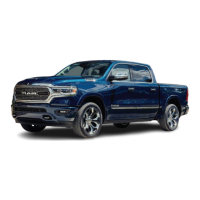
The wipers and washers are operated by a
switch in the multifunction lever. Turn the end of
the lever to select the desired wiper speed.
Windshield Wiper/Washer Lever
Rotate the end of the lever upward, to the first
detent past the intermittent settings for
low-speed wiper operation. Rotate the end of
the lever upward to the second detent past the
intermittent settings for high-speed wiper
operation.
Intermittent Wiper System
The intermittent feature of this system was
designed for use when weather conditions
make a single wiping cycle, with a variable
1 — Ambient Light Control
2 — Instrument Panel Dimmer Control
2
20_DT_OM_EN_USC_t.book Page 53



 To Next Page