NOTE:
In case the ignition switch does not change with the push of a button, the RKE Key
Fob may have a low or dead battery. In this situation a back up method can be used
to operate the ignition switch. Put the nose side (side opposite of the emergency key)
of the Key Fob against the ENGINE START/STOP button and push to operate the
ignition switch.
The Wireless Ignition Node (WIN) oper-
ates similar to an ignition switch. It has
four operating positions, three with de-
tents and one that is spring-loaded. The
detent positions are OFF, ACC, and ON/
RUN. The START position is a spring-
loaded momentary contact position.
When released from the START position,
the switch automatically returns to the
ON/RUN position.
Locking And Unlocking The Doors
Push and release the UNLOCK button on the RKE Key Fob once to unlock the driver’s
door. Push and release the UNLOCK button twice within five seconds to unlock all
doors and the tailgate and the RamBox (if equipped). The turn signal lights will flash
to acknowledge the unlock signal. The illuminated entry system will also turn on.
All doors can be programmed to unlock on the first push of the UNLOCK button.
Refer to “Uconnect Customer Programmable Features” in “Electronics” for further
information.
Panic Alarm
1. Push the PANIC button once to turn the Panic Alarm on.
2. Wait approximately three seconds and push the button a second time to turn the
Panic Alarm off.
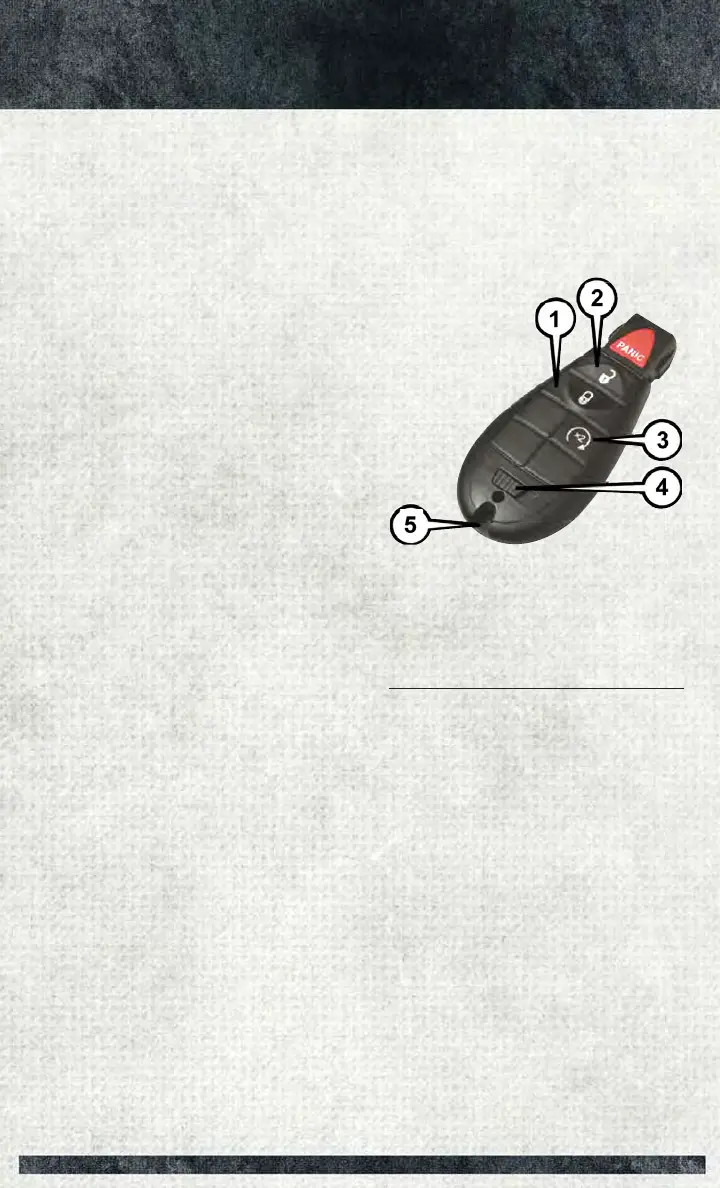
Key Fob
1 — Lock
2 — Unlock
3 — Remote Start
4 — Emergency Key Release
5 — Emergency Key
GETTING STARTED
11



 To Next Page