If your vehicle is not equipped with a touchscreen, this feature can be programmed
through the Electronic Vehicle Information Center (EVIC) or Driver Information
Display (DID). Refer to “Electronic Vehicle Information Center (EVIC)” or “Driver
Information Display (DID)” in “Understanding Your Instrument Panel” in the Owner’s
Manual on the DVD for further information.
WARNING!
• Persons who are unable to feel pain to the skin because of advanced age,
chronic illness, diabetes, spinal cord injury, medication, alcohol use, exhaus-
tion, or other physical conditions must exercise care when using the steering
wheel heater. It may cause burns even at low temperatures, especially if used for
long periods.
• Do not place anything on the steering wheel that insulates against heat, such as
a blanket or steering wheel covers of any type and material. This may cause the
steering wheel heater to overheat.
TILT STEERING COLUMN
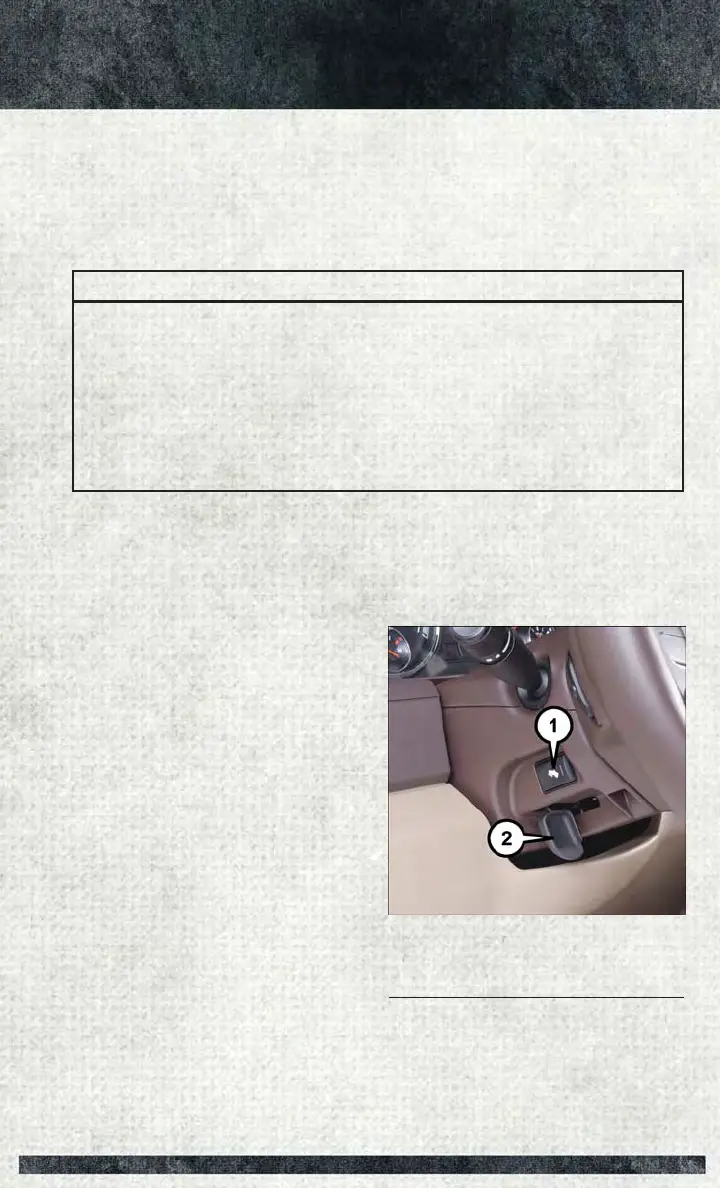
This feature allows you to tilt the steering column upward or downward. The tilt lever
is located on the steering column, below the multifunction lever.
Pull the lever toward the steering wheel
to unlock the steering column. With one
hand firmly on the steering wheel, move
the steering column up or down, as de-
sired. Release the lever to lock the steer-
ing column firmly in place.
Tilt Lever Location
1 — Adjustable Pedal Switch
2 — Tilt Lever
GETTING STARTED
41



 To Next Page