13
MP2014 MANUAL
DJ Changeover
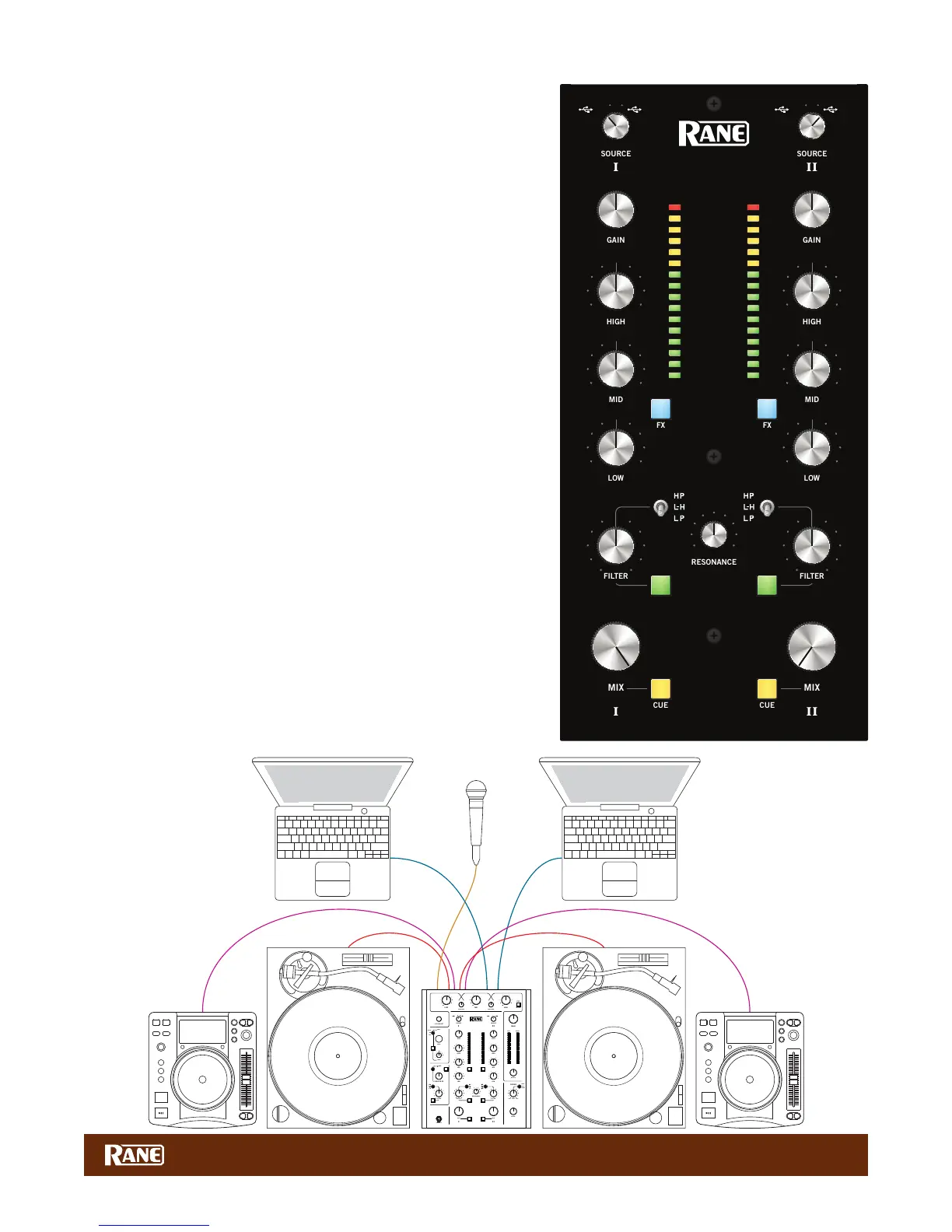
One of the biggest challenges of digital DJing has been seamlessly
changing over from one DJ to the next and playing back-to-back DJ sets.
With the dual USB architecture of the MP2014 mixer, changeover between
digital DJs has never been easier.
Deck Changeover Controls
At the top of each input channel is the Source selector to switch input
sources. If your computer is connected to USB port A, switch a channel
Source knob to USB A, and the mixer assigns the corresponding virtual
deck to that channel for audio playback. For example, assigning both
channels to USB 1A-2A assigns both virtual decks to the computer
connected to USB port A.
The same applies to USB port B. If your computer is connected to USB
port B, switching a channel Source Select knob to USB B, assigns the
corresponding virtual deck to that channel for audio playback.
When two DJs are connected to the MP2014, they can quickly swap
deck control between computers just using the Source select knobs.
The DJ Changeover Walkthrough
In the scenario below, one DJ, let’s call him DJ A, is already connected to
the MP2014 using either USB port A or B. With DJ A’s computer already
connected and playing music, do the following:
1. Connect your computer to the unused USB port on the MP2014.
2. Switch the Input Source on the other non-playing input channel to the
USB source of your computer.
3. Play a track on this Deck and mix it in when you're ready — audio from
both computers are in the mix.
4. Fade out the audio playing from DJ A’s computer to the audio playing
from your computer.
5. Assign the Input Source for the remaining free mixer channel(s) to your
computer and continue DJing.
When DJ A is done, disconnect his computer from the USB port. If you’re
back-to-back mixing with DJ A, keep the computer connected and
perform the same swapping instructions to regain deck control.
1B
1A
2B
2A
PH/CD 2 AUX 2PH/CD 1 AUX 1
MP2014
OL
+10
+7
+5
+3
+2
+1
0
-1
-2
-3
-5
-7
-10
-15
-24
OL
+10
+7
+5
+3
+2
+1
0
-1
-2
-3
-5
-7
-10
-15
-24
0
2
1
3
4
5
6
7
8
9
10
OFF +6
OFF +6
OFF +6
0
2
1
3
4
5
6
7
8
9
10
0
2
1
3
4
5
6
7
8
9
10
OFF +6
OFF +6
OFF +6
0
2
1
3
4
5
6
7
8
9
10
LOW HIGH
TURNTABLE OUT
MIC
TURNTABLE OUT
CD OUT CD OUT
USBUSB
1B1A
2B2A
PH/CD 2 AUX 2PH/CD 1 AUX 1
MP2 014
135 380
OL
+10
+7
+5
+3
+2
+1
0
-1
-2
-3
-5
-7
-10
-15
-24
OL
+10
+7
+5
+3
+2
+1
0
-1
-2
-3
-5
-7
-10
-15
-24
OL
+10
+7
+5
+3
+2
+1
0
-1
-2
-3
-5
-7
-10
-15
-24
0
2
1
3
4
5
6
7
8
9
10
0
2
1
3
4
5
6
7
8
9
10
∞
0 dB
+10
∞
0 dB
+10
∞
0 dB
+10
OFF
|
+6
OFF
|
+6
OFF
|
+6
0
2
1
3
4
5
6
7
8
9
10
0
2
1
3
4
5
6
7
8
9
10
0
2
1
3
4
5
6
7
8
9
10
0
2
1
3
4
5
6
7
8
9
10
OFF
|
+6
OFF
|
+6
OFF
|
+6
0
2
1
3
4
5
6
7
8
9
10
0
2
1
3
4
5
6
7
8
9
10
0
2
1
3
4
5
6
7
8
9
10
BASS TREBLE
LOW HIGH
0
2
1
3
4
5
6
7
8
9
10
80
225
640
1.7k 4.75k
1.0k
2.8k
8.0k


 To Next Page