8
MP2014 MANUAL
Connections
Mixer Inputs
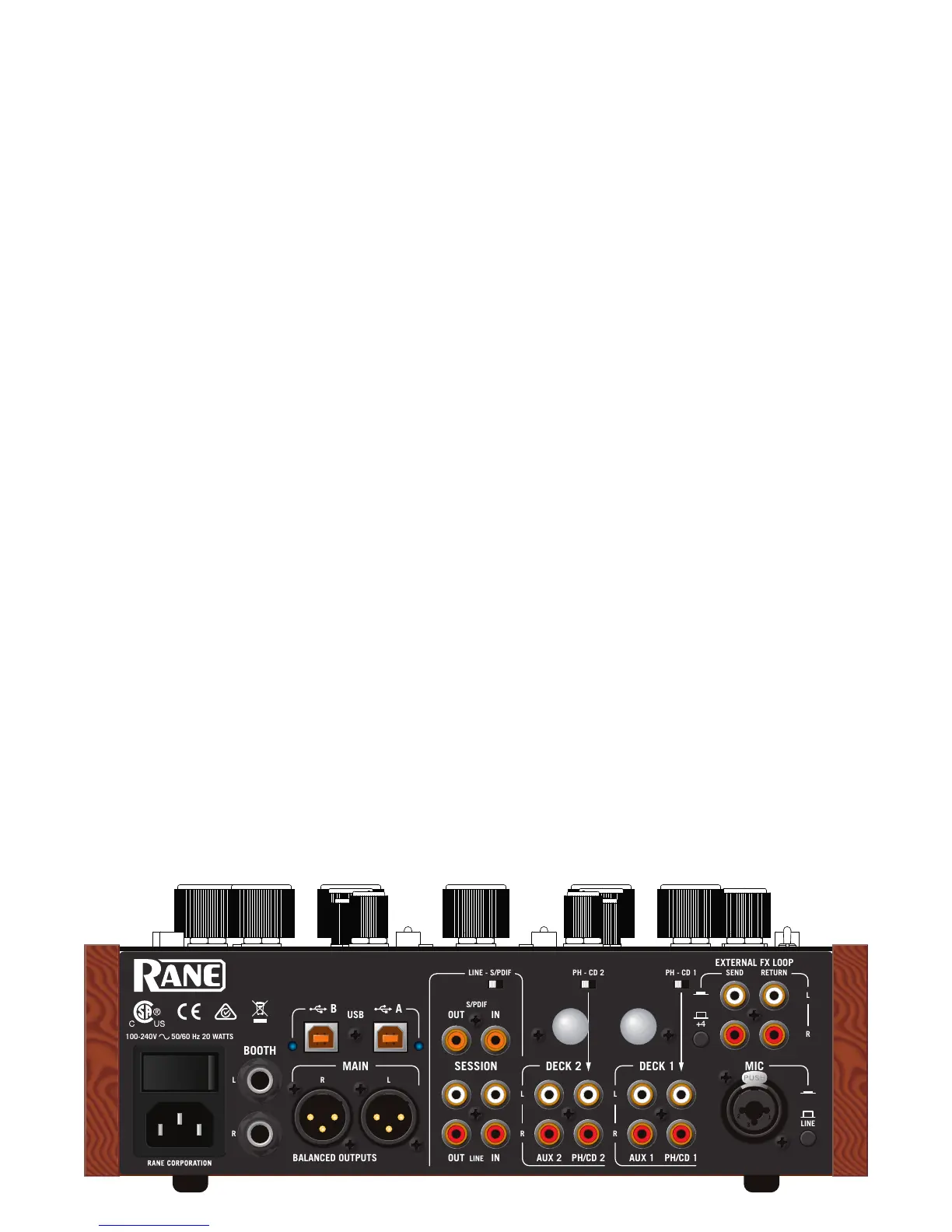
• One stereo Phono / CD input is provided for each Deck channel on a red and white pair of RCA jacks. Set each channel
to PH or CD using the rear panel slide switches. Connect your turntable ground wires to the rear panel ground posts.
• Computer control panel: Phono Sensitivity adjustment will match source levels. See "Control Panel" on page 14.
• One stereo line-level AUX input is provided for each of the two Deck channels on a red and white pair of RCA jacks. An
AUX input can be from a CD deck, electronic instrument, or other consumer audio device.
• One stereo Session Input is available as analog on a pair of red and white RCA jacks, or digitally using the orange S/PDIF
jack. Select the input type with the LINE - S/PDIF switch. Use this input to connect two mixers together. Using S/PDIF
Session Input with another mixer's S/PDIF Session Output can digitally link mixers without converting to analog.
• This input may also be an auxiliary 3rd channel line input, with it's own sweep Filter, headphone Cue and Level.
• The balanced microphone input on a combination TRS / XLR jack can be switched to:
• LINE level for the output of a wireless mic receiver.
• MIC level for a regular dynamic microphone. The MP2014 does not supply phantom power.
• External FX Loop Return stereo input is on a pair of unbalanced RCA jacks. The FX Return input is normally used in
combination with the FX Loop Send output to connect an outboard effects processor.
Mixer Outputs
All of these outputs carry the same Main mix, each with its own Level control:
• MAIN Output is on a pair of balanced XLR jacks.
The control panel has a mono option and clean feed option for the Main Output. See "General Tab" on page 14.
• BOOTH Output is on a pair of balanced 1/4" TRS jacks.
• SESSION Out is on a pair of unbalanced RCA jacks, and digitally via S/PDIF on an RCA jack.
The FX Loop Send output is from a pair of unbalanced RCA jacks. The FlexFX Send output is normally used in combination
with the FlexFX Loop Return input to connect the Deck and Mic Inputs to outboard analog effects.
• The SEND output level can be switched to -10 (for unbalanced devices) or +4 (for balanced devices).
Cabling Note: When using unbalanced 1/4" tip-sleeve cables from the Booth Outputs, or RCA cables from the analog
Session Outputs, keep cables short, less than 3 meters (10 feet) to avoid hum and interference. Balanced 1/4" TRS or XLR
cables are the best choice, allowing greater distance runs without problems.
Two USB Ports
The MP2014 allows simultaneous connection of two computers, each port completely independent. The USB ports are
100% class compliant, allowing hook-up to Mac OS X without the need for an additional driver. A high-performance ASIO
driver connects the audio in most Windows DAW and DJ software. MIDI end points are class compliant with both OS X and
Windows devices. Connect either port to a single computer. See "Class Compliant USB Ports" on page 14.
Power Supply
The MP2014 Mixer features an internal universal switching power supply that operates on any AC mains 100 to 240 VAC, 50
or 60 Hz (most places in the world). All that is required for the traveling DJ is the appropriate IEC line cord, available from a
local electronics store. Though this mixer has turn on/off muting, it’s smart to leave the power unplugged until everything
else is connected.
100-240V 50/60 Hz 20 WATTS
MP2014
MIC
-10


 To Next Page