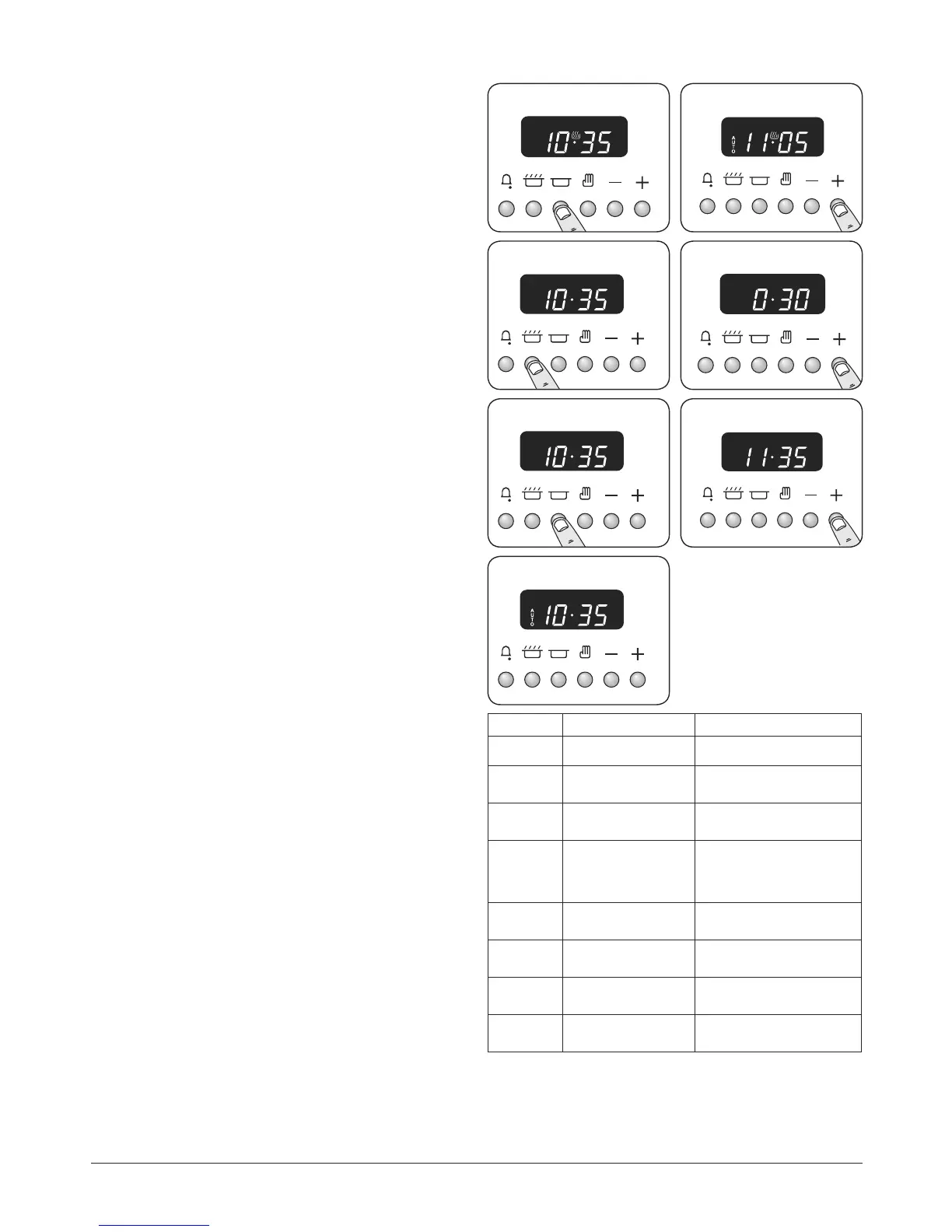
ArtNo.302-0002 - 6BC annotated
Setting a Cook End Time
Press and hold the ‘stop time’ [] button (Fig. 2.23) and then
press the [+] button (or [–] button) until the required ‘stop
time’ shows (Fig. 2.24). The [] symbol and [AUTO] will show
in the display.
Once the ‘stop time’ is reached, the beeper sounds and the
[AUTO] symbol ashes. Turn the oven control knob to 0 and
then press any button to stop the beep. Press [
] to return to
manual cooking.
To Start and Stop the Ovens Automatically
Before you set the clock for automatic operation you must
have two numbers clearly in mind – the ‘cook period’ and the
‘stop time’.
Note: You cannot set a start time directly – this is set
automatically by setting the ‘cook period’ and the ‘stop time’.
Press and hold the [] button (Fig. 2.25) and then press the
[+] button (or [–] button) until the required ‘cook period’ shows
(Fig. 2.26).
Now press and hold the [] button (Fig. 2.27) and then press
the [+] button (or [–] button) until the required ‘stop time’
shows (Fig. 2.28). Release the buttons.
[AUTO] will now show in the display (Fig. 2.29).
Set the oven(s) to the required temperature. When cooking
is nished [AUTO] will ash and the beeper will sound. Turn
the oven knob(s) to the OFF position rst, and then press any
button once to stop the beep; press the [
] button to return
to manual cooking.
If you are out, do not worry about the beeper going o, it
stops after a while. When you return, turn the oven knob(s) to
0 rst, and then press [] to return to manual cooking.
AUTO is Showing, You Want to Reset to Manual Cooking
To return to manual cooking mode from an Automatic
setting, simultaneously press the [+] and [-] key, this will clear
the automatic program and return to manual mode.
Please note that this action will also clear the [Minute Minder]
setting.
For an overview of the functions refer to Table 2.2.
Fig. 2.23 Fig. 2.24
Fig. 2.25 Fig. 2.26
Fig. 2.27 Fig. 2.28
Fig. 2.29
Symbol Function Notes
[]
Sets the Minute Minder Used with the [+] and [-] buttons
[]
Sets the duration / cook
period
Used with the [+] and [-] buttons
[]
Sets the end / stop cook
time
Used with the [+] and [-] buttons
[ ]
or
[] & []
Allows the time of day to
be set when ‘AUTO’ is not
active
Used with the [+] and [-] buttons
[ ]
Resets the cooking
control to manual
[ - ]
Decreases time interval
Holding this button down
allows a quick set
[ + ]
Increases time interval
Holding this button down
allows a quick set
[ + ] & [ - ]
Clears all ‘AUTO’ and
minute minder programs
Table 2.2



 To Next Page