BEFORE REMOVING SERVICE ACCESS COVERS
ENSURE THAT ALL ELECTRICAL ACCESS TO THE
APPLIANCE HAS BEEN SWITCHED OFF (SWITCH
OFF AND REMOVE PLUG).
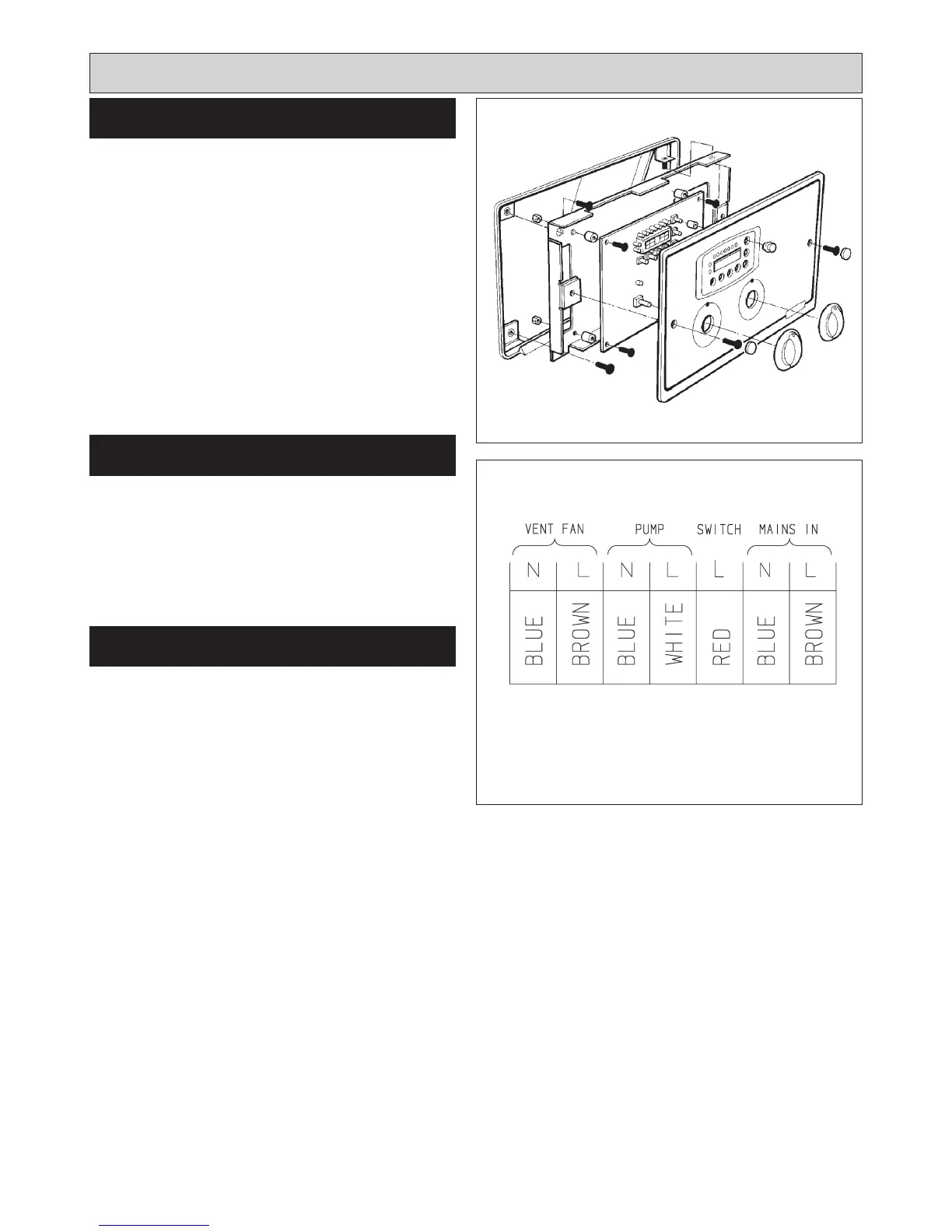
SEE FIG. 31
1. Remove the controls door and put in a safe position.
(Rayburn 680KCD only).
2. Remove both thermostat control knobs.
3. Remove the 2 cover panel fixing screws.
4. Remove glass cover panel and place in a safe
position.
5. Remove the two control panel fixing screws.
6. Pull open facia controls chassis (hinged on RH side)
and remove 3 pin plug from rear of control board.
1. Re-attach the 3-pin plug.
2. Close facia controls chassis and secure with the 2
screws.
3. Refit the outer panel in position and secure with the 2
screws.
4. Replace the thermostat knobs.
5. Replace the controls door. (Rayburn 680KCD only).
SEE FIG. 32
20
ELECTRICAL COMPONENT
ACCESS
Replacement of parts (Electrical controls)
Fig. 31 DESN 515773
RE-ASSEMBLE
CONTROL CIRCUIT-EXTERNAL
Fig. 32 DESN 515951



 To Next Page