EasyManua.ls Logo

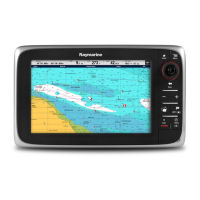
Raymarine a78 - User Manual

Raymarine a78
388 pages
Print Icon
To Next Page IconTo Next Page
Loading...
LightHouse™
OPERATION
INSTRUCTIONS
Release 15
English
© 2015 Raymarine UK Limited
Date: 09-2015
Document number: 81360-2-EN

Table of Contents

Questions and Answers

  • D
    Douglas BellSep 12, 2025
    Why won't my Raymarine a78 Marine Equipment connect via Bluetooth?
    • H
      Haley MillerSep 12, 2025
      If you have no wireless connection on your Raymarine Marine Equipment, ensure that Bluetooth is enabled on the multifunction display. Also, make sure that the 'Bluetooth' option is enabled on the iPhone and that the Bluetooth device is paired with the multifunction display.
  • S
    Steven CalderonAug 25, 2025
    How to troubleshoot Raymarine a78 that won't start?
    • C
      carriemillerAug 25, 2025
      If your Raymarine Marine Equipment system or part of it does not start up, there could be a power supply problem. Check the relevant fuses and breakers. Also, verify that the power supply cable is in good condition and that all connections are tight and free from corrosion. Finally, ensure that the power source provides the correct voltage and sufficient current.
  • D
    David WalterAug 26, 2025
    Why does my Raymarine Monitor not turn on or keep turning off?
    • R
      Rebecca WalshAug 26, 2025
      Your Raymarine Monitor might not be turning on or keeps turning off due to several reasons: a blown fuse or tripped breaker (check and replace if necessary, and inspect for cable damage if fuses repeatedly blow), a poor or damaged power supply cable or connections (ensure the cable is fully inserted and locked, check for damage or corrosion, and flex the cable to check for reboots), incorrect power connection (ensure the installation instructions have been followed), or an insufficient power source (check the power supply voltage under load).
  • J
    Joshua WrightNov 24, 2025
    Why are data readings on my Raymarine a78 problematic?
    • L
      Lisa ButlerNov 24, 2025
      If you are experiencing problematic data readings on your Raymarine Marine Equipment, check the sonar presets, gain, and frequency settings, as they may be inappropriate for the present conditions. Verify the voltage from the power supply, as a low voltage can affect the transmitting power of the unit. Ensure that the power, transducer, and all other cables to the unit are properly connected and free from damage. Check that the transducer is mounted correctly and is clean. If you have a transom mount transducer, check that the transducer hasn't kicked-up due to hitting an object. Adjust the scroll speed. Note that fish arches are not displayed if the vessel is stationary; fish will appear as straight lines. Turbulence around the transducer due to high vessel speed may also be confusing the...
  • J
    Justin JordanSep 13, 2025
    Why is the Raymarine app running slowly on my Marine Equipment?
    • C
      Christine FinleySep 13, 2025
      If your Raymarine app runs slowly or not at all, the device may not be compatible with the Raymarine app. For iOS devices, best performance is achieved on iPhone 4 or later and iPad 2 or later. For Android/Kindle Fire, best performance is achieved with a 1GHz processor or better running 2.2.2 or later. Also, ensure your MFD contains software version 3.15 or later, as the MFD software may be incompatible with the mobile application.
  • E
    Elizabeth LarsonSep 23, 2025
    What to do if Raymarine Marine GPS System won't boot up?
    • M
      Michael AndersonSep 23, 2025
      If your Raymarine Marine GPS System product will not boot up or is in a re-boot loop, first refer to the solutions for 'Product does not turn on or keeps turning off'. If the issue persists, it could be due to software corruption. Try re-flashing the latest software from the Raymarine website. As a last resort, on display products, you can try to perform a ‘Power on Reset’; however, this will delete all settings/presets and user data (such as waypoints and tracks) and revert the unit back to factory defaults.
  • H
    Holly VillegasSep 6, 2025
    Why is instrument data missing from some Raymarine Marine Equipment displays?
    • J
      Joseph CrawfordSep 6, 2025
      If instrument or other system data is missing from some but not all displays on your Raymarine Marine Equipment, check that all required equipment is connected to the network. Verify the status of the Raymarine network switch and ensure that SeaTalkhs/RayNet cables are free from damage. If a software mismatch between equipment is suspected, contact Raymarine technical support.
  • M
    Melissa JohnsonSep 7, 2025
    Why can't I control the thermal camera from my Raymarine a78?
    • C
      Caitlin RamirezSep 7, 2025
      If you cannot control the thermal camera from the Raymarine display or keyboard, ensure the thermal camera application is running on the multifunction display, as opposed to the video application which does not have camera controls.
  • C
    Catherine MejiaSep 23, 2025
    How do I fix a Raymarine Marine GPS System with no depth reading?
    • M
      Mark WardSep 23, 2025
      If your Raymarine Marine GPS System is showing no depth reading or has lost bottom lock, there are several potential causes. Check that the transducer has been installed in accordance with the instructions provided with it. If the transducer angle is too great, the beam can miss the bottom, so adjust the transducer angle and recheck. If the transducer has a kick-up mechanism, check that it has not kicked up due to hitting an object. With the product under load, use a multi-meter to check the power supply voltage as close to the unit as possible to establish the actual voltage when the current is flowing.
  • C
    ccraneAug 31, 2025
    Why is instrument data missing from all Raymarine a78 displays?
    • A
      Amanda BrownAug 31, 2025
      If instrument, engine, or other system data is unavailable at all displays on your Raymarine Marine Equipment, check the data bus (e.g., SeaTalkng) wiring and connections to ensure data is being received at the display. Verify the overall integrity of the data bus (e.g., SeaTalkng) wiring. Check the source of the missing data (e.g., ST70 instrument or engine interface) to ensure it is operating. Also, check the power to the SeaTalk bus. If a software mismatch between equipment is suspected, contact Raymarine technical support.

Raymarine a78 Specifications

General IconGeneral
Display Size7 inches
Display Resolution800 x 480 pixels
TouchscreenYes
GPSYes
ChartplotterYes
SonarYes
Wi-FiYes
BluetoothYes
EthernetYes
NMEAYes
Video InputYes
Waterproof RatingIPX6 and IPX7
Radar CompatibilityYes
NMEA 2000 CompatibilityYes
Operating Temperature-15°C to 55°C
Storage Temperature-20°C to 70°C
CartographyRaymarine LightHouse
Weight1.32 kg (2.91 lbs)

Related product manuals