Youcanaddanyapplication(s)toany
emptypage.
Pagefeaturingasingleapplication.
Pagefeaturingmultipleapplications.
Youcanalsodenea"layout"foreachpage,whichdetermineshow
theapplicationsarearrangedonthescreen.
Changinganexistingpageonthehomescreen
Withthehomescreendisplayed:
1.SelectCustomize.
2.SelectHomescreen.
3.SelectEditPage.
4.Selectthepageiconthatyouwanttochange.
TheCustomizemenuoptionsaredisplayed.
5.Selecttheappropriatepagelayout(forexample,“Splitscreen”).
6.Selecttheapplication(s)youwanttodisplayonthepage,either
byselectingtherelevantmenuitemordraggingitovertothe
displayedpage.
7.SelectFinish.
TheRenamePagedialogisdisplayed.
8.Usetheon-screenkeyboardtonamethepage,thenselectSave.
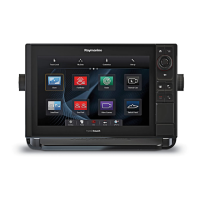
Controls
1.Touchscreen—youcantouchthescreentooperatemany
commonfunctions,includingallmenuoperations.
2.Menu—accessesmenus.Pressagaintoclosemenus.
3.UniControl—providesajoystickandrotarycontrolandanOK
buttonforusingmenusandapplications.
4.Back—presstoreturntoapreviousmenuordialoglevel.
5.WPTS/MOB—pressandreleasetoaccessthewaypoint
options.Pressagaintoplaceawaypoint.Pressandholdto
placeaManOverboard(MOB)markeratyourcurrentposition.
5











 To Next Page