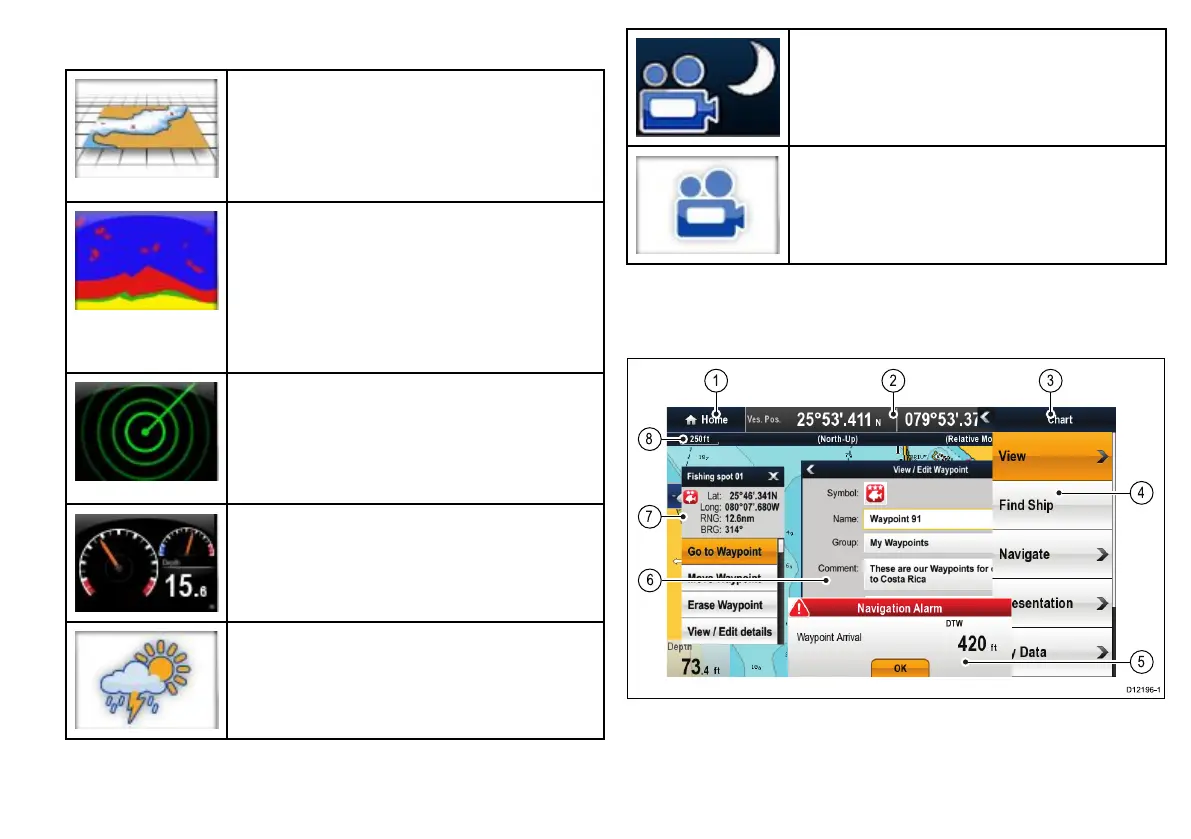
Applications
Chartapplication—providesa2Dor3Dgraphical
viewofyourchartstohelpyounavigate.Waypoint,
route,andtrackfunctionsenableyoutonavigatetoa
speciclocation,buildandnavigateroutes,orrecord
whereyou’vebeen.Chartcardsprovidehigherlevels
ofdetailand3Dviews.
Fishnderapplication—withatransducerand
a“D”variantmultifunctiondisplayorcompatible
DigitalSounderModule(DSM),youcanusethe
shnderapplicationtohelpyouaccuratelydistinguish
betweendifferentsizesofsh,bottomstructure,and
underwaterobstacles.Youcanalsoviewseadepth
andtemperaturedataandmarkpointsofinterestsuch
asshingspotsorwrecks.
Radarapplication—withasuitableradarscanner,
youcanusetheradarapplicationtotracktargets
andmeasuredistancesandbearings.Anumberof
automaticgainpresetsandcolormodesareprovided
tohelpyougetthebestperformancefromyourradar
scanner.
Dataapplication—viewsystemandinstrumentdata
onyourmultifunctiondisplay,forarangeofcompatible
instruments.Usethejoystickortouchscreentoscroll
throughtheavailabledatapages.
Weatherapplication—(NorthAmericaonly).Witha
suitableweatherreceiverconnectedtoyoursystem,
theweatherapplicationoverlayshistorical,live,and
forecastedweathergraphicsonaworldmap.
Thermalcameraapplication—viewandcontrola
compatiblethermalcamerausingyourmultifunction
display.
Videoapplication—viewavideoorcamerasource
onyourmultifunctiondisplay.
Screenoverview
7









 To Next Page