•Theactivechartapplicationischangedtoalow-detail2Dview,
withaninitialrangeof15m(50ft).MotionmodeissettoAuto
Range.
•Theactiveradarapplicationrangeischangedto230m(760ft).
•AllGotoandFollowfunctionsaredisabledinallapplications.
Navigationtoanyactivewaypointisstoppedandanyexisting
navigationfunctioniscancelled.
•IfpositionorheadingandspeedinformationisavailableaMOB
waypointisplacedatthecurrentvesselpositioninanyapplication
thatiscapableofshowingwaypointsandvesselposition.
•MOBdataisdisplayedinthedatabar,replacingtheexistingdata.
•MOBdataisdisplayedonthehomescreen,replacingthestatus
icons.
•AsthevesselmovesawayfromtheMOBpositionadottedlineis
displayed,joiningtheMOBpositionwiththevessel’sposition.
WhentheMOBalarmiscancelled:
•MOBdataisremovedfromtherelevantapplications.
•Thechartapplicationmotionmodeisreset.
•Thechartiscenteredonthevesselandpitch/rotationsetto
default.
•GOTOandroutefunctionsarerestored.
•Thedatabarmodeisreset.
•AMOBnormalmodesignalissenttoanyinstrumentonSeaT alk.
Activatingthemanoverboard(MOB)alarm
1.PressandholdtheWPTS/MOBbuttonfor3seconds.
Cancellingthemanoverboard(MOB)alarm
1.SelectOKontheMOBalarmdialog.
TheMOBalarmremainsactive.
2.Tocancelthealarm,pressandholdtheWPTS/MOBbutton
for4seconds.
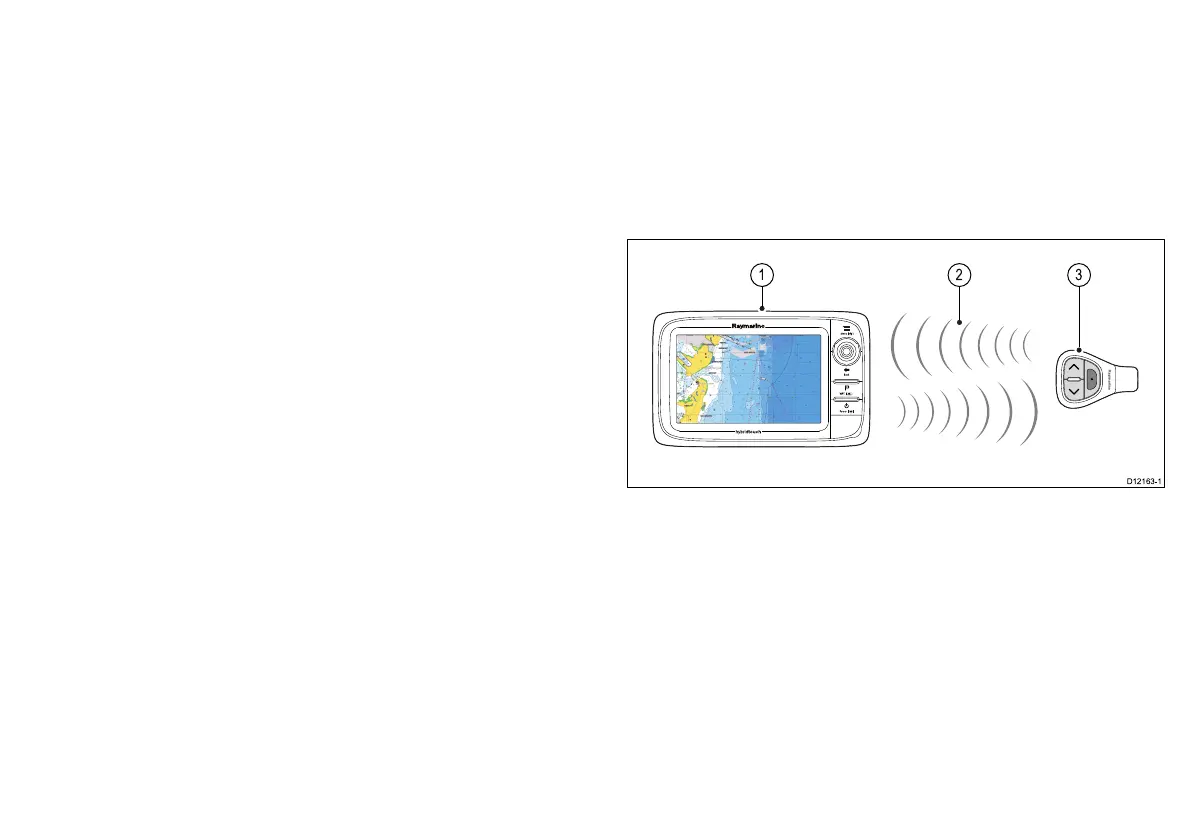
Remotecontrolconnection
Youcancontrolthemultifunctiondisplaywirelesslyusinga
Raymarineremotecontrolunit.
TheremotecontrolusesaBluetoothwirelessconnection.
1.Multifunctiondisplay.
2.Bluetoothconnection.
3.RaymarineBluetoothremotecontrol(forexample,RCU-3).
Tousetheremotecontrolyoumustrst:
•EnableBluetoothintheSystemSettingsonthemultifunction
display.
•Pairtheremotecontrolunitwiththemultifunctiondisplay.
9









 To Next Page