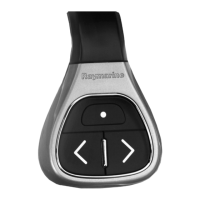
ButtonApplicationwherefunctionavailable:
Defaultfunctions:Chart
Radar
Fishnder
WeatherHomescreen
Range/zoom.•PressUPorDOWNarrowfor
momentaryresponse.
•HoldUPorDOWNarrowfor
continuousresponse.
Openhomescreen.Shortcut:Hold
Selectapplicationinhomescreen(in
left-to-right,top-to-bottomorder).
•PressUPorDOWNarrowfor
momentaryresponse.
•HoldUPorDOWNarrowfor
continuousresponse.
Togglemenuitemsandoptionsin
dialogsandprompts(inleft-to-right,
top-to-bottomorder).
•PressUPorDOWNarrowfor
momentaryresponse.
•HoldUPorDOWNarrowfor
continuousresponse.
Placewaypointatvesselposition.
Shortcut
Mediaplayercontrol(requiresa
Bluetoothmediaplayerpairedtothe
multifunctiondisplay).
•PressUP/DOWNarrowfornext/
previoustrack.
•PressSHORTCUTbuttonforplay/
pause.
Customizablefunctions:
Openhomescreen.SHORTCUT
Switchactiveapplication(onlyavailable
whenmultipleapplicationsare
displayed).
SHORTCUT
CustomizingtheSHORTCUTbutton
Onyourmultifunctiondisplay,withthehomescreen
displayed:
1.SelectSet-up.
2.SelectSystemSettings.
3.SelectExternalDevices.
4.SelectRemoteControl.
5.SelectCustomizeshortcutkey.
6RCU-3


 To Next Page
 Loading...