6.Selectthefunctionthatyouwanttoassigntothe
SHORTCUTkey.
ReconnectingtheRCU
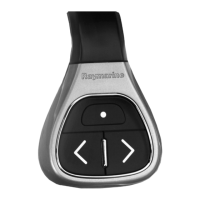
1.WhenyoupairtheRCU-3withamultifunction
displayawirelessconnectionisestablished.
2.Whenyoupoweroffthemultifunctiondisplayitloses
itsconnectionwiththeRCU-3after10minutes.
>
10 Minutes
=
10
15
20
25
30
Minutes
35
40
45
50
55
60
5
3.Torestoretheconnectionbetweenthe2units,press
andholdanybuttonontheRCU-3foratleast3
seconds.
=
3 Seconds
10
15
20
25
30
Seconds
35
40
45
50
55
60
5
Note:YouwillalsoneedtoreconnecttheRCU-3as
describedaboveifyoudisableandthenre-enable
theBluetoothconnectiononthemultifunctiondisplay
atanytime.
Technicalspecication
Powerrequirement
3Vdc(1.5Vdcfromeachof
2xAAAAbatteries).Alkaline
batteriesarerecommended.
TypicalOperatingrange5meters(lineofsight)
Environmental
Operatingenvironment
•Operatingtemperature:
-20°Cto+55°C(0ºFto
131ºF)
•Non-operating
temperature:-30°Cto
+70°C(–8ºFto158ºF)
•Relativehumiditylimit:
93%
•Waterprotection:
waterprooftoIPX7
standard.
DataprotocolBluetoothv2.1,HIDv1.0
Conformance
Europe:
•2004/108/EC
AustraliaandNewZealand:
•C-Tick,ComplianceLevel
2
USA:
•FCCcertication
Japan:
•VCCICertication
China:
•CCSCertication
7


 To Next Page
 Loading...