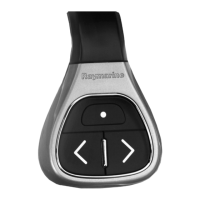
Mountingtheremotecontrolunit
Theremotecontrolunitcanbewornaroundyourneck
ormountedtoasteeringwheel.Adaptorsareprovided
forbothmethods.
1.Forlanyarduse:attachthesuppliedlanyardtothe
unitandsecureitwiththesuppliedscrew.
2.Forsteeringwheeluse:Chooseasuitablelocation
fortheunitthatiswithinreachandwithin5meters
ofthemultifunctiondisplaythatyouwanttocontrol.
3.Chooseasuitableorientationfortheunit.Itcanbe
usedwiththebuttonsfacingtowardsorawayfrom
thesteeringwheel.
4.Arangeofsteeringwheeladaptorsissupplied.
Selecttheadaptorthatbestsuitsthethicknessof
yoursteeringwheel.
5.Wraptheadaptoraroundthewheelatthemounting
position.
6.Gentlypullapartthesuppliedclaspandwrapit
aroundtheadaptorandthesteeringwheel.
7.Pushtheremoteontotheclasp,ensuringagoodt.
8.Tightenthescrewuntiltheclaspistightaroundthe
wheel.
Operatingprinciples
Remotecontroloperatingprinciples.
•Only1multifunctiondisplaymaybeoperatedbya
remotecontrolunitatanyonetime.Youcannotpair
amultifunctiondisplaytomorethan1remotecontrol
atthesametime.
•The3buttonsontheremotecontrolunithave
differentfunctionsdependingontheCONTEXTin
whichyouareusingit.Forexample,inthechart
applicationthebuttonscontroldifferentfunctionsthan
theydointhehomescreen.
•Allfunctionsareaccessedusingacombinationof
the3buttons.Forsomefunctionsyoumustpressa
buttonMOMENTARILY .YoucanalsoHOLDabutton
forcontinuousresponse(forexample,continuous
ranginginthechartapplication).
•Themainmethodsofoperationinvolvetheuseofthe
UPandDOWN“arrow”buttonstohighlightdifferent
on-screenoptions.TheSHORTCUTbuttonisused
toselect(execute)them.
•Duringthepairingprocessyoumustdenewhichof
thearrowbuttonsyouwanttobethe“UP”button.
•TheSHORTCUTbuttoniscustomizableandcanbe
conguredtooperateoneofanumberoffunctions,
usingtheSystemSettingsmenuonyourmultifunction
display.
4
RCU-3


 To Next Page
 Loading...