User Guide 9
How do I view instrument data?
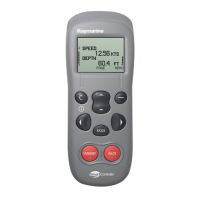
Your SmartController can display up to 8 pages of boat information.
Each page can be set to show 1,2 or 4 data items, or, to view
information graphically. When the autopilot is enabled, an extra "P"
page is added to the favourites, showing autopilot specific information.
3
1
2
From the main instrument display:
1. Press the up/down key to
move to the previous or next
page.
2. The number of the page
currently being displayed will
be shown in the upper left
hand corner.
3. Press the MENU softkey to
access SmartController settings
Example Screens
view previous page
view next page
MENU
DEPTH
4.7FT
SPEED
11KTS
MENU
XTE 0.35NM
BTW
002º
DTW
2.5NM
2 Data items
Graphcal data
1
4
If you only ever use a few favourite pages, use
the PAGE ON/OFF feature to turn off the rest.
Quick Tip
D7614-1


 To Next Page