Installation Step 12
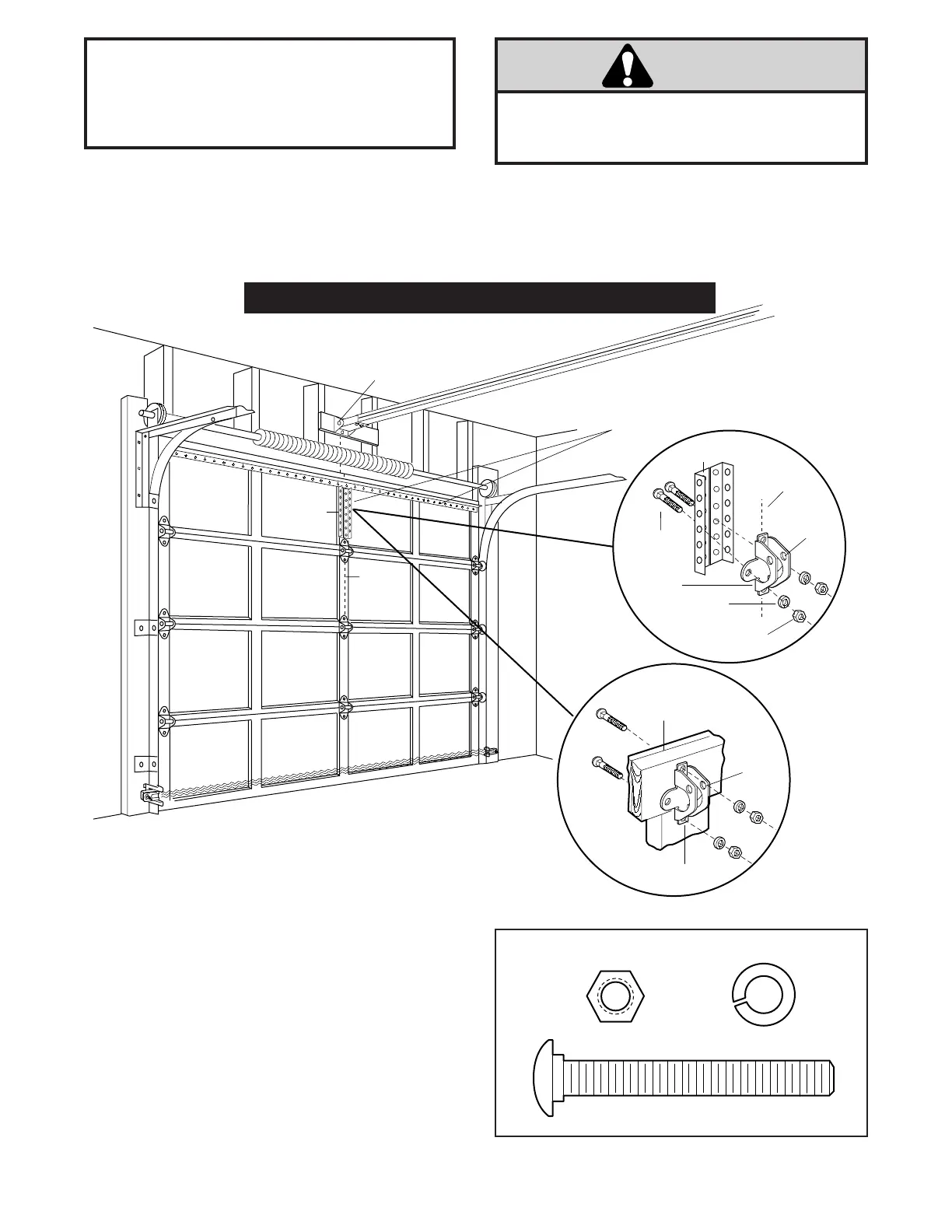
Fasten Door Bracket
Follow instructions which apply to your door type
as illustrated below or on page 21.
To prevent damage to steel, aluminum, fiberglass or
glass panel doors, always reinforce the inside of the door
both vertically and horizontally with an angle iron.
A horizontal brace should be long enough to be secured to 2 vertical supports. A vertical brace should cover the
height of the top panel.
The illustration shows one piece of angle iron as the horizontal brace. For the vertical brace, 2 pieces of angle iron
are used to create a U-shaped support.
• Center the door bracket on the previously marked
vertical guideline used for the header bracket
installation. Note the correct UP placement, as
stamped inside the bracket.
• Position the bracket on the face of the door within the
following limits:
A) The top edge of the bracket 2-4" below the top edge
of the door.
B) The top edge of the bracket directly below any
structural support across the top of the door.
• Mark and drill 5/16" left and right fastening holes.
Secure the bracket as shown in Figure 1 if there is
vertical reinforcement.
If your installation doesn't require vertical reinforcement
but does need top and bottom fastening holes for the door
bracket, fasten as shown in Figure 2.
20
Vertical
Guideline
Door
Bracket
Nut
5/16"-18
Carriage Bolt
5/16"-18x2-1/2"
Lock
Washer
5/16"
Vertical
Guideline
UP
UP
Door
Bracket
Location
Header
Bracket
Horizontal and vertical reinforcement
is needed for lightweight garage doors
(fiberglass, aluminum, steel,
doors with glass panel, etc).
Vertical
Reinforcement
Door Bracket
Inside Edge
of Door or
Reinforcement Board



 To Next Page