Control Adjustments—Digital
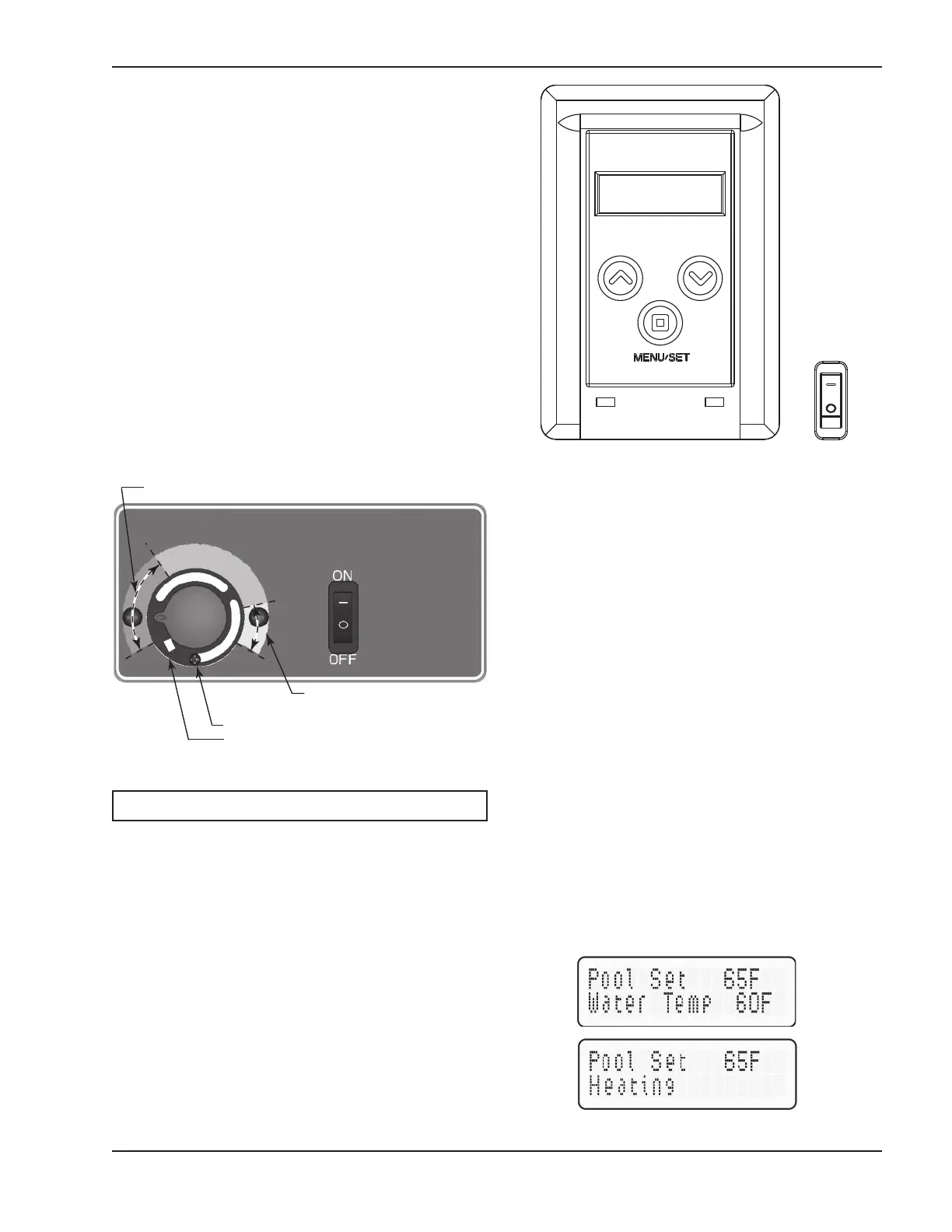
The pool heater (chauffe-piscine) touchpad, located
on the upper front panel of the heater, allows the user
to select either POOL or SPA operation, and to adjust
the setpoint temperature. The LCD display window
indicates the mode (OFF, SPA, POOL) and the actual
water temperature. A manual power switch provided
below the touchpad turns the control power ON or
OFF.
OWNER’S OPERATING
INSTRUCTIONS
Control Adjustments—Analog
The pool or spa water temperature is controlled by the
thermostat on the upper front panel of the heater. The
control center contains an On/Off toggle switch and a
thermostat. The switch functions as a means for turn-
ing the heater On or Off.
The thermostat is fitted with a means of limiting the
upper temperature limit below the maximum level. The
knob stop adjustment ring shown in Fig. 17 is
adjustable by loosening the set screw, rotating the
knobstop ring to the desired location, and retightening
the set screw.
17
HOT
COOL
Knobstop Ring
Knobstop Set Screw
Fig. 17: Water Temperature Thermostat
NOTE: Maximum temperature is 104°F (40°C).
Fig. 18: Digital Control Adjustment
MENU/SET Button
The MENU/SET button is used to select either POOL
or SPA operation. It also allows the user to turn the
heater off electronically. The LCD remains energized
and displays OFF, while also continuing to show the
actual water temperature.
Temp Buttons
If the heater is in POOL or SPA mode, the desired
water temperature (SETPOINT) will also be displayed
and may be adjusted using the UP or DOWN buttons.
Operation
In the POOL or SPA modes, the actual water temper-
ature is displayed along with the desired water
temperature (SETPOINT). When the water tempera-
ture is above the setpoint, “Water Temp” will alternate
with “No Demand.” When the water temperature is
below the setpoint and the heater is firing, “Water
Temp” will alternate with “Heating.”
To adjust the setpoint temperature, make sure the con-
trol is in the appropriate mode (POOL or SPA) and
push the UP or DOWN buttons.
ALTERNATING DISPLAYS DURING HEATING


 To Next Page