31
XIV-7. Settings
Press the power button to turn on the display, To
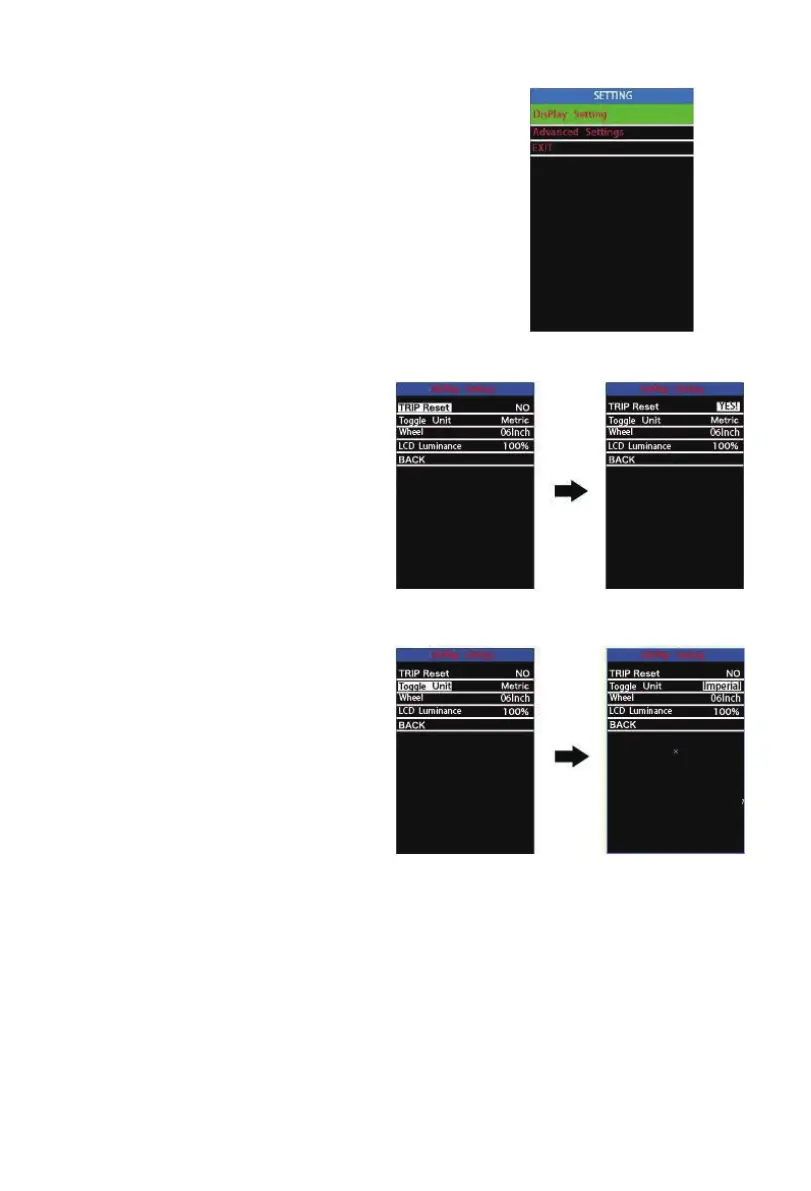
access settings menu, hold both the “+” button and
the “-” button for 2s. Display settings and Advanced
settings are listed:
• All the Settings are operated on a parked e-bike.
XIV-7.1: Display settings:
Trip Reset
Trip Reset represents trip distance clear-
ance setting.
To reset trip distance, press the “+” button
or the “-” button to select the Yes or No.
Yes represents clearing a trip distance. No
represents not clearing a trip distance.
To store a changed setting, press the “i”
button. The default value is NO.
Toggle Unit
Toggle Unit represents unit conversion
settings.
To toggle the unit, press the “+” button or
the “-” button to choose the desired unit,
and then press the “i” button to conrm.
To store a changed setting, press the “i”
button. The default value is “Metric(km)”.



 To Next Page