33
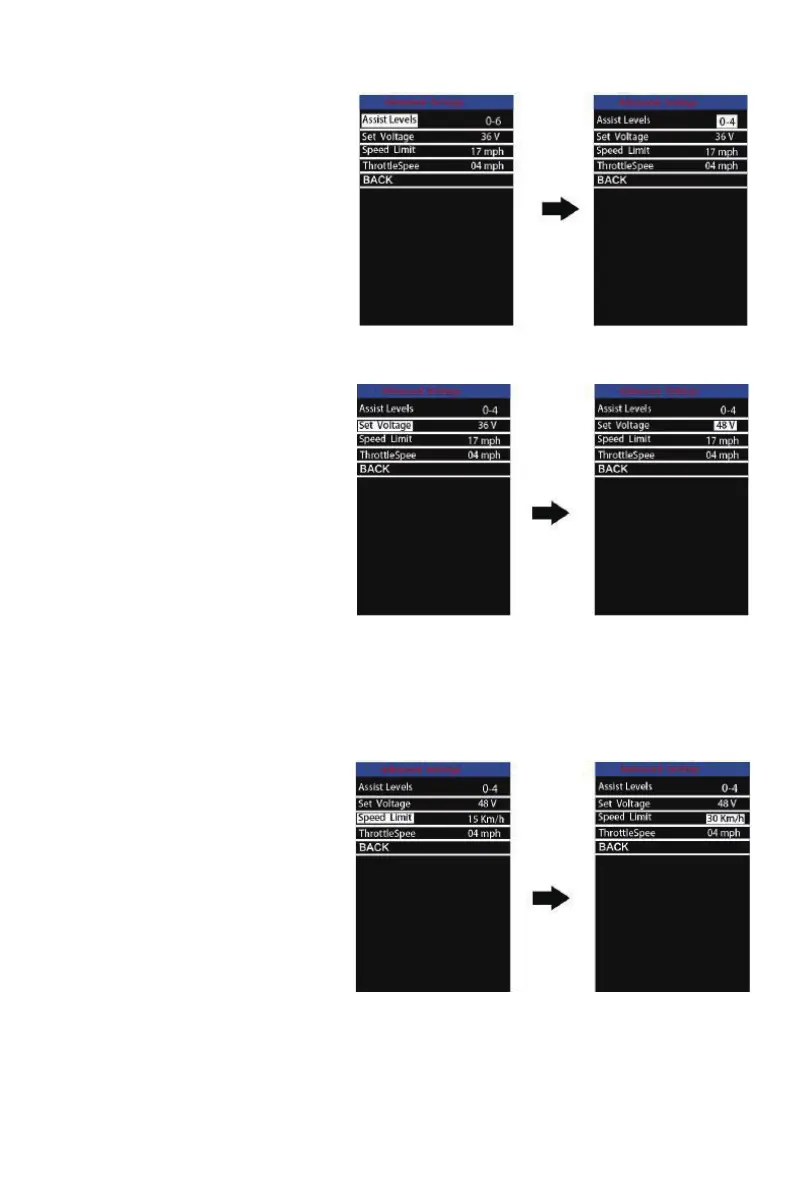
Assist Levels settings
Assist levels represents assist level
mode settings, 8 modes to select: 0-2,
1-2, 0-4, 1-4, 0-6, 1-6, 0-8, 1-8. The
default value is 0-6.
To change the mode of assist lev-
el, press the “+” or the “-” button to
choose the desired mode, and then
press the “i” button to conrm.
Assist Level Mode settingInterface
Set Voltage settings
Set Voltage represents battery volt-
age&segment settings. 36V and 48V
are switchable. The default voltage is
48V.
5 voltage values of 36V or 48V must
be entered one by one. For example,
VOL 1 is rst bar voltage value. The
default value is 41.5V.
To set battery power bar, press the “+”
or the “-” button to increase or de-
crease the value. To store a changed
setting and access the second bar,
press the “i” button.
BatterySettingsIndicator Interface
After 5 voltage values are entered completely, press the “i” button to conrm and save the set-
tings.
Speed Limit Settings
Speed Limit represents the limited
speed settings. When the current
speed is faster than speed limit, the
E-bike system will switch off automat-
ically. Speed limit range is 15Km/h to
99.9Km/h.
To change basic settings, press the
“+” or the “-” button to increase or
decrease until the desired value is
displayed.
To store a changed setting, Press the
“i” button. The default value is 27 Km/h.
SpeedLimit Settings Interfac e



 To Next Page