15
FAST CHARGING LITHIUM BATTERY
STORAGE LITHIUM BATTERY
-
11
-
6.3 'FAST' charging Lithium battery
The charging current is getting smaller as the process goes to the near end term
of Lithium battery charging. To finish charging process earlier, this program eliminate
certain term of CV process. Actually, the charging current will goes to 1/5 from the
initial value to end the process while the normal chaging goes to 1/10 during CV term.
The charging capacity may be a bit smaller than normal charging but the process
time will be reduced.
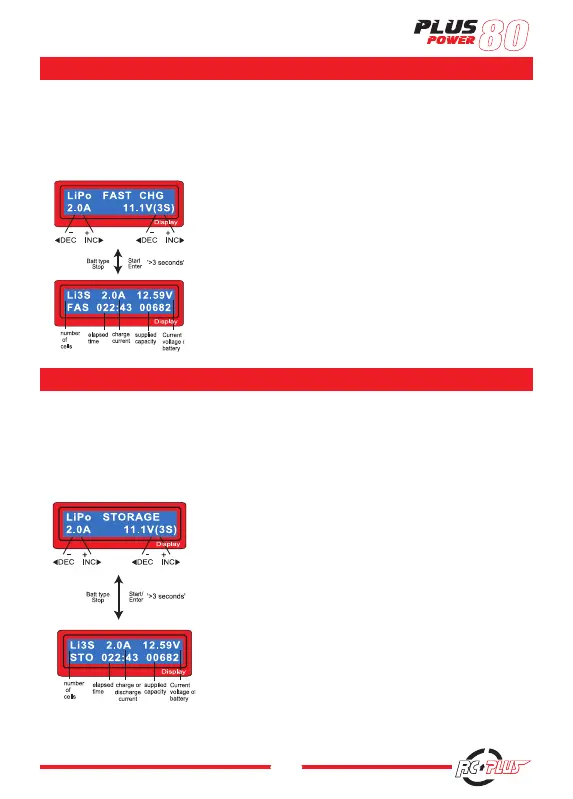
You can set up the charging current and the voltage of
the battery pack is being charged. As you press Start/
Enter button the voltage confirmation will be displayed.
And then, if you confirm the voltage and current, press
Start/ Enter button again to start charging.
This shows the present state of 'FAST' charging. To
stop charging arbitrary, press Batt type/Stop key
once.
6.4 'STORAGE' control Lithium battery
This is for charging or discharging Lithium battery not to be used for the time
being. The program will determine to charge or discharge the battery to the certain
voltage depends on the voltage of the battery at its initial stage. They are different
from the type of the battery, 3.75V for Lilo, 3.85V for LiPo and 3.3V for LiFe per cell.
If the voltage of battery at its initial stage is over the voltage level to storage, the
program will start to discharge.
You can set up the current and the voltage of the
battery pack to be charged. The current will be used for
charge or discharge the battery to reach the ' storage '
level of voltage.
The screen shows the present situation during charge
process. To stop charging press Batt type/Stop key
once.
The charging current is getting smaller as the process goes to the near end term of Lithium battery charging. To finish
charging process earlier, this program eliminate certain term of CV process. Actually, the charging current will goes
to 1/5 from the initial value to end the process while the normal charging goes to 1/10 during CV term. The charging
capacity may be a bit smaller than normal charging but the process time will be reduced.
You can set up the charging current and the voltage of the battery pack is
being charged. As you press Start/ Enter button the voltage confirmation will
be displayed. And then, if you confirm the voltage and current.
Press Start/ Enter button again to start charging.
This shows the present state of ‘FAST’ charging. To stop charging arbitrary,
press Batt type/Stop key once.
This is for charging or discharging Lithium battery not to be used for the time being. The program will determine to
charge or discharge the battery to the certain voltage depends on the voltage of the battery at its initial stage. They are
different from the type of the battery, 3.75V for Lilo, 3.85V for LiPo and 3.3V for LiFe per cell. If the voltage of battery
at its initial stage is over the voltage level to storage, the program will start to discharge.
You can set up the current and the voltage of the battery pack to be charged.
The current will be used for charge or discharge the battery to reach the ‘
storage ‘ level of voltage.
The screen shows the present situation during charge process. To stop charg-
ing press Batt type/Stop key once.
-
11
-
6.3 'FAST' charging Lithium battery
The charging current is getting smaller as the process goes to the near end term
of Lithium battery charging. To finish charging process earlier, this program eliminate
certain term of CV process. Actually, the charging current will goes to 1/5 from the
initial value to end the process while the normal chaging goes to 1/10 during CV term.
The charging capacity may be a bit smaller than normal charging but the process
time will be reduced.
You can set up the charging current and the voltage of
the battery pack is being charged. As you press Start/
Enter button the voltage confirmation will be displayed.
And then, if you confirm the voltage and current, press
Start/ Enter button again to start charging.
This shows the present state of 'FAST' charging. To
stop charging arbitrary, press Batt type/Stop key
once.
6.4 'STORAGE' control Lithium battery
This is for charging or discharging Lithium battery not to be used for the time
being. The program will determine to charge or discharge the battery to the certain
voltage depends on the voltage of the battery at its initial stage. They are different
from the type of the battery, 3.75V for Lilo, 3.85V for LiPo and 3.3V for LiFe per cell.
If the voltage of battery at its initial stage is over the voltage level to storage, the
program will start to discharge.
You can set up the current and the voltage of the
battery pack to be charged. The current will be used for
charge or discharge the battery to reach the ' storage '
level of voltage.
The screen shows the present situation during charge
process. To stop charging press Batt type/Stop key
once.


 To Next Page
 Loading...