19
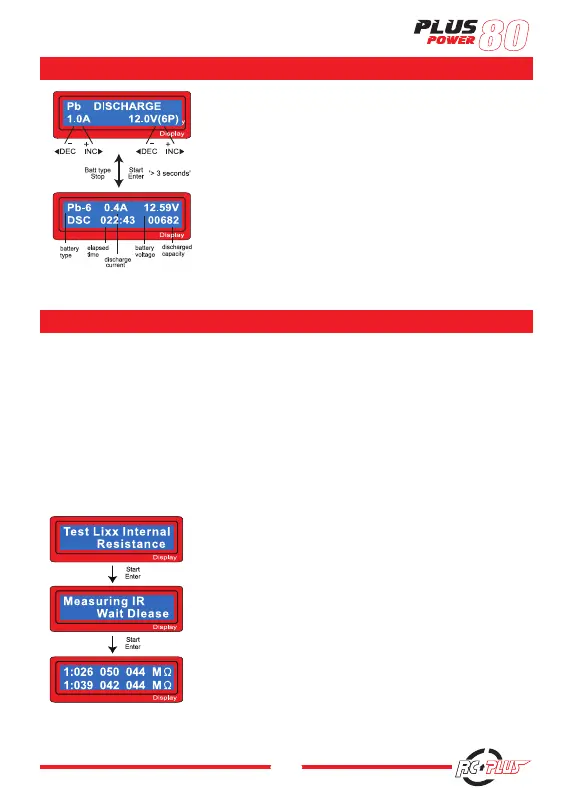
Set discharge current on the left and final voltage on the right. The
discharge current ranges from 0.1 to 1.0A.
To start the process, press Start/Enter key for more than 3 seconds.
The screen displays the current state of discharge. You can alter the
discharge current by pressing Start/Enter key during the process. Once
you change the current value, store it by pressing Start/Enter button
again. To stop discharging press Batt Type/Stop key once. The audible
sound indicates you at the end of process.
Interface of the internal Resistance Testing
Press ENTER to enter the menu
Show the data of battery pack IR
Press ‘INC’ to check the total data of the battery pack IR
(Press ‘INC’ again to back to show the data of the single cell IR)
Lithium battery internal resistance is one of the important index about battery discharge capacity and effi-
ciency. We can know battery performance and the matching of each battery by getting the battery resistance
value. The lithium battery internal resistance value tested by this charger is relative (not absolute), which is
tested under the testing voltage. But it can also know the battery performance and matching through the
relative value. If you want more battery performance comparison, you had better put them under the same
voltage to detect. For example, to compare two 3-cells batteries, you should ensure that the total voltage is
consistent. Testing in the single voltage of 4,20V, the test data is smaller the performance better and the data
more close to the battery the better matching nature.
DISCHARGING PB BATTERY
BATTERY METER TESTING
-
15
-
The screen displays the state of charging process. To
stop charging forcibly, press Batt type/Stop key once.
The audible sound indicates you at the end of process.
8.2 Discharging Pb battery
Set discharge current on the left and final voltage on
the right. The discharge current ranges from 0.1 to 1.0A.
To start the process, press Start/Enter key for more
than 3 seconds.
The screen displays the current state of discharge. You
can alter the discharge current by pressing Start/Enter
key during the process. Once you change the current
value, store it by pressing Start/Enter button again.
To stop discharging press Batt Type/Stop key once.
The audible sound indicates you at the end of process.
-
15
-
The screen displays the state of charging process. To
stop charging forcibly, press Batt type/Stop key once.
The audible sound indicates you at the end of process.
8.2 Discharging Pb battery
Set discharge current on the left and final voltage on
the right. The discharge current ranges from 0.1 to 1.0A.
To start the process, press Start/Enter key for more
than 3 seconds.
The screen displays the current state of discharge. You
can alter the discharge current by pressing Start/Enter
key during the process. Once you change the current
value, store it by pressing Start/Enter button again.
To stop discharging press Batt Type/Stop key once.
The audible sound indicates you at the end of process.


 To Next Page