EasyManua.ls Logo

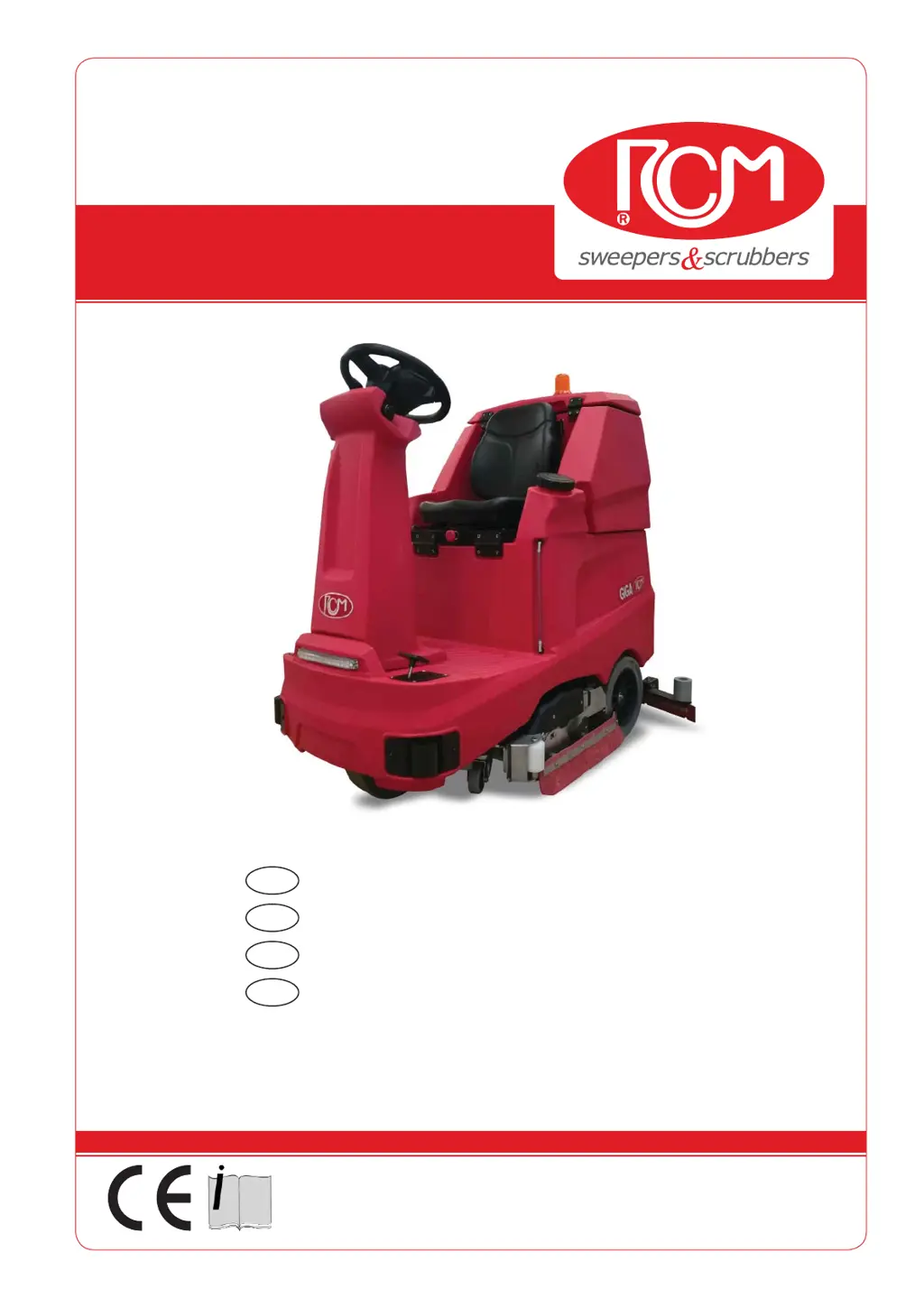
RCm GIGA 802 - User Manual

Default Icon
86 pages
Print Icon
To Next Page IconTo Next Page
Loading...
GIGA
33.GI.101 - GIGA 702R
33.GI.102 - GIGA 802
33.GI.103 - GIGA 902
5/2020 Rev.01
RCM S.p.A.
via Tiraboschi, 4 - 41043 Casinalbo - Modena - Italia
Tel. +39 059 515 311 - Fax +39 059 510 783
www.rcm.it - info@rcm.it
MANUALE D’USO E MANUTENZIONE
ITA
INSTRUCTION AND MAINTENANCE HANDBOOK
EN
MANUAL DE USO Y MANTENIMIENTO
ES
MANUEL D’UTILISATION ET D’ENTRETIEN
FR

Table of Contents

Questions and Answers

  • E
    Edward HamiltonSep 10, 2025
    What to do if my RCm GIGA 802 doesn't move?
    • B
      Benjamin JohnsonSep 10, 2025
      If your RCm Scrubber isn't moving forward or in reverse, there are several possible causes. Check if the accelerator pedal connector is disconnected and reconnect it if necessary. A broken safety micro-switch under the seat could also be the problem, requiring replacement. The differential with electric traction motor might be damaged or have worn carbon brushes, which would mean replacing the motor or carbon brushes. It's also possible that the traction motor has thermal protection activated, in which case you should wait for the motor to cool. Finally, check if the electric brake pedal is pressed or damaged; release the pedal or replace it if damaged.
  • S
    Sally HolmesAug 22, 2025
    What to do if my RCm GIGA 802 Scrubber doesn't start?
    • M
      mark08Aug 22, 2025
      If your machine doesn't start, it could be due to several reasons. First, ensure the main ignition key is inserted and turned clockwise. Check the battery charge level and charge if necessary. Also, inspect the fuse and replace it if it's blown. Other potential issues include a broken safety micro-switch under the seat (replace it), a pressed emergency stop button (disconnect and restart), a damaged anti-tear relay for the battery charger (replace it), or a disconnected battery connection plug (connect the plug).
  • A
    Andrew BrownAug 25, 2025
    Why does my RCm GIGA 802 Scrubber not start or stop suddenly?
    • D
      Dylan MorenoAug 25, 2025
      If your machine doesn't start or stops suddenly, check if the batteries are disconnected and connect them if needed. Ensure the batteries are adequately charged. If the motors are under stress, wait a minute before restarting. Also, make sure the operator is seated, pressing the accelerator pedal. For anomalies or alarms on the display, no answer.
  • B
    Brett SwansonAug 26, 2025
    Why is the detergent solution not coming down on the brushes of my RCm GIGA 802?
    • C
      Carlos JohnsonAug 26, 2025
      If the detergent solution isn't coming down, or only a small amount is coming out, start by checking the water supply hoses on the brushes for clogs and clean them if necessary. Inspect the hoses for crushing and restore or replace them if damaged. Ensure the water filter (solution) is clean and tightly closed. If the closing electromagnet is blocked, replace it. Verify there's water in the tank and fill it if empty. Finally, check the water pump operation.
  • M
    Maria WoodsAug 27, 2025
    How to fix uneven detergent distribution on my RCm Scrubber brushes?
    • T
      Taylor OchoaAug 27, 2025
      Uneven detergent distribution may be caused by clogged water supply hoses on the brushes. Clean the piping to resolve this issue.
  • B
    Brenda LaraAug 29, 2025
    Why does my RCm Scrubber machine not move forward or in reverse?
    • P
      Pamela BryantAug 29, 2025
      If the machine isn't moving forward or in reverse, check the accelerator pedal connector and reconnect it if disconnected. Replace the safety micro-switch under the seat if it's broken. If the differential with the electric traction motor is damaged or the carbon brushes are worn, replace the motor or carbon brushes. If there is traction motor thermal protection, wait for the motor to cool. Ensure the electric brake pedal is released and replace it if damaged.
  • H
    Heidi TaylorSep 18, 2025
    Why is the detergent solution not dispensing properly on my RCm GIGA 802 Scrubber?
    • C
      Courtney WilsonSep 18, 2025
      If the detergent solution isn't dispensing properly on your RCm Scrubber, it could be due to several reasons. The water supply hoses on the brushes might be clogged, so clean the piping. The hoses could also be crushed, in which case you should restore the hose or replace it. The water filter (solution) might be clogged, so clean the filter. Make sure the water filter (solution) is perfectly closed. A blocked closing electromagnet could also be the problem, requiring replacement. Check that there is water in the tank and fill the water tank if needed. Finally, check the water pump operation.
  • D
    Daniel SantiagoSep 12, 2025
    Why does my RCm Scrubber stop suddenly?
    • B
      Brittney HoffmanSep 12, 2025
      Your RCm Scrubber could be stopping suddenly due to several reasons: * Batteries might be disconnected, so ensure they are connected. * Batteries might be low, requiring a charge. * Motors might be under too much stress, tripping the thermal magnetic protection (wait a minute and restart). * The operator got up, activating the micro-switch under the seat (sit and press the accelerator). * There might be an anomaly, indicated by an alarm on the display.
  • S
    Susan RojasSep 8, 2025
    Why doesn't the squeegee dry on my RCm Scrubber?
    • E
      Eric Bean DVMSep 8, 2025
      The squeegee might not be drying because of several reasons. The rubber blades could be worn and need replacement, or the squeegee itself might be clogged and require cleaning. A foreign object could be lodged in the squeegee. The vacuum hose might be clogged, so cleaning the hose is necessary. The squeegee could be poorly adjusted, the water drain hose cap might be open and needs to be closed tightly. The vacuum motor could be blown or the vacuum motor brushes worn, requiring replacement of the motor or brushes respectively. The squeegee not lowered at start-up, faulty actuator, requiring replacement of the actuator. The dirty water vacuum filter could be clogged, requiring cleaning. Finally, the recovery tank cover gaskets could be damaged, and need replacement.
  • T
    teresacoxSep 5, 2025
    Why won't the squeegee lift or lower on my RCm GIGA 802 Scrubber?
    • E
      ericbyrdSep 5, 2025
      If the squeegee does not lift or lower, it could be due to a full recovery tank (empty it), reverse gear being engaged (disengage it), or batteries discharged by 90% (charge them). Check if the squeegee actuator is receiving current. If the brush actuator is broken, replace it. Also, check and replace the actuator micro if it's faulty. Finally, check the control unit and replace it if faulty.

Summary

GENERAL SAFETY STANDARDS

STANDARDS TO FOLLOW DURING OPERATION

MAINTENANCE STANDARDS

CONTROLS AND COMPONENTS {FIG.3}

Emergency stop button

Button to stop all machine functions in case of immediate necessity.

Electrical system and Control unit

Location of the main electrical system control unit and dashboard panel.

DESCRIPTION OF CONTROLS AND COMPONENTS {FIG.4}

WATER LOADING AND WASHING PHASE {FIG.5}

Water loading

Procedure for filling solution tank with water and detergent.

Washing phase

Explanation of the washing process, including double cleaning action for stubborn dirt.

STANDARD OPERATING MODE {FIG.6}

BATTERY DISCHARGE PERCENTAGE AND ALARM THRESHOLDS

Battery discharge percentage and alarm thresholds

Information on battery discharge levels, alarm thresholds, and their impact on machine functions.

WATER DRAINING AND CLEANING THE RECOVERY TANK {FIG.10}

WATER DRAINING FROM THE SOLUTION TANK AND WATER FILTER CLEANING {FIG.11}

MAINTENANCE {FIG.12 - 1;4}

MAINTENANCE {FIG.12 - 2;4}

MAINTENANCE {FIG.12 - 3;4}

Squeegee Maintenance

Instructions for assembling, adjusting, and maintaining the squeegee for optimal drying.

MAINTENANCE {FIG.12 - 4;4}

VACUUM MOTOR {FIG.13}

DRIVE SYSTEM {FIG.14}

BRAKING {FIG.16}

Disabling the Electric Brake

Procedure for deactivating the electric brake for manual movement, emphasizing safety reactivation.

ELECTRICAL SYSTEM {FIG.17 - 1;6}

Battery installation

Steps for installing or replacing batteries, including safety checks and parameter adjustments for battery types.

ELECTRICAL SYSTEM {FIG.17 - 2;6}

ELECTRICAL SYSTEM {FIG.17 - 4;6}

Alarms diagnostics

List of control unit alarms, their causes, and descriptions for troubleshooting machine anomalies.

PERIODIC CONTROL, MAINTENANCE AND SAFETY CHECKS

Control and Maintenance Operations Table

Table outlining periodic checks and maintenance tasks based on operating hours.

TROUBLESHOOTING {1;2}

Troubleshooting Guide (Part 1)

Lists common machine defects, their causes, and recommended solutions.

TROUBLESHOOTING {2;2}

SAFETY INFORMATION

RCm GIGA 802 Specifications

General IconGeneral
ModelRCm GIGA 802
CategoryScrubber
TypeRide-on Scrubber
Working Width800 mm
Power SupplyBattery
Battery Voltage24 V
Max. Speed6 km/h
Max. Gradient10%
Battery Capacity240 Ah

Related product manuals