P a g e | 23 Bee8 User’s Manual Reach/BTX
Settings Page Title/Logo Tab
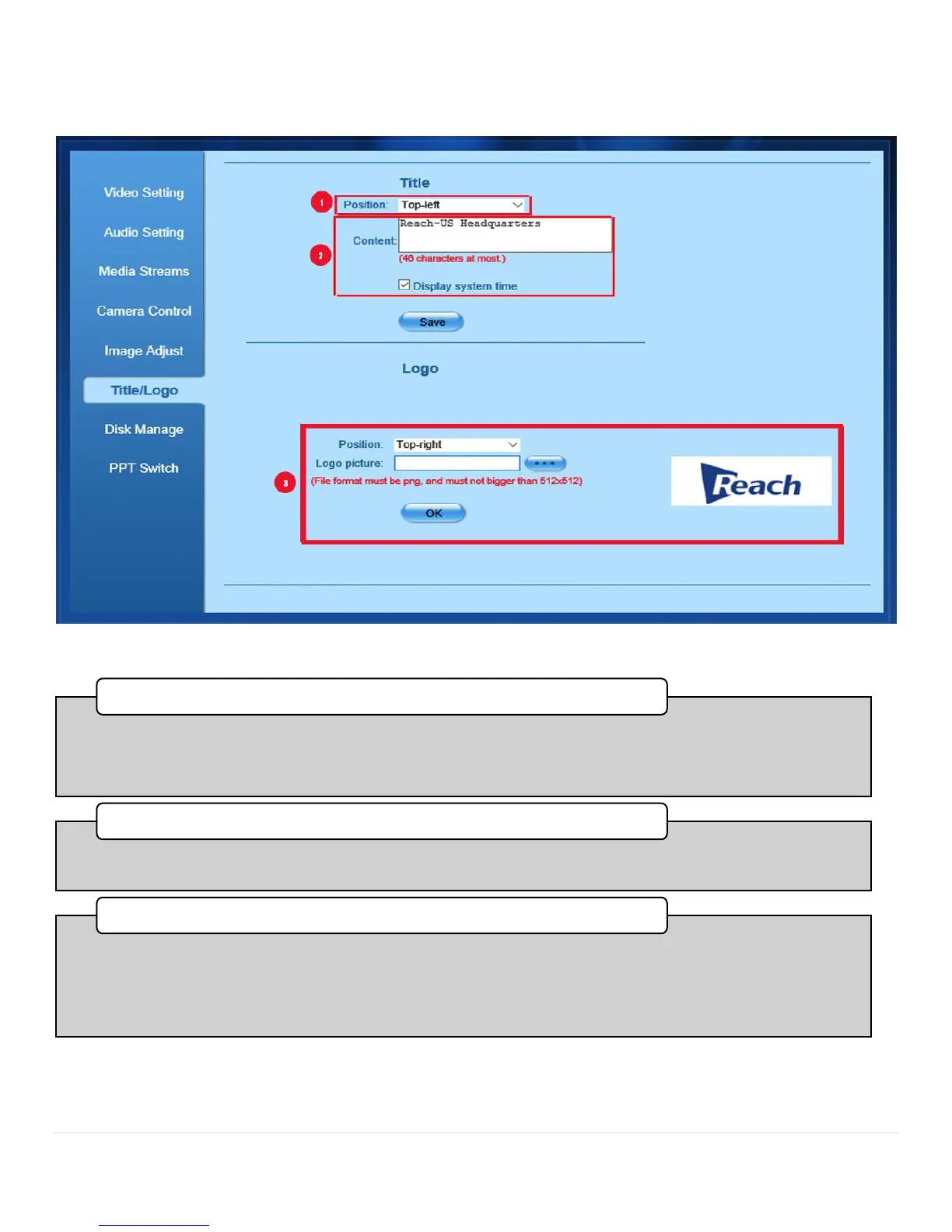
Figure 13. Title-Logo Tab
•This pull down menu gives you the option of placing a title in the Top Left, Top Right, Bottom Left, or
Bottom Right of the display.After you have completed any changes in this section press Save to commit
them.
1. Title Position
•Enter the content of the title here. You can also decide to display the System Time by checking the box
below.After you have completed any changes in this section press Save to commit them.
2. Content Text Box
•Position the logo. This pull down menu gives you the option of placing a title in the Top Left, Top Right,
Bottom Left, or Bottom Right of the display. Logo Picture. Press the button with three dots to locate the
file you wish to use as a logo. This file MUST be in PNG file format, no larger than 5132 X 512 pixels.After
you have completed any changes in this section press OK to commit them. A preview of the file will appear
to the right.
3. Logo Placement



 To Next Page