EasyManua.ls Logo

Realistic PRO-26 - Display Indicators Explained

Realistic PRO-26
22 pages
Print Icon
To Next Page IconTo Next Page
To Previous Page IconTo Previous Page
Loading...
and
—selects
the
scan
and
search
direction.
Number
Keys—each
key
has
a
single
digit
with
a
range
of
numbers
printed
above
il
The
single
digits
refer
to
the
number
of
a
channel
or
frequency
entered.
The
range
of
numbers
(21-40,
for
example)
indi¬
cates
the
channels
that
make
up
a
memory
bank.
See
“Understanding
Channel
Storage
Banks"
on
Page
19.
SHIFT—-selects
MODE,
STEP,
DATA,
RVW,
and
ATT
when
used
with
the
corresponding
number
keys.
For
e
xample,
to
use
a
function
printed
above
keys
1-5
(mode,
step,
DATA,
RVW,
and
ATT),
press
SHIFT
and
then
press
the
desired
key.
MODE—selects
the
auto
or
selectable
modulation
mode
function.
STEP—lets
you
select
the
frequency
step
during
a
direct
or
limit
search.
DATA—turns
on
or
off
the
data
signal
skip
feature.
RVW—lets
you
review
locked-out
channels
or
search
skip
memory.
ATT—turns
on
or
off
fhe
attenuator
for
each
channel
to
help
reduce
in¬
terference
from
strong,
nearby
transmitters.
E/wx—enters
the
frequency
when
you
program
channels,
and
starts
scanning
the
weather
frequencies
when
you
are
not
programming
channels.
(The
weather
frequencies
are
received
only
in
Canada.)
AUTO—lets
you
automatically
program
frequencies
into
selected
banks.
16
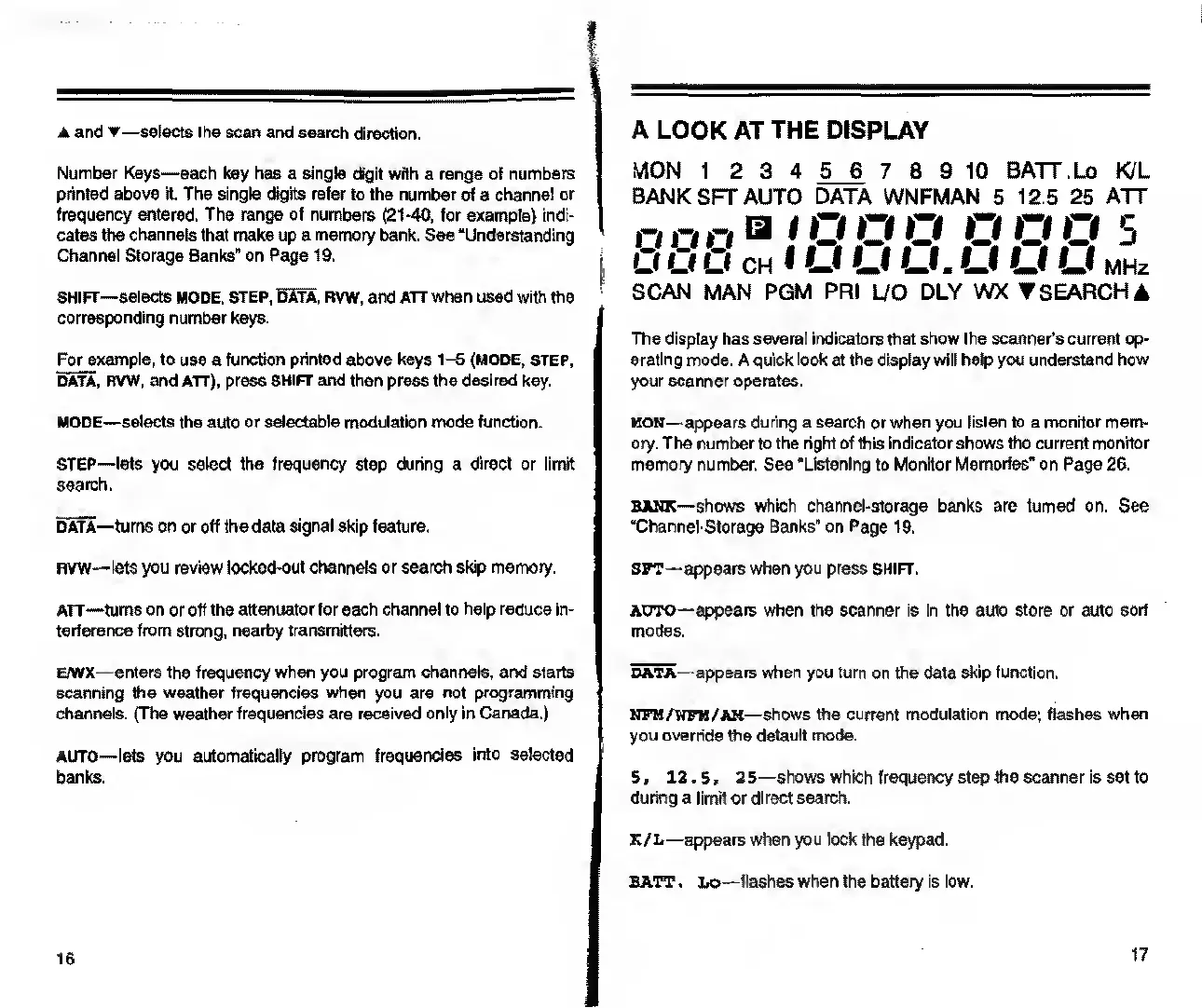
A
LOOK
AT
THE
DISPLAY
MON
1
2
3
4
5_6
7
8
9
10
BATT.Lo
K/L
BANK
SFT
AUTO
DATA
WNFMAN
5
12.5
25
ATT
nnn
a
i
n
n
o
O
O
O
s
cits
8
ch
i
u
u
u.
u
u
u
MHi
SCAN
MAN
PGM
PRI
L/O
DLY
WX
SEARCH
A
The
display
has
several
indicators
that
show
the
scanner’s
current
op¬
erating
mode.
A
quick
look
at
the
display
will
help
you
understand
how
your
scanner
operates.
MON—
appears
during
a
search
or
when
you
listen
lo
a
monitor
mem¬
ory.
The
number
to
the
right
of
this
indicator
shows
the
current
monitor
memory
number.
See
“Listening
to
Monitor
Memories"
on
Page
26.
BANK—
shows
which
channel-storage
banks
are
turned
on.
See
“Channel-Storage
Banks”
on
Page
19.
SFT—appears
when
you
press
SHIFT.
AUTO—appears
when
the
scanner
is
in
the
auto
store
or
auto
sort
modes.
data—
appears
when
you
turn
on
the
data
skip
function.
NFM/WFM/AN
—shows
the
current
modulation
mode;
flashes
when
you
override
the
default
mode.
5,
12.5,
25—shows
which
frequency
step
the
scanner
is
set
to
during
a
limit
or
direct
search.
K/L—appears
when
you
lock
the
keypad.
BATT.
Lo—flashes
when
the
battery
is
low.
17

Related product manuals