EasyManua.ls Logo

Realistic PRO-37 - A GENERAL GUIDE TO SCANNING

Realistic PRO-37
14 pages
Print Icon
To Next Page IconTo Next Page
To Previous Page IconTo Previous Page
Loading...
You
can
still
manually select
any
channel
in
a bank, even
if
the
bank
is
turned off.
You
cannot
turn off
all
banks. One
bank
is
always
active.
Using
the
Priority Feature
You can scan through
the
pro-
grammed
channels,
and still
not
miss
an
important
or
interesting
call
on a
specific channel.
Just
program
the
channel as the
priority
channel
and
turn on the
priority
feature by
pressing
PRI
during
scanning.
The
scanner
now checks the
priority
channel every
2
seconds,
and stays
on the
channel
if
there
is
activity.
To
program
a channel
as the
priority
channel,
press
PGM, the desired
channel
number, and then
press
PRl.
flappears
in
the
upper
left
corner
of
the display
whenever the
scanner
is
set
to the
priority
channel.
You
can
only select
one channel
as the
priority
channel.
MANUALLY
SELECTING
A
CHANNEL
You
can
monitor a
channel
without
scanning.
This is useful
if
you
hear
an
emergency
broadcast
on
a channel
and do
not
want
to
miss any details
-
even though there
might be
peri-
ods
of silence
-
or
if
you
want to
monitor a
locked-out channel.
To
select
a channel,
just
press
MAN-
UAL, enter the
channel
number, and
press
MANUAL again. Or,
if
the scan-
ner
is
scanning
and stops
at the
de-
sired
channel,
just
press
MANUAL
one
time.
Pressing
MANUAL addi-
18
tional
times
makes the scanner
step
through
the channels.
BATTERY.SAVING
FEATU
RE
Your scanner
has
a
special
battery-
saving
feature. When
you
have
man-
ually
selected a
channel,
if
the
scan-
ner
does
not
detect a signal
within 5
seconds
and
you
do
not
press
a
key,
the scanner
enters
the standby mode.
ln
this
mode the scanner
rests
for 1
second,
then checks
for
a signal
for
1/2 second. The scanner
continues
doing
this until
you press
a
button or
it
receives a signal.
During
standby,
the
scanner uses
only
40
percent
of the
normal
power
consumption.
A
GENERAL GUIDE
TO SCANNING
BIRDIES
Birdies
are
frequencies
that
your
scanner
generates
internally
that
in-
terfere
with broadcasts
on the same
frequencies. This makes it
difficult or
impossible
to
hear
transmissions on
these
frequencies. lf
you program
one
of these
frequencies,
you
hear
only
noise
on the channel.
lf the
interference is not
severe,
you
might
be able to turn
SQUELCH
clock-
wise
to cut out the
interference. The
most
common birdies to
watch for
are
listed
below.
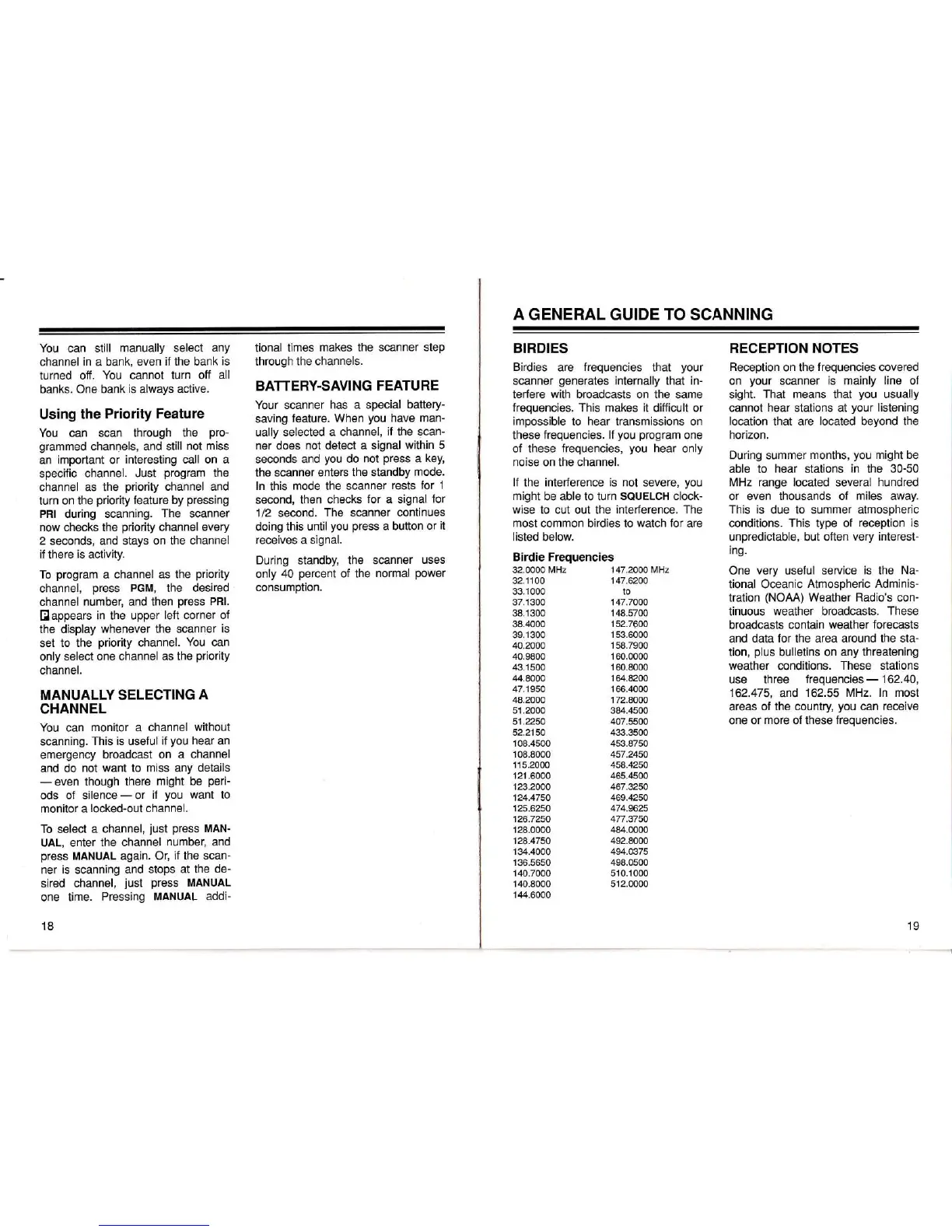
Birdie Frequencies
RECEPTION
NOTES
Reception
on the
frequencies
covered
on
your
scanner
is mainly line of
sight.
That
means that
you
usually
cannot
hear
stations at
your
listening
location
that are
located
beyond
the
horizon.
During summer
months,
you
might be
able to
hear stations
in
the 30-50
MHz range located
several
hundred
or
even thousands of
miles
away.
This is
due to summer
atmospheric
conditions.
This
type
of
reception is
unpredictable,
but often
very interest-
ing.
One
very
uselul service
is the
Na-
tional Oceanic
Atmospheric
Adminis-
tration
(NOAA)
Weather
Radio's
con-
tinuous
weather
broadcasts.
These
broadcasts
contain
weather forecasts
and data
for
the area around
the sta-
tion,
plus
bulletins on any threatening
weather
conditions.
These
stations
use three
frequencies
-
162.40,
162.475,
and
162.55 MHz.
ln most
areas
of
the
country,
you
can
receive
one
or
more
of these
frequencies.
32.0000 MHz
32.1
1
00
33.1 000
37.1300
38.1300
38.4000
39.1 300
40.2000
40.9800
43.1
500
44.8000
47.1950
48.2000
51.2000
51.2250
52.2150
108.4500
108.8000
115.2000
121 .6000
123.2000
124.4750
125.6250
126.7250
128.0000
128.4750
134.4000
136.5650
140.7000
140.8000
144.6000
147.2000 MHz
147.6200
to
147.7000
148.5700
152.7600
153.6000
158.7900
1 60.0000
160.8000
164.8200
166.4000
172.8000
384.4500
407.5500
433.3500
453.8750
457.2450
458.4250
465.4500
467.3250
469.4250
474.9625
477.3750
484.0000
492.8000
494.O375
498.0500
51 0.1000
512.0000
19

Related product manuals