EasyManua.ls Logo

Realistic PRO-37 - SEARCHING FOR ACTIVE FREQUENCIES; Limit Search; Direct Frequency Search

Realistic PRO-37
14 pages
Print Icon
To Next Page IconTo Next Page
To Previous Page IconTo Previous Page
Loading...
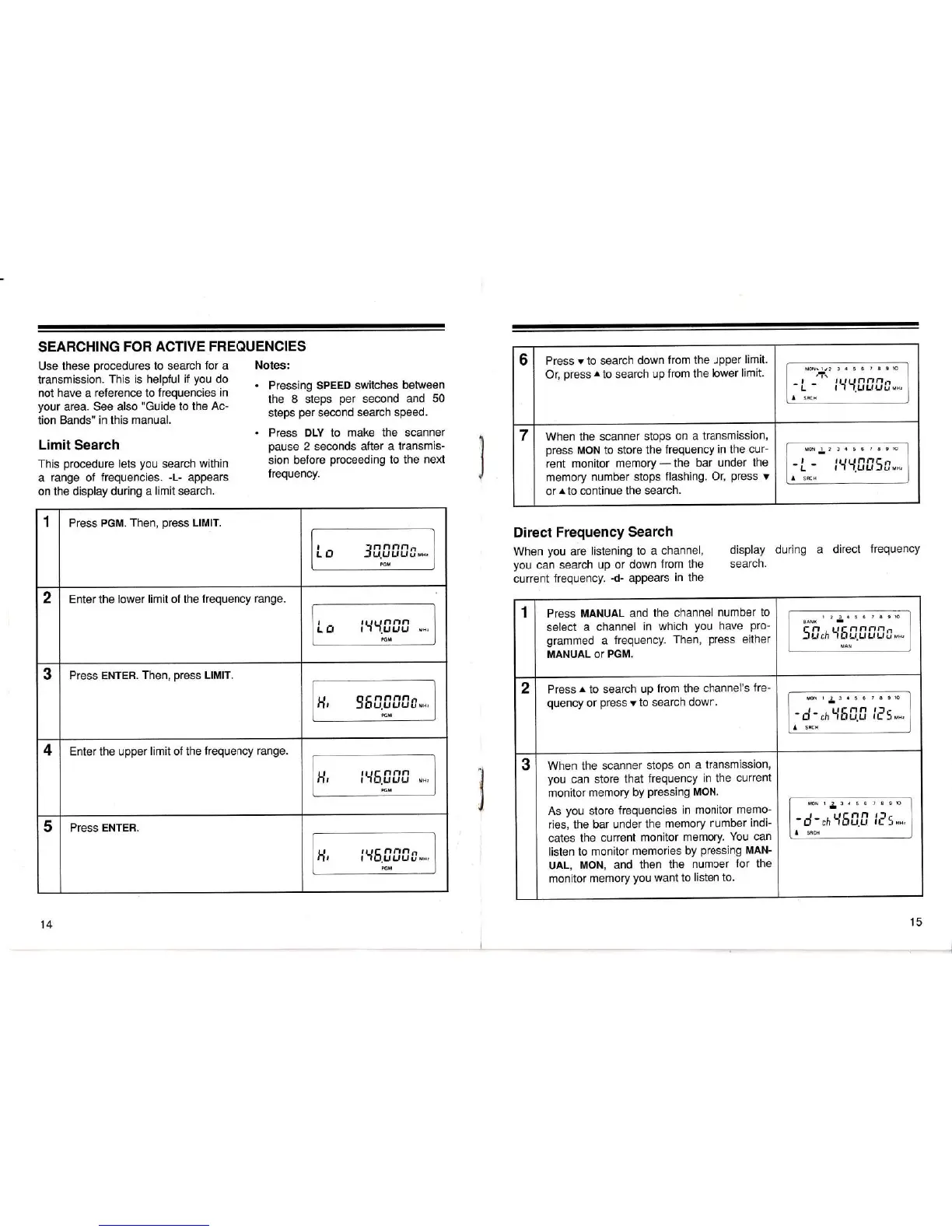
SEARCHING
FOR
ACTIVE FREQUENCIES
Use these
procedures
to search
for
a
Notes:
transmission.
This is helpful if
you
do
not
have
a
reference to
frequencies in
'
Pressing
SPEED
switches
between
your
area. see also
"Guide
to the
Ac-
the
8 steps
per
second and 50
tion
Bands,, in
this
manual.
steps
per
second
search speed'
.
Press DLV to
make the scanner
Limit
Search
pause
2
seconds
after
a
transmis-
This
procedure
lets
you
search
within
sion
before
proceeding
to
the
next
a
range of
frequenties.
-t-
appears
frequency'
on the display
during a
limit
search.
Direct
Frequency
Search
When
you
are
listening to
a channel,
display
during
a direct
frequency
you
can
search
up or
down
from
the
search.
current
frequency.
-d-
appears
in the
6
Press
v
to search
down
from the
upper
limit.
Or,
press
^to
search
up
from the
lower
limit.
MON\1.2 3
4
5 5
7 8 I
10
zl^
I rilr t fll-r,.l.-
-L
-
r-l'1.uuLlU,,,
I
sBcH
7 When the
scanner
stops
on
a transmission,
press
MON to
store
the
frequency
in the
cur-
rent monitor
memory
-
the
bar
under
the
memory
number stops
flashing.
01
press
v
or
r
to continue
the
search.
MoN
r
2 3
4
5
6 7 8 910
-
L
-
i{t{.[]115t,.,
I
sncn
1
Press PGM.
Then,
press
LIMIT.
I lnnr'll.t-
L O
-f
U.uLtuUu,,
PGM
2 Enter the
lower limit of the
frequency
range.
r ,r tr tnnn
L El
t'I'l.ul.lu
MBr
PGM
3
Press ENTER.
Then,
press
LlMlT.
H,
55[.[][1[t",,
4
Enter
the upper
limit
of the
frequency range.
tt ttt,- ,:,:t,:t
Ill
t-ltrUl.lu
MHr
PGM
5
PresS ENTER.
H'
lY'5.0f,fru,,.
PGM
1
Press
MANUAL and
the
channel
number to
select
a
channel
in which
you
have
pro-
grammed
a
frequency.
Then,
press
either
MANUAL
OT
PGM.
1
2 3
4
5 6
7 8 9lO
EANK
.
r I.l t rt- nllr-,n.-
-lUch
-1
Lf LtuLf
Lliius,
MAN
2
Press
r
to
search
up
from the
channel's
fre-
quency
or
press
v
to search
down.
MoN1234567891O
-d-,h'{5[.[
115,,.
I
sacx
3
When the
scanner
stops
on
a transmission,
you
can
store
that
frequency
in the
current
monitor
memory by
Pressing
MON.
As
you
store
frequencies
in
monitor
memo-
ries, the bar
under
the
memory
number
indi-
cates
the
current
monitor
memory.
You
can
listen to
monitor
memories
by
pressing
nnnN'
UAL,
MON, and
then
the
number
for the
monitor
memory
you
want to
listen to.
MoN
1
2
3
4
5 6
7 8 9lO
-r-{-,hY5[.[
lr'!],,,
I
sncx
14
15

Related product manuals