UNDERSTANDING
YOUR
SCANNEH
The
antenna
jack
on
your
scanner
makes it
easy to use
your
scanner
with
a
variety
of antennas.
You
can
remove
the supplied antenna,
if
you
want,
and attach a different
one, such
as an external
mobile
antenna,
tele-
scopic antenna, or outdoor base an-
tenna.
Radio Shack stores sell the
antenna connector adapters that
let
you
use these antennas.
Use coaxial cable to connect an out-
door antenna.
Always
use
50-ohm co-
axial
cable. For lengths over 50
feet,
use
RG8 low-loss
dielectric coaxial
cable.
CONNECTING
AN
EARPHONE
For
private
listening,
plug
an ear-
phone
into the
EAR
jack
on top of
your
scanner.
This automatically
dis-
connects
the speaker.
We recom-
mend Radio Shack's earphone
Cat.
No.
33-175.
ln a
noisy environment,
mono
headphones
(Cat.
No. 20-210)
make listening easier.
Always set
volume
to
its minimum
po-
sition before
you
plug
in
earphones or
headphones. Then,
adjust the
volume
to a confortable
listening level.
Warning: Do not listen
at extremely
high volume levels,
especially
when
using an
earphone. Extended
high-
volume listening
can
lead
to
perma-
nent hearing loss.
CONNECTING
AN
EXTENSION SPEAKER
ln
a
noisy
area, an extension
speaker
such as
Radio
Shack Cat.
No. 21-
549,
positioned
in
the
right
place,
might
provide
more comfortable
lis-
tening.
Plug
the speaker cable's
1/8-
inch mini-plug into
the scanner's
EAR
jack.
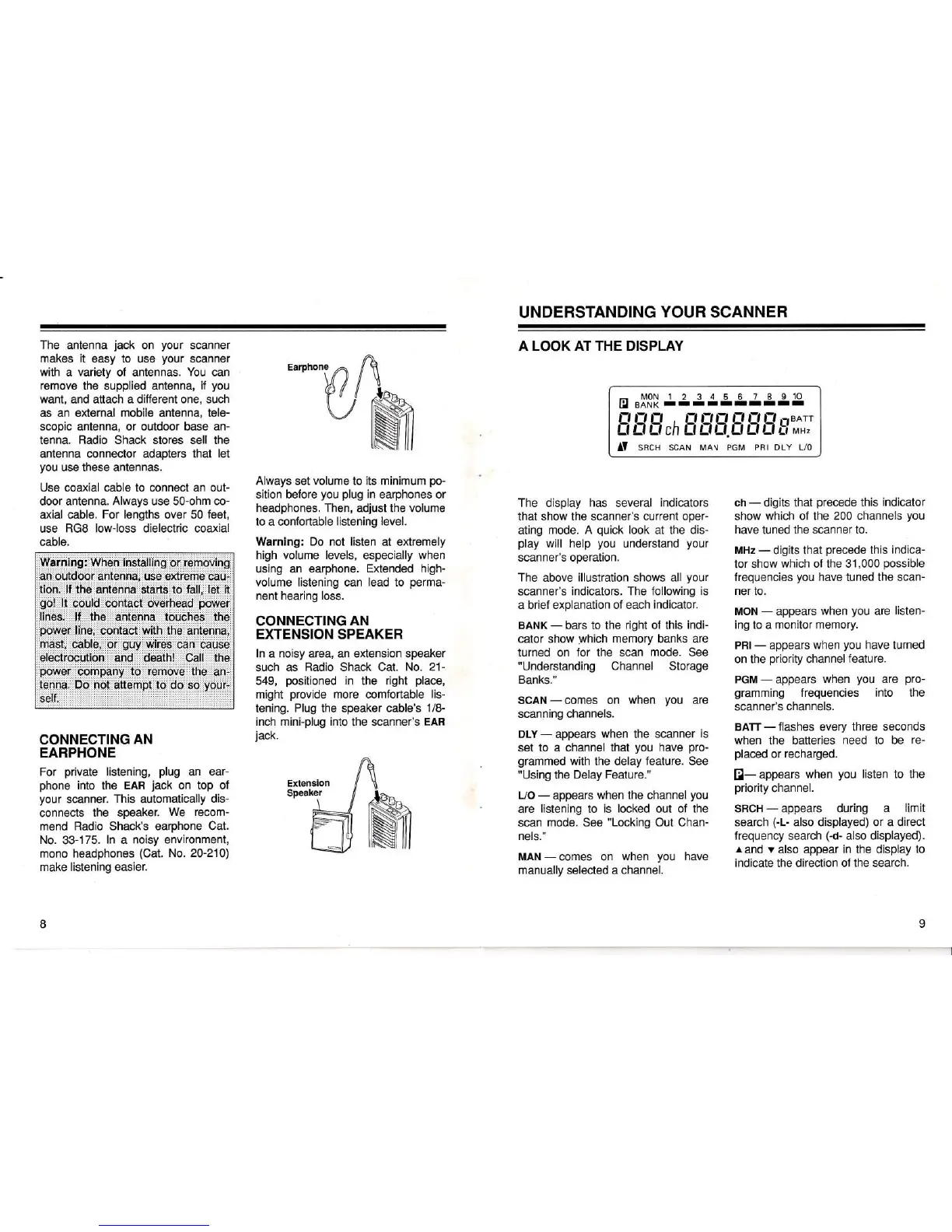
A LOOK
AT THE DISPLAY
The display
has
several
indicators
that show the scanner's
current oper-
ating
mode. A
quick
look
at the dis-
play
will help
you
understand
your
scanner's operation.
The
above
illustration
shows
all
your
scanner's
indicators. The following
is
a brief
explanation of each
indicator.
BANK
-
bars to the
right of this
indi-
cator show
which
memory
banks
are
turned on
for the scan
mode. See
"Understanding Channel Storage
Banks."
SCAN
-
comes on
when
you
are
scanning channels.
DLY
-
appears
when the scanner
is
set to
a channel that
you
have
pro-
grammed
with
the delay
feature. See
"Using
the
Delay Feature."
L/O
-
appears
when
the channel
you
are
listening
to
is locked
out of the
scan
mode. See
"Locking
Out Chan-
nels."
MAN-comes on
when
you
have
manually
selected
a channel.
tr
,x'3[
J3g5gg4gg]g
E rT,-T,r,,-T
fl
,-T
ff E
ff
fl
ii,'.I
AY
sRcH
scAN ,o* ,on PRr
DLY L/o
ch
-
digits that
precede
this
indicator
show
which of the
200 channels
you
have
tuned the
scanner to.
MHz
-
digits that
precede
this
indica-
tor show
which of the 3'1,000
possible
frequencies
you
have
tuned the
scan-
ner
to.
MON
-
appears
when
you
are
listen-
ing to
a
monitor memory.
PRI- appears
when
you
have
turned
on the
priority
channelfeature.
PGM
-
appears
when
you
are
pro-
gramming
frequencies into the
scanner's
channels.
BATT
-
flashes
every
three seconds
when the batteries
need to be
re-
placed
or recharged.
El-
appears
when
you
listen
to
the
priority
channel.
SHCH
-
appears during a
limit
search
(-L-
also displayed)
or a direct
frequency search
(-d-
also displayed).
r
and
v
also appear
in
the display to
indicate
the
direction of the search.














 To Next Page