EasyManua.ls Logo

Realistic PRO-37 - PREPARATION; POWER SOURCES; Important Information about External Adapters

Realistic PRO-37
14 pages
Print Icon
To Next Page IconTo Next Page
To Previous Page IconTo Previous Page
Loading...
PREPARATION
POWER SOURCES
You
can
power your
scanner
from any
of the
following three
sources:
.
lnternal
batteries
.
A
standard
AC
outlet
(using
an
op-
tionalAC
adapter)
.
Your
vehicle's battery
(using
an op-
tional
DC
adapter)
Using
Batteries
You
can
operate
your
scanner
from
six
AA
batteries.
For
longest
operation
and best
performance,
we recom-
mend alkaline
batteries
(Cat.
No.
23-
552). Or,
you
can use
rechargeable
nickel-cadmium
batteries
(Cat.
No.
23-125).
Warning:
The
scanner
has a
built-in
circuit
that
lets
you
recharge
nickel-
cadmium
batteries
inside the scanner.
However,
you
must
never use this
cir-
cuit
when
you
have
installed
non-re-
chargeable
batteries
in the scanner.
Be
sure
to
read
"lmportant
lnforma-
tion
about
External
AdaPters" and
"Charging
Nickel-Cadmium
Batteries."
BATT flashes
on the
display
and a
beep
sounds
every 3 seconds
when
the batteries
are
low. When this
hap-
pens,
replace all
six batteries
immedi-
ately
(or
recharge the
nickel-cadmium
batteries).
Important lnformation
about
External
Adapters
The
scanner has
two external
power
The CHG
jack
supplies
power
to oper-
jacks
-
PWR
and
CHG. lt is important
ate the scanner
and also applies
that
you
understand
the
purpose
of
power
to the
internal
batteries to
each
jack
before
you
connect any charge
them. Use the CHG
jack
only
adapter to the
scanner.
lmproper
use when
you
have
installed rechargeable
of the
jacks
can damage the
scanner
nickel-cadmium
batteries.
and the
power
adapter'
warning: Never
use
the
cHG
jack
The PWR
jack
powers
the
scanner
with non-rechargeable
batteries. lf
and disconnects
the
internal
batteries.
you
try to
recharge
non-rechargeable
You can
use this
jack
with
an
external batteries,
they become
very hot
and
power
source
regardless
of the type could even
explode.
of batteries lnstalled.
Using an
AC Power
Source
To
power
the scanner from AC
power,
you
need
Radio
Shack's
9-volt,
300mA AC
adapter
(Cat.
No. 273-
1455).
Use of an adapter with
differ-
ent
ratings
could
damage
your
scan-
ner
or the adapter.
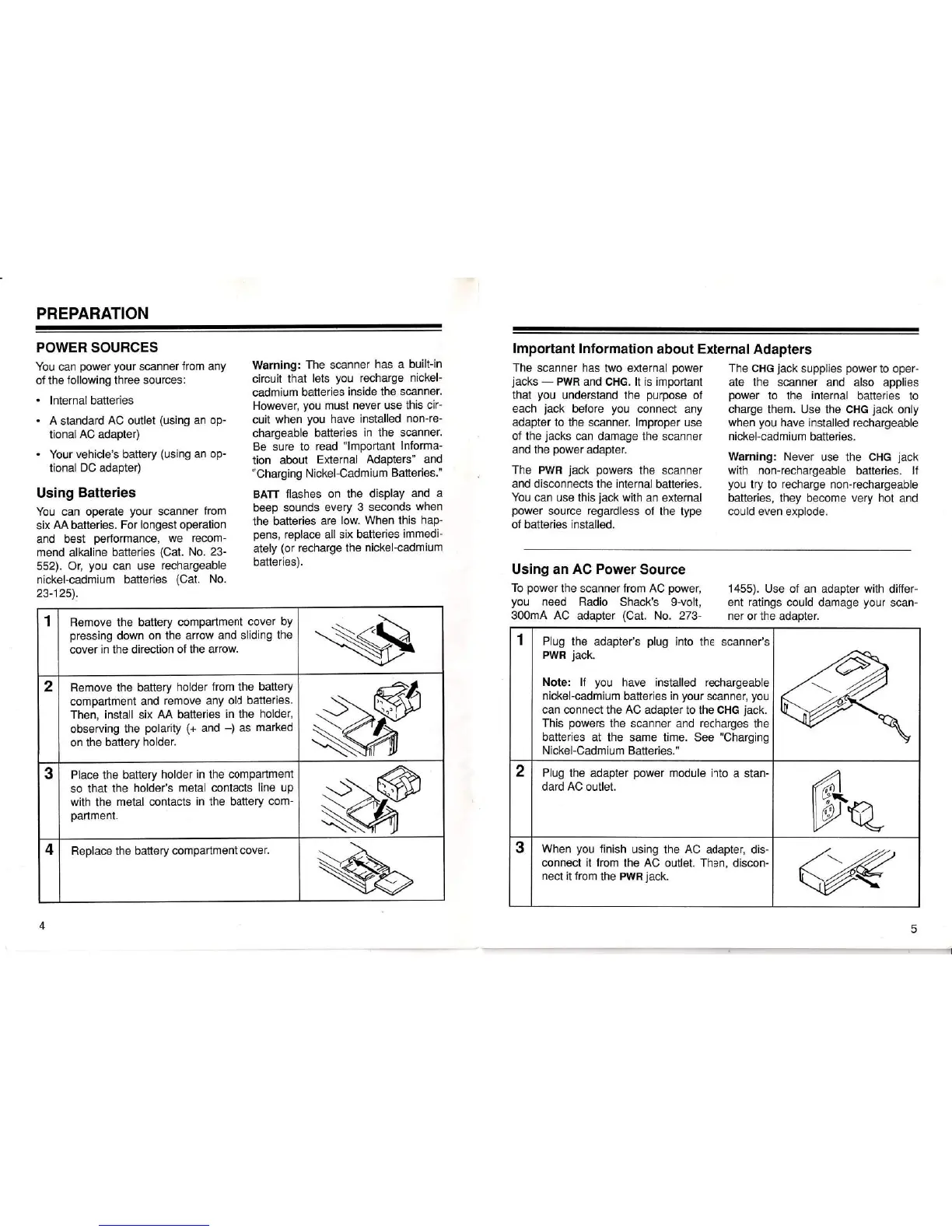
1
Remove
the
battery
compartment
cover
by
pressing
down
on the arrow
and sliding
the
cover in the direction
of the arrow.
2
Remove the battery
holder
from the
battery
compartment
and
remove any
old batteries.
Then,
install
six
AA
batteries
in
the
holder,
observing
the
polarity
(+
and
-)
as
marked
on
the battery
holder.
3
Place the
battery
holder
in
the
compartmenl
so that
the
holder's
metal contacts
line
up
with
the
metal contacts
in the battery
com-
partment.
4
Replace the battery
compartment
cover.
1 Plug
the
adapter's
plug
into
the scanner's
PWR
jack.
Note: lf
you
have installed rechargeable
nickel-cadmium
batteries
in
your
scanner,
you
can connect the
AC
adapter
to the
cHG
jack.
This
powers
the scanner
and
recharges
the
batteries
at the same time. See "Charging
Nickel-Cadm ium Batteries."
2
Plug
the adapter
power
module
into
a stan-
dard AC outlet.
3
When
you
finish
using
the
AC
adapter, dis-
connect it from
the
AC
outlet. Then,
discon-
nect
it from
the
PWR
jack.
4

Related product manuals