PRO-37
t u,
[mllTIIlT_l
HYPERSCAN
-W'li
.o
""
f-sANlmANUAil l--r---..lf 2
-fT--)
I ll lll:20ll2i-4oll41-60l
l:ll:ll:ll:ll:l
truiltLur-lf-,i.--lf s
-ll
6 I
I ll ll61-80ll81-ioolhor-12d
lr=ll:llellEllE=l
fD€wll-
^
lf 7 lf
s__-lt s
1
I Il lll2l-1,rolll,l1-16011161-1801
l=ll=ll=llc=ll:l
F'*-"lfIl;,s,'"]
l:ll=llc=llr=llal
I-Idfr-l fuor I t--pBT-l I
pGM
-l
l-ct
Effi]
L=lt=-1tr-lt=-]trj
2OO CHANNEL DIRECT
ENTRY
A LOOK
AT THE KEYBOARD
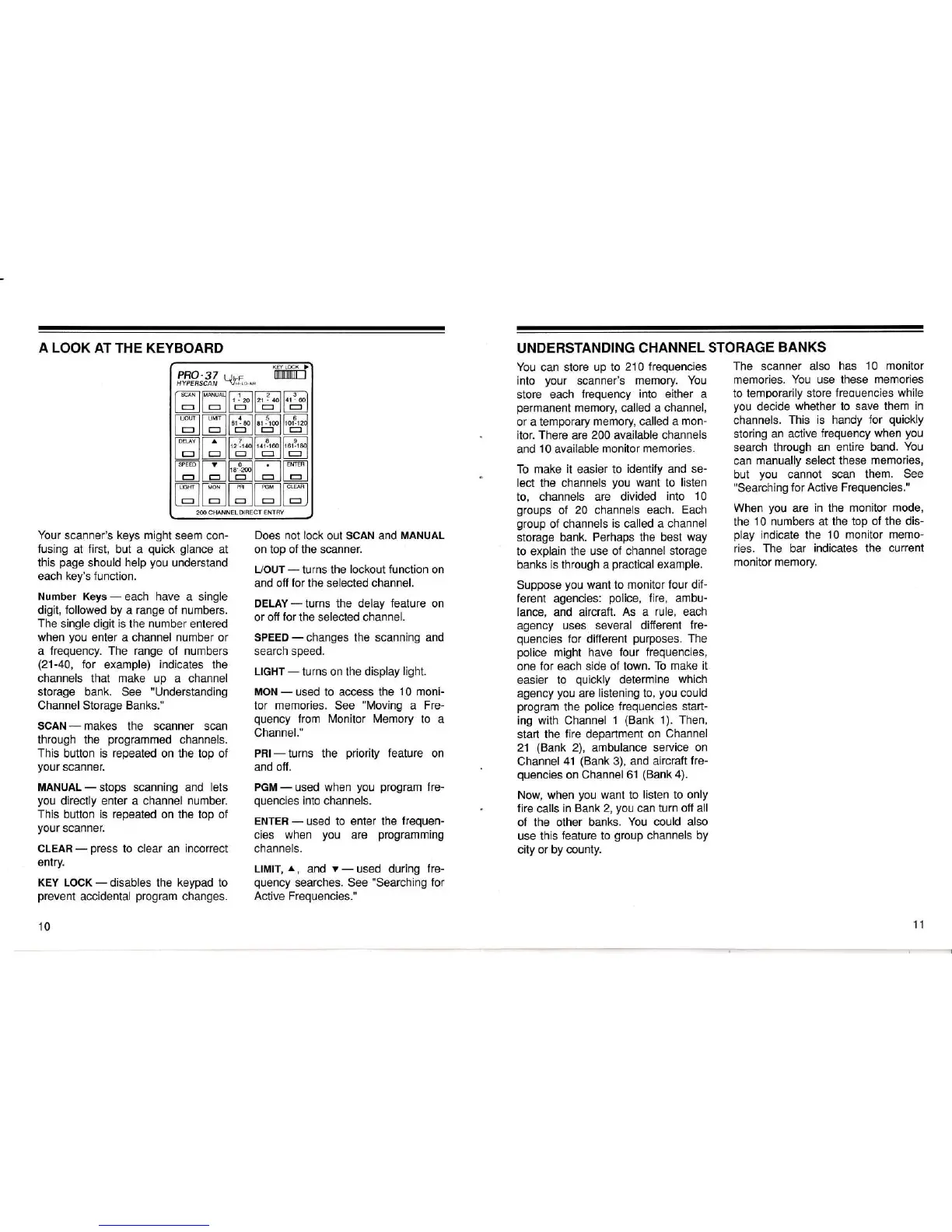
Your
scanner's
keys might
seem con-
fusing
at
first,
but a
quick glance
at
this
page
should
help
you
understand
each
key's
function.
Number
Keys
-
each
have
a single
digit,
followed
by a
range
of
numbers.
The
single digit
is
the
number
entered
when
you
enter
a channel
number
or
a
frequency. The range
of
numbers
(21-40,
for
example) indicates the
channels
that
make
up a channel
storage bank.
See
"Understanding
Channel Storage Banks."
SCAN
-
makes
the scanner scan
through the
programmed
channels.
This
button is repeated on the
top of
your
scanner.
MANUAL
-
stops scanning and
lets
you
directly enter a channel
number.
This button
is
repeated
on
the top
of
your
scanner.
CLEAH
-
press
to clear an
incorrect
entry.
KEY LOCK
-
disables the
keypad
to
prevent
accidental
program
changes.
10
UNDERSTANDING CHANNEL
STORAGE
BANKS
Does not
lock
out SCAN and
MANUAL
on top of the scanner.
L/OUT
-
turns the
lockout function
on
and off
for
the selected channel.
DELAY
-
turns the delay
feature
on
or off
for
the selected channel.
SPEED-changes
the scanning and
search speed.
LIcHT
-
turns on the
display
light.
MON
-
used to access the
10 moni-
tor
memories.
See
"Moving
a
Fre-
quency
from Monitor
Memory
to
a
Channel."
PRI- turns the
priority
feature
on
and off.
PGM
-
used
when
you
program
fre-
quencies
into
channels.
ENTER
-
used to enter
the
frequen-
cies
when
you
are
programming
channels.
LtMtT,
^,
?fld
v
-
used during
fre-
quency
searches. See
"Searching
for
Active Frequencies."
You
can store
up to
210 frequencies
into
your
scanner's
memory. You
store each
frequency into either a
permanent
memory, called a channel,
or
a temporary
memory, called a
mon-
itor.
There
are
200
available
channels
and
10
available
monitor
memories.
To make it easier to
identify and se-
lect the channels
you
want
to
listen
to, channels
are divided
into 10
grioups
of
20 channels each.
Each
group
of channels
is called a channel
storage
bank.
Perhaps the best
way
to explain the
use of channel storage
banks
is
through a
practical
example.
Suppose
you
want to
monitor four dif-
ferent
agencies:
police,
fire, ambu-
lance,
and aircraft.
As
a
rule, each
agency
uses several
different
fre-
quencies
for
different
purposes.
The
police
might have four
frequencies,
one
for each side of
town.
To make
it
easier
to
quickly
determine
which
agency
you
are
listening to,
you
could
program
the
police
frequencies start-
ing
with
Channel
1
(Bank
1). Then,
start
the
fire
department
on
Channel
21
(Bank
2),
ambulance
service
on
Channel
41
(Bank
3), and aircraft
fre-
quencies
on Channel
61
(Bank
4).
Now, when
you
want
to
listen to only
fire calls
in Bank
2,
you
can
turn off all
of the
other banks.
You
could
also
use this
feature
to
group
channels
by
city or by
county.
The scanner also
has
10 monitor
memories. You use these memories
to temporarily
store
freouencies while
you
decide
whether
to
save them
in
channels.
This is handy
for
quickly
storing
an active
frequency
when
you
search through
an entire band.
You
can
manually select these
memories,
but
you
cannot
scan them.
See
"Searchi
ng for
Active Frequencies."
When
you
are
in
the
monitor
mode,
the
10 numbers at the top
of the dis-
play
indicate the
10 monitor
memo-
ries.
The
bar
indicates the
current
monitor
memory.
11














 To Next Page