©2019, REC TEC Industries, LLC
Questions? CLICK for support!
Back to Table of Contents
21
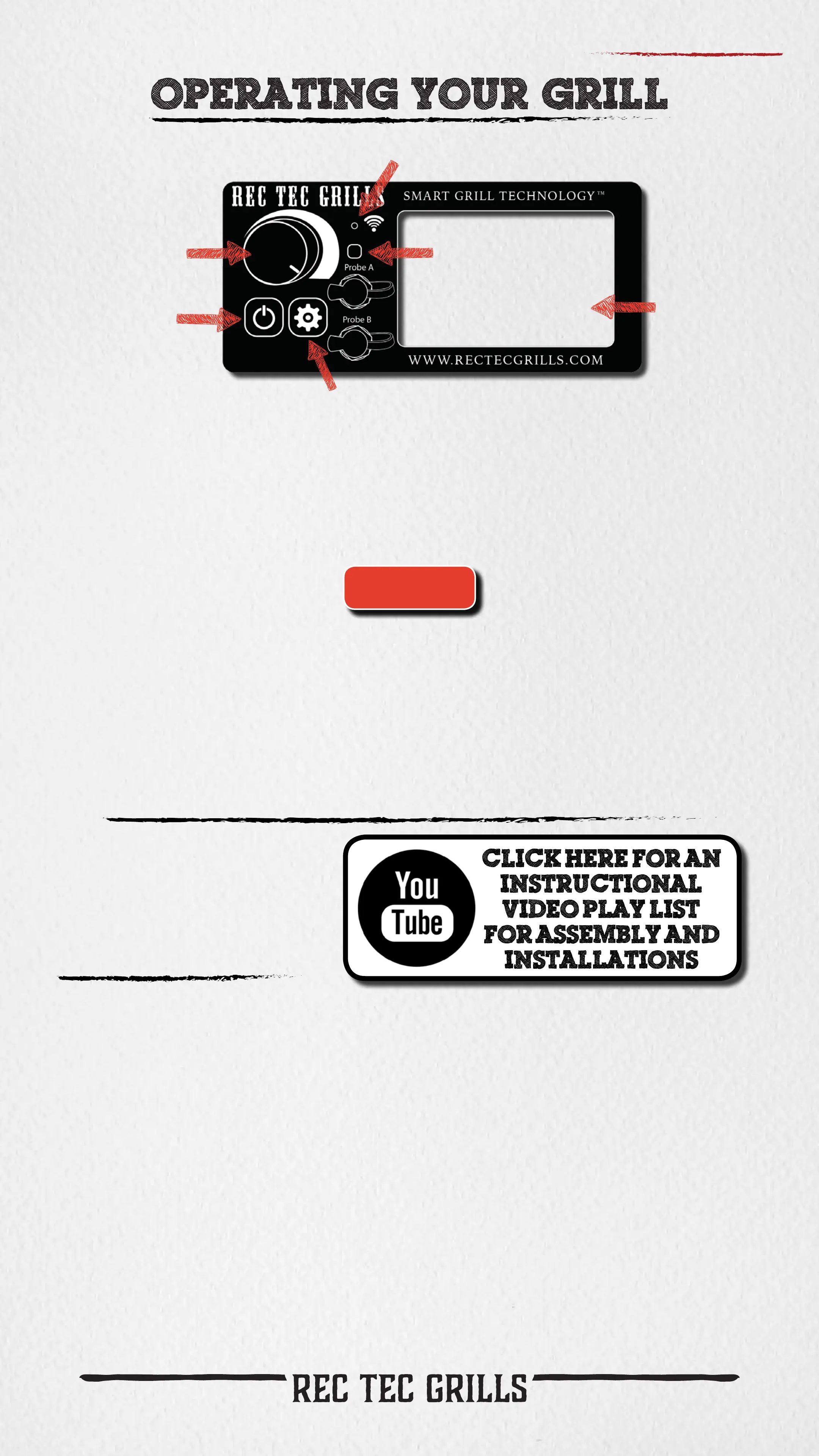
Wi-Pellet Connection Indicator
Temperature
Control Knob
Power
Button
Settings Button
Display
Screen
Wi-Pellet Sync
Button (see app)
• Pressing the Power Button again activates the shut down mode of your grill.
If grill’s actual temperature is below 160ºF, pressing the Power Button will
simply turn the grill off.
• When the power button is used to shut down your grill, the
Smart Grill Technology™ processor will stop adding pellets to
the re pot and the fan will continue running to completely
burn the pellets remaining in the re pot. During this cooling
process, the display screen will display FAN.
Temperature Control Knob: Turn knob to select computer maintained
temperature in 5ºF increments (Range: 200ºF - 500ºF).
LO: LO will display as actual temperature when knob is turned counterclockwise
beyond 200ºF and Xtreme Smoke will be activated. The grill will feed pellets to
the re at the minimum feed rate (lowest rate possible to maintain a reliable re).
This will produce the most smoke and achieve the lowest temperature possible,
given environmental conditions/type of pellets used.
FUL: FUL will display as actual temperature when knob is turned clockwise beyond
500ºF. Grill will feed pellets to the re at the 100% of auger capacity. This will
produce the highest temperature possible, given environmental conditions/type
of pellets used.
ER Codes
Power Button:
Press Power Button to turn grill on and adjust Temperature Control Knob to
desired temperature.
• Turning the grill ON activates the automatic startup mode and illuminates
the digital readout.
• If your grill fails to light itself within 30 minutes of startup, the Smart Grill
Technology™ processor will turn the grill off and display ER-2 on the screen.
Additional Temperature Settings: LO and FUL
WIFI: Download app from
Apple App Store for Apple
devices or Google Play for
Android devices, and follow
the directions on app.



 To Next Page