15
5. To end the current data logging session pause the data logging
session and hold the REC button for 2 seconds.
Note: The meter will scan for a SD memory card when a rst manual
recording is attempted. If a card is not inserted or the card is defective,
the meter will ash "CArD-E-". In this case, power the meter OFF and try
again with another SD memory card.
Transferring Data from the SD Memory Card to a Computer
1. While the meter is powered OFF remove the SD memory card from
the SD card slot.
2. Insert the SD memory card into the computer.
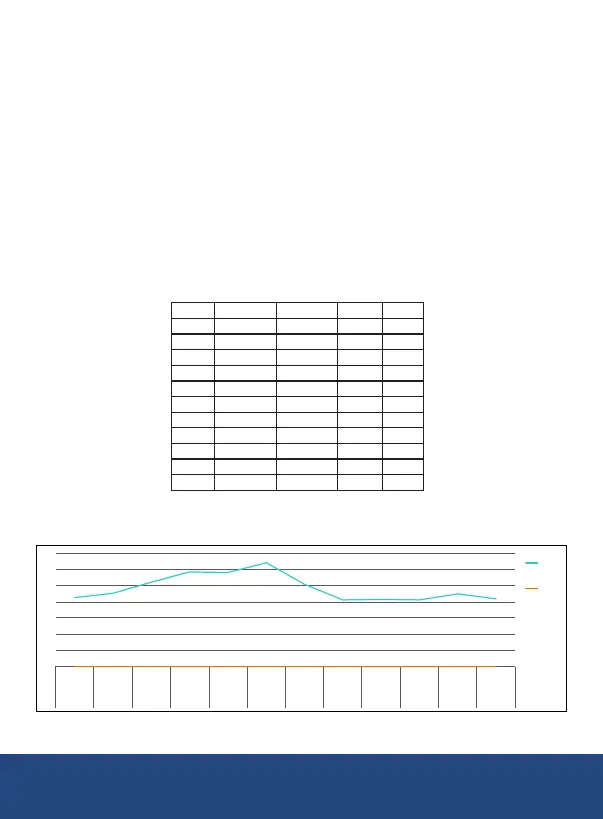
Place Date Time Value Unit
1 19-07-10 0:05:02 42.5 dB
2 19-07-10 0:05:04 45.3 dB
3 19-07-10 0:05:06 52 dB
4 19-07-10 0:05:08 58.5 dB
5 19-07-10 0:05:10 58.1 dB
6 19-07-10 0:05:12 64 dB
7 19-07-10 0:05:14 50.8 dB
8 19-07-10 0:05:16 41.1 dB
9 19-07-10 0:05:18 41.5 dB
10 19-07-10 0:05:20 41.1 dB
11 19-07-10 0:05:22 44.7 dB
0
10
20
30
40
50
60
70
0:05:02 0:05:04 0:05:06 0:05:08 0:05:10 0:05:12 0:05:14 0:05:16 0:05:18 0:05:20 0:05:22 0:05:24
19-07-10 19-07-10 19-07-10 19-07-10 19-07-10 19-07-10 19-07-10 19-07-10 19-07-10 19-07-10 19-07-10 19-07-10
1 2 3 4 5 6 7 8 9 10 11 12
Value
Unit
continued...
REED Instruments
1-877-849-2127 | info@reedinstruments.com | www.reedinstruments.com



 To Next Page