68
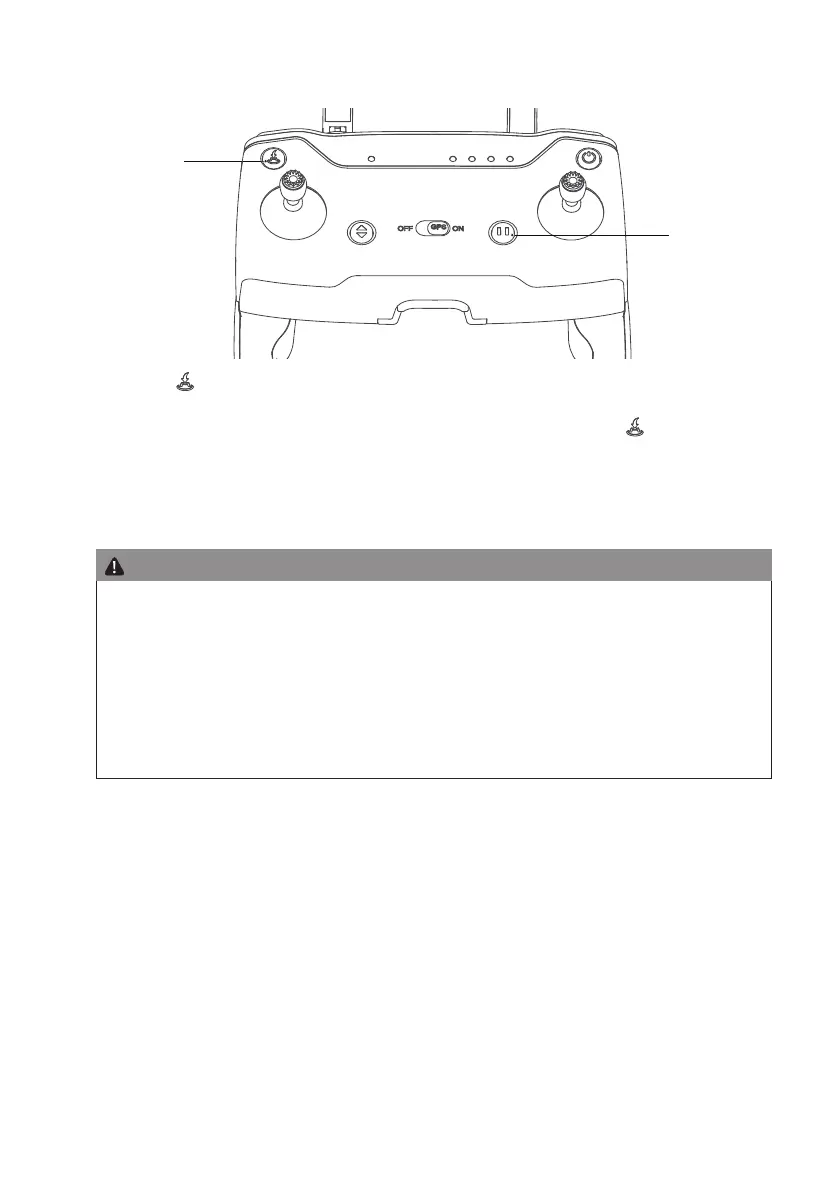
RTH Button / Pause Button
Pause
RTH
Long press ″
″ button, with “B-B” sound on RC, to start the RTH, The drone will y back to the latest recorded
return point. The joysticks can not be used during the process of ascent and return. During its landing, user can toggle
the joystick to control the drone and decide the landing site. During its return, press the ″
″ button again to exit
RTH mode, Then the user will regain control of the drone.
Short press the pause button, the aircraft will interrupt the current mode such as track, lose control return, waypoint,
quick shots, or orbit mode),and change to position mode.
Attention:
• To ensure the return to home point as precise as possible, please y the drone in open area (no tall buildings
in 50 meters of radius, at in 10 meters of radius) with the GPS working well, Then the return to home function
will be able to activate.
• With the GPS positioning mode turned on, it will automatically enter auto return to home mode if the remote
controller loses control.
• Once the RTH mode is enabled, if the drone ies below 30 meters of altitude, the drone will automatically
ascend to 30 meters before returning to home point. If the drone ies over 30 meters of altitude, the drone
will return to home point at the current altitude. Please do not use other functions during the process of return.
Please ensure there are no obstacles in way of return in case of any potential accidents.


 To Next Page