— English Vacuum spray degassing — 28.08.2019 - Rev. B
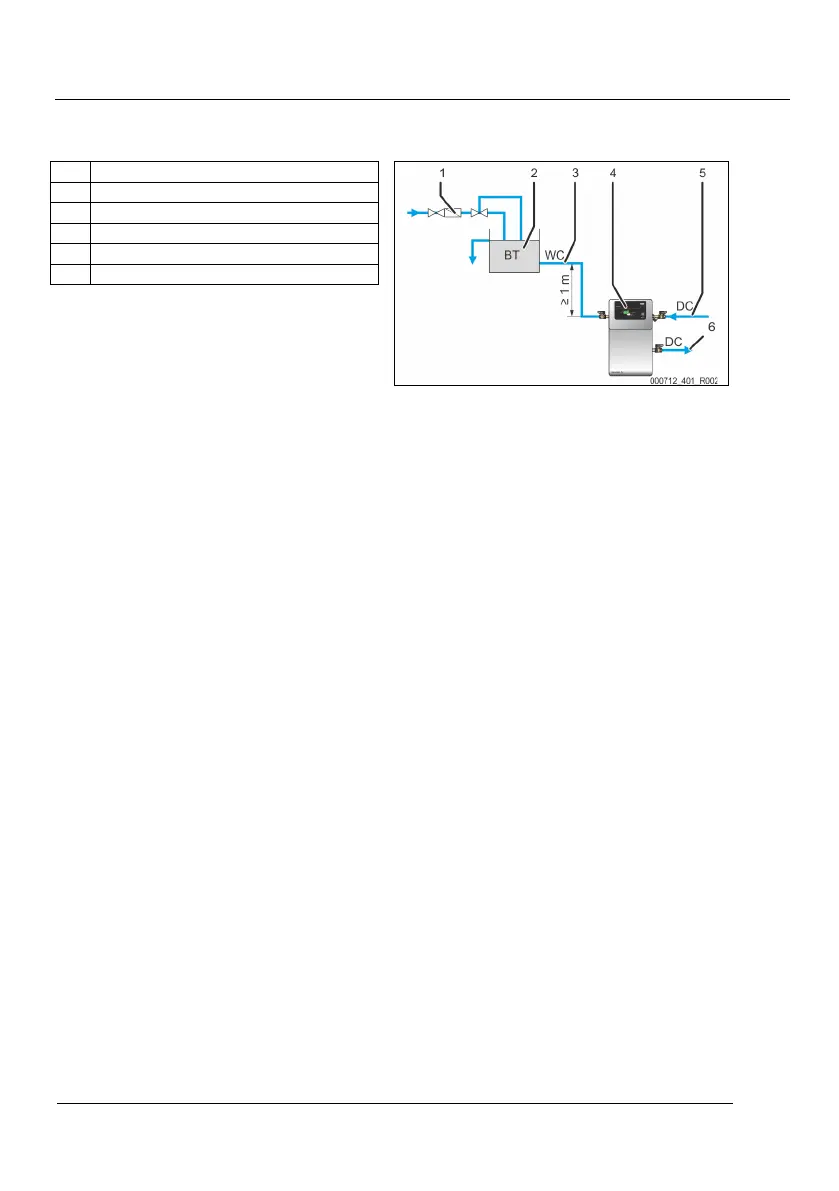
6.3.3.1 Make-up line
1 "ST" dirt trap
2 "BT" system separator vessel
3 "WC" make-up line
4 Device
5 "DC" degassing line (gas-rich water)
6 "DC" degassing line (degassed water)
For water make-up, note the following conditions:
• For a water make-up via a "BT" mains disconnect
receptacle, its bottom edge must be at least 1 m over
the "PU" device pump.
• Close the connection of the "WC" make-up line when a
make-up line is not connected.
– Set the make-up variant to “None” via the Reflex
Control Smart app.
• Install at least one "ST" dirt trap with a mesh size ≤ 0.25 mm closely upstream of the device in the “WC” make-up line (3).
Note!
Avoid a device fault.
Ensure that manual water make-up to the facility system is possible.
Note!
Use a pressure reducer in the "WC" make
-up line if the idle pressure exceeds 6 bar.
6.4 Switching and make-up variants
The device has three make-up variants:
• Pressure-dependent "Magcontrol" make-up.
– In a facility system with an expansion vessel.
• Level-dependent "Levelcontrol" make-up.
– In a facility system with a pressure maintenance station.
• No make-up
– No automatic make-up takes place. In operation via the Reflex Control Smart App, this is indicated and selected as
“None” under the make-up variants selection.
-up via the make-up button on the device can be performed under level-dependent "Levelcontrol"
-up (see chapter 9.3 "Manual make-up" on page 24 ).
With the “Magcontrol” variant no manual make-up is possible.



 To Next Page