CHAPTER 6
6-12
Adjustment Item Display Range
Base level Bas -8 to +8
Mid level Mid -8 to +8
Treble level Tre -8 to +8
Balance Bl Left 15-Right 15
Fader Fd Rear 15-Front 15
Exit the audio control mode by pressing AUD.
Clock Adjustment
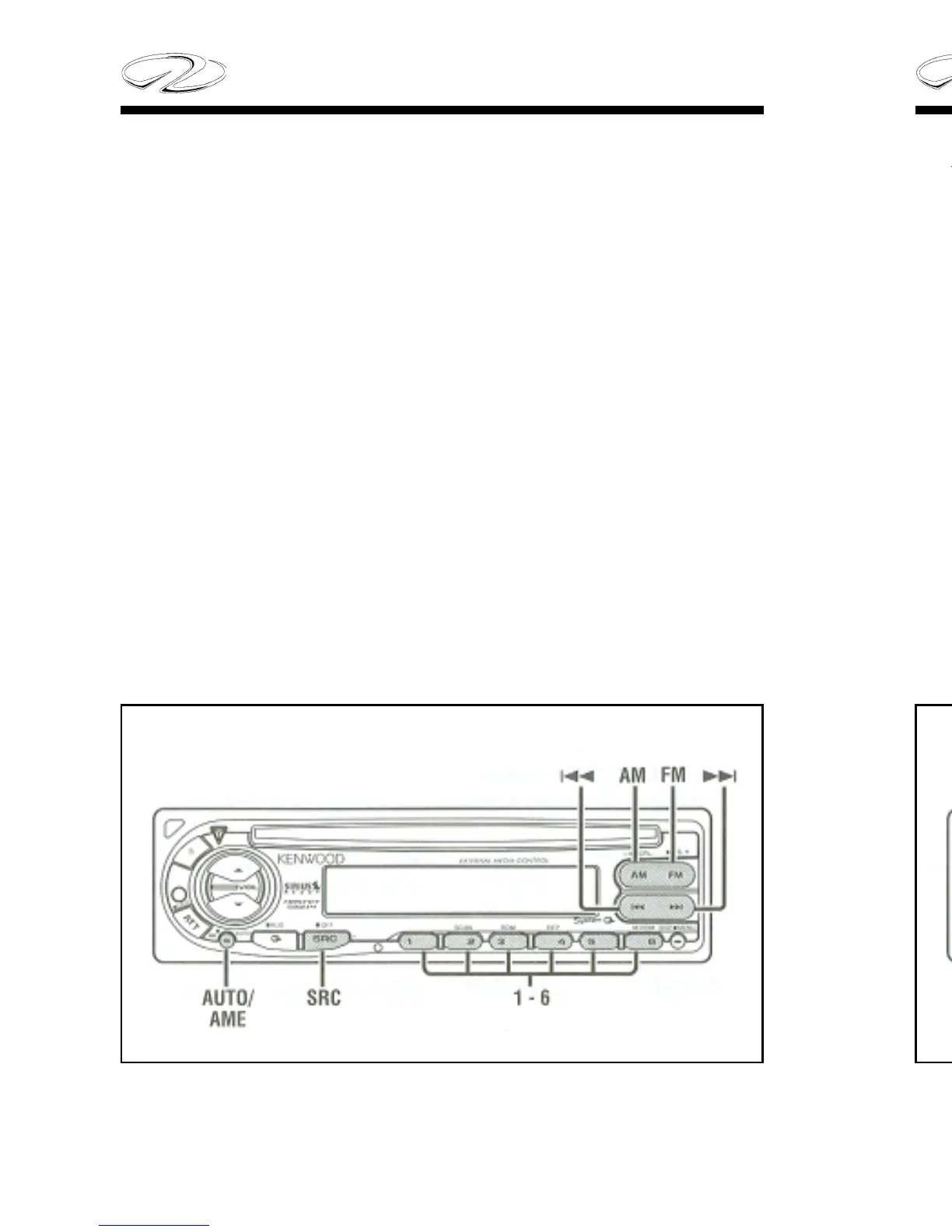
Select the clock display by pressing the CLK button.
Enter the clock adjustment mode by pressing the CLK button for at
least 2 seconds. The clock display will blink.
Adjust the hours by pressing the AM or FM buttons.
Adjust the minutes by pressing the << or >> button.
Exit the clock adjustment mode by pressing CLK.
TUNING FUNCTIONS
CHAPTER 6
6-12
Adjustment Item Display Range
Base level Bas -8 to +8
Mid level Mid -8 to +8
Treble level Tre -8 to +8
Balance Bl Left 15-Right 15
Fader Fd Rear 15-Front 15
Exit the audio control mode by pressing AUD.
Clock Adjustment
Select the clock display by pressing the CLK button.
Enter the clock adjustment mode by pressing the CLK button for at
least 2 seconds. The clock display will blink.
Adjust the hours by pressing the AM or FM buttons.
Adjust the minutes by pressing the << or >> button.
Exit the clock adjustment mode by pressing CLK.
TUNING FUNCTIONS



 To Next Page