1.62
Y
Rear screen wiper
Depending on the variants,
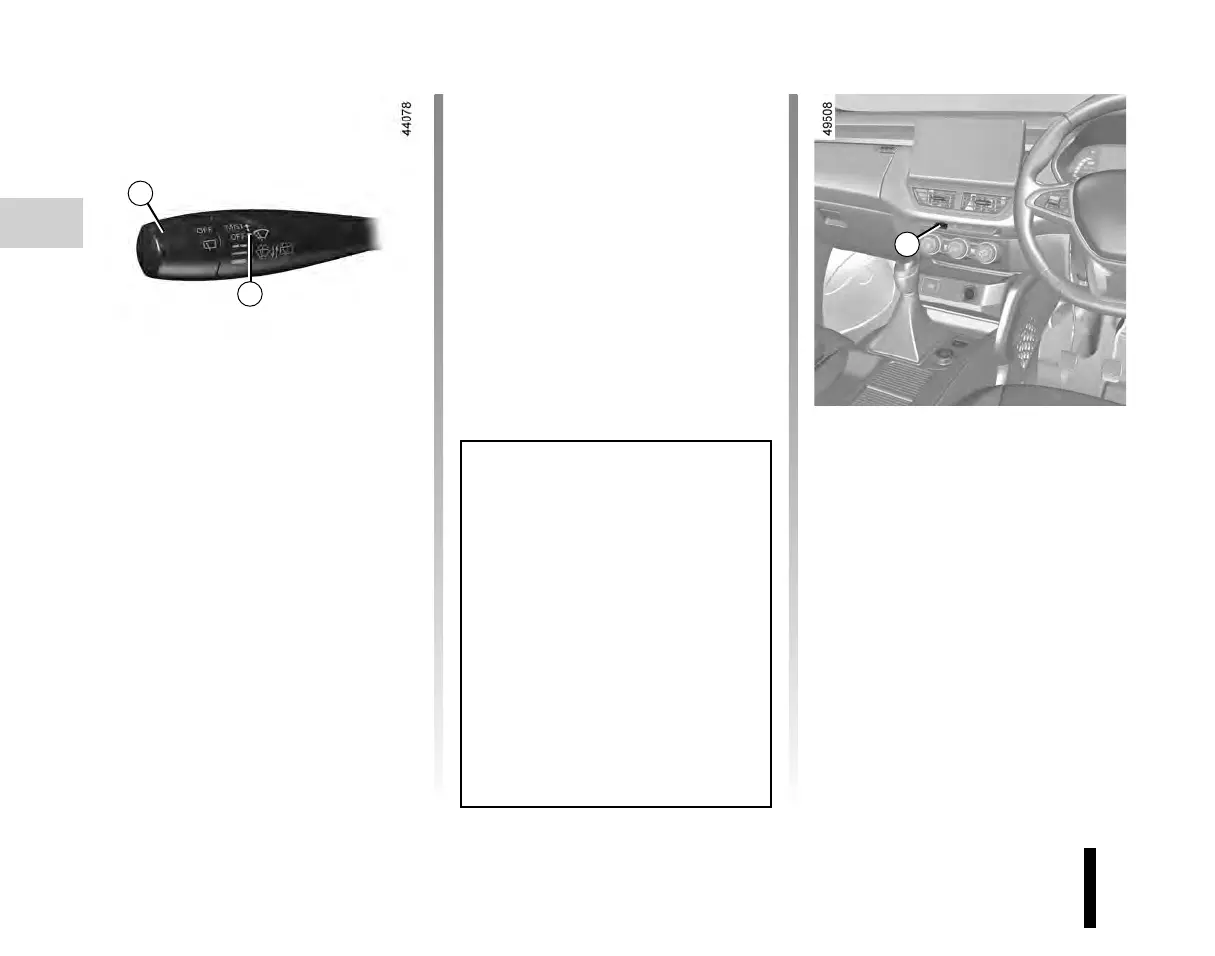
with the ignition on, turn the end of
stalk 1 to align the symbol with mark 2
p
Rear screen washer/
wiper
With the ignition on, turn the end of
stalk 1 to align the symbol with mark 2.
When the stalk is released, it returns to
the rear wipe position.
A longer push will trigger three sweeps
of the wipers, in addition to the wind
screen washer.
V
Heated rear screen
Depending on the variants,
with the engine running, press button
3 (the indicator light on the instrument
panel lights up).
This function de-ices/demists the rear
screen.
The function is stopped:
– automatically after a period of time
set by the system (warning light goes
out);
– by pressing button 3 again (the warn-
ing light goes out).
WINDSCREEN WASHING / WIPING (2/2)
Before using the rear wiper, check
that no object is obstructing the
travel of the blade.
In frosty weather, make sure that
the wiper blades are not stuck by ice
(to avoid the risk of the motor over-
heating).
Keep an eye on the condition of the
blades. They should be replaced as
soon as they become less efficient.
This will occur approximately once
a year. Clean your windscreen reg-
ularly.
1
2
1












 To Next Page