en
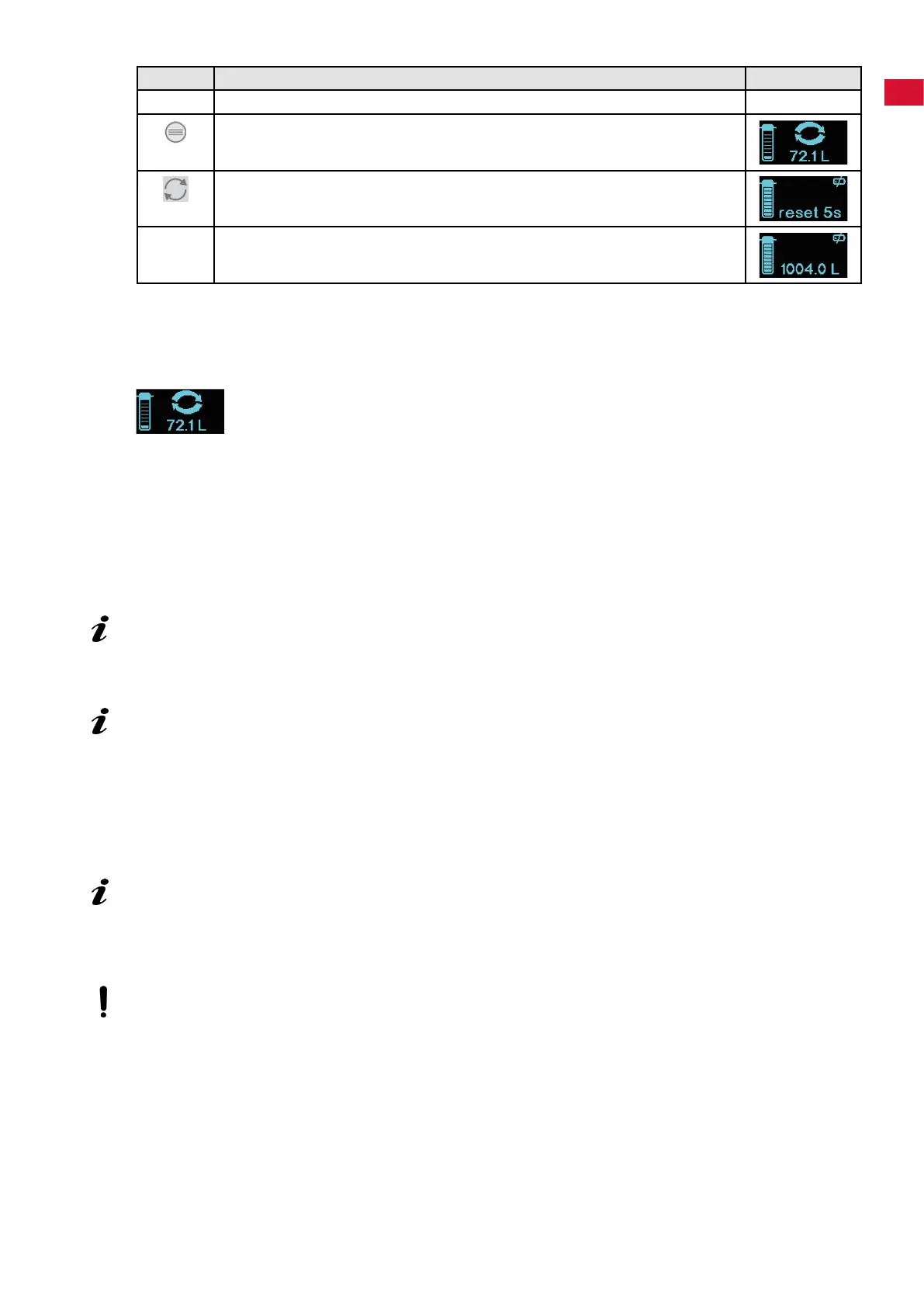
⇒ Reset the counter
Key Display
The display is switched o. ---
Press the "MENU" key:
- Display: Filter status.
Press and hold the "RESET" key for approx. 5 seconds.
- The display shows "reset 5s", the countdown runs down.
The lter capacity is now reset and the last value entered is shown.
The system is now ready for operation.
4.3 Replacing a lter cartridge
Once 90 % of the lter capacity has been used up, at the latest after 360 days, you are prompted to re-
place the lter cartridge:
⇒ Run the ushing hose into a suitable container (e.g., a bucket) or into a drain.
⇒ Slowly unscrew the used lter cartridge anti-clockwise. This releases it from the lter head and it can be
removed.
♦ During this procedure, the consumer unit and the water supply line are hydraulically disconnected
from the lter head and the system is decompressed. In this case, it can happen that a minimal quan-
tity of decompression water can escape from the ushing hose due to pressure peaks. Take this into
consideration and place a suitable container underneath.
⇒ Open the purge valve (5) (OPEN, Fig. 3).
Waterescapesfromtheushinghoseassoonastheltercartridgehasbeeninserted!
⇒ Remove the new lter cartridge from the packaging and check for damage.
⇒ Insert the lter cartridge into the lter head.
InserttheltercartridgewithitsmarkingatinsertionmarkAandscrewitinasfarasitwillgo,
operatingmarkB.
⇒ Vent and rinse the lter cartridge.
- Filter cartridge M: Flush with min. 5 liters of water
- Filter cartridge L: Flush with min. 10 liters of water
⇒ Close the purge valve (5) (CLOSE, Fig. 4).
⇒ Enter the date of installation and the time of replacement in the corresponding elds on the sticker on
the lter cartridge (a ballpoint pen can be used).
NOTICE:Therinsingwaterisinitiallymilkyandcloudy.Thisisduetothedispersedairandclears
after a short time.
Checkthecorrectpositionoftheltercartridgeinthelterheadusingthemarkingsonthelter
head(B,Fig.5)andltercartridge.Wheninsertingtheltercartridge,payattentiontotheposition
ofthesticker.Thisshouldfaceforwardsothatallthenecessaryinformationisvisible.
If the lter cartridge is removed from the lter head without being replaced by a new one, the wa-
ter supply to the lter head must be shut o.
4.3.1 Resetting the counter / checking the lter capacity
If a lter cartridge of the same size was used when replacing the lter cartridge, only the counter needs to
be reset.
If a larger lter cartridge is used, its capacity must be entered rst.
See Chapter 4.2.1
4.4 Programming and display unit
Information on additional functions of the programming and display unit is provided in the instructions for
use available online.
- 5 -


 To Next Page