- 7 -
EN
5.4.1 Abort mixing process
1. Stop the mixing process.
Press the control knob once.
The appliance will beep.
Mixing process being aborted
2. Aerate bowl.
Hold the bowl!
Press the control knob.
The bowl will be released in a few seconds.
3. Remove the mixing bowl
5.4.2 Power cut
Twister HYROXWLRQ only
If a power cut should occur or the appliance is switched off during a mixing operation, the vacuum will be maintained
and the bowl will stay on the device.
When the power returns or the device is switched back on again, the bowl will become ventilated and then fall off.
7ZLVWHUHYROXWLRQYHQWXULonly
In case of a power failure or if the appliance is switched off, the bowl will be vented and be uncoupled.
5.5 Adjustment During the Mixing Process
All the mixing parameters can be displayed in large-scale characters during the mixing process if you press the
relevant parameter key.
All the mixing parameter settings for the current stage or a subsequent stage can be changed
GXULQJWKHPL[LQJSURFHVV
3UHVVSDUDPHWHUNH\
- Mixing parameter symbol will appear in the display.
- Value will be displayed in large-scale characters.
Turn the control knob to change the value.
&KDQJHVPDGHWRWKHPL[LQJSDUDPHWHUVHWWLQJVGXULQJWKHPL[LQJSURFHVVZLOOEHDSSOLHGWRWKDWPL[LQJ
SURFHVVRQO\DQGZLOOQRWEHVDYHG6HHVHFWLRQIRULQVWUXFWLRQVRQFKDQJLQJDQGVDYLQJPL[LQJSDUDPHWHU
settings.
6. Programming
6.1 Programme Selection
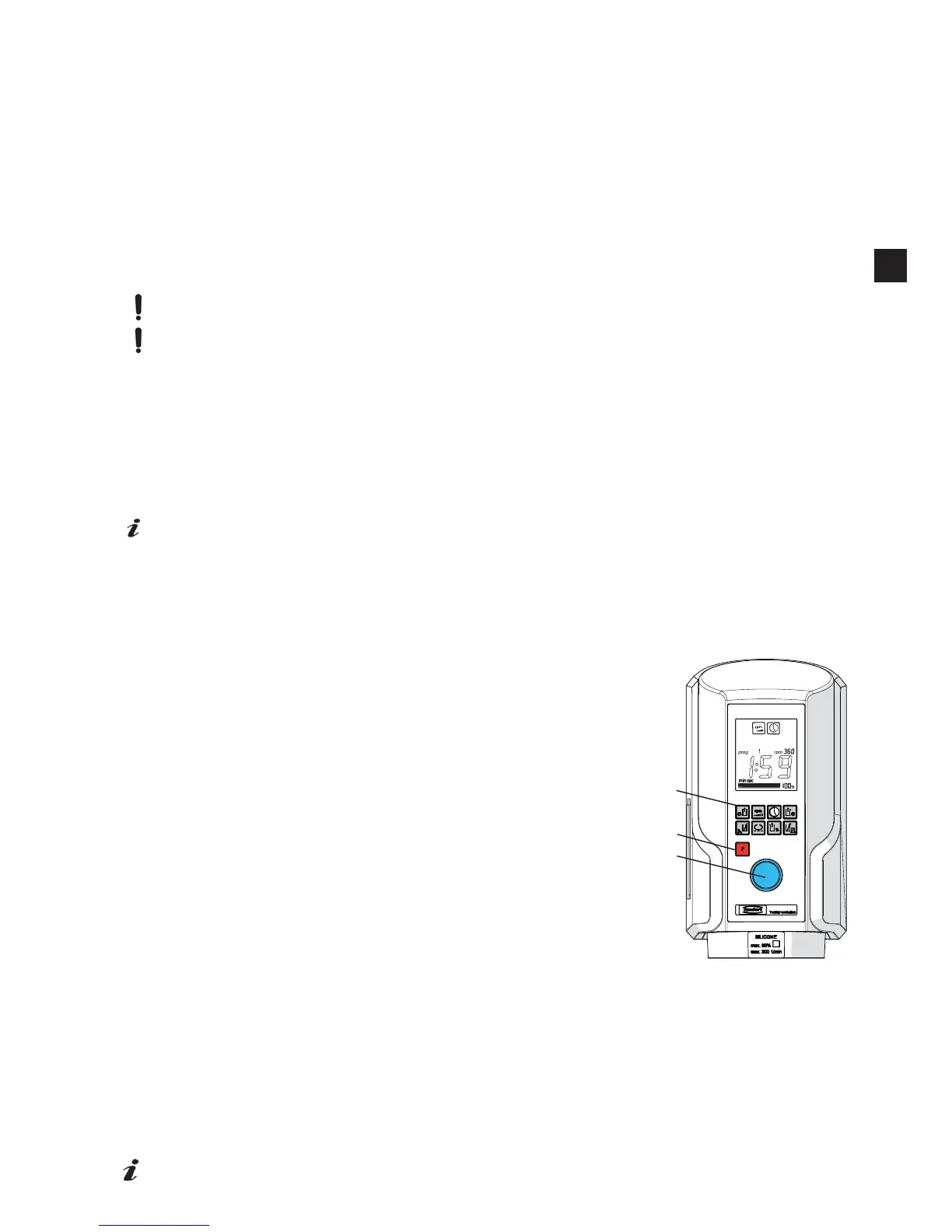
1. Press the programming key, „P“ (2).
2. Select the desired program by turning the control knob (1).
7KHIROORZLQJZLOODSSHDULQWKHGLVSOD\ZKHQDSURJUDPLVVHOHFWHG
Symbols of the mixing parameter settings which are being used in the current program.
Mixing time setting in selected program.
Speed setting in selected program.
Vacuum setting in selected program.
6.2 Displaying Mixing Parameters
The mixing parameters of the currently selected programme can be displayed at any
time.
'LVSOD\LQJWKHSDUDPHWHUV
Press parameter key (3).
Mixing parameter symbol will appear in the display.
Mixing parameter setting is displayed in large-scale characters for approx. 4 sec. or
until another key is pressed.
6.3 Setting / Saving Mixing Parameters
Only the mixing parameters of the currently selected programme can be changed
and saved.
6.3.1 Saving mixing parameter settings permanently
1. Select mixing parameter settings.
Press parameter key (3).
Mixing parameter symbol will appear in the display.
Mixing parameter setting is displayed in large-scale characters for approx. 4 sec. or until another key is pressed.
2. Set value.
Turn the control knob (1) to change the value.
Set further values as described in 1 and 2.
3. Save value.
Press programme button „P“ (2) until the acoustic signal can be heard (after approx. 2 seconds) which means
that all values in the selected programme have been permanently saved.
,QGLYLGXDOYDOXHVFDQDOVREHVDYHGSHUPDQHQWO\E\SUHVVLQJWKHUHOHYDQWSDUDPHWHUEXWWRQIRUDSSUR[
seconds.
¿J
1
2
3
EN


 To Next Page