49
Communication
NOT
z
7KHGURSFDEOHVKDOOQRWH[FHHGIHHWPDQGWKH59&EXVVKDOOQRWH[FHHG
feet (30 m).
z
'LႇHUHQWGURSVRFNHWVDUHXVHGRQWKH59&EXVE\GLႇHUHQW59PDQXIDFWXUHUV6HOHFWWKH
'URS3OXJVWKDWPDWFKWKHGURSVRFNHWVIRUWKHLQWHUGHYLFHFRPPXQLFDWLRQFRQQHFWLRQV,I
\RXDUHQRWVXUHDERXWWKH'URS3OXJVHOHFWLRQFKHFNZLWKWKH59PDQXIDFWXUHU7KLVXVHU
PDQXDOWDNHVWKH0LQL&ODPS,,SOXJ3LQDVDQH[DPSOH
z
'LႇHUHQW'URS3OXJVIROORZGLႇHUHQWSLQRXWV&ULPSWKH'URS3OXJVRQWKH'URS&DEOHV
IROORZLQJWKHFRUUHFWSLQRXW,I\RXDUHQRWVXUHDERXWWKH'URS3OXJSLQRXWFKHFNZLWKWKH
59PDQXIDFWXUHU7KLVXVHUPDQXDOWDNHVWKHSLQRXWRIWKH0LQL&ODPS,,SOXJ3LQDVDQ
example.
AC / INV
CHC
FAULT
Pure Sine Wave Inverter Charger
REMOTE
DRY
CAN
NO
NC
C
CONTACT
WARNING
please read the instructions carefully
Before working on this product.
High voltage,in order to avoid risks,
L
L
N
OUTPUT
INPUT
N
WARNING
please read the instructions carefully
Before working on this product.
High voltage,in order to avoid risks,
OFF
ON
OFF
ON
REMOTE
DRY
CAN
NO
NC
C
CONTACT
WARNING
please read the instructions carefully
Before working on this product.
High voltage,in order to avoid risks,
L
L
N
OUTPUT
INPUT
N
WARNING
please read the instructions carefully
Before working on this product.
High voltage,in order to avoid risks,
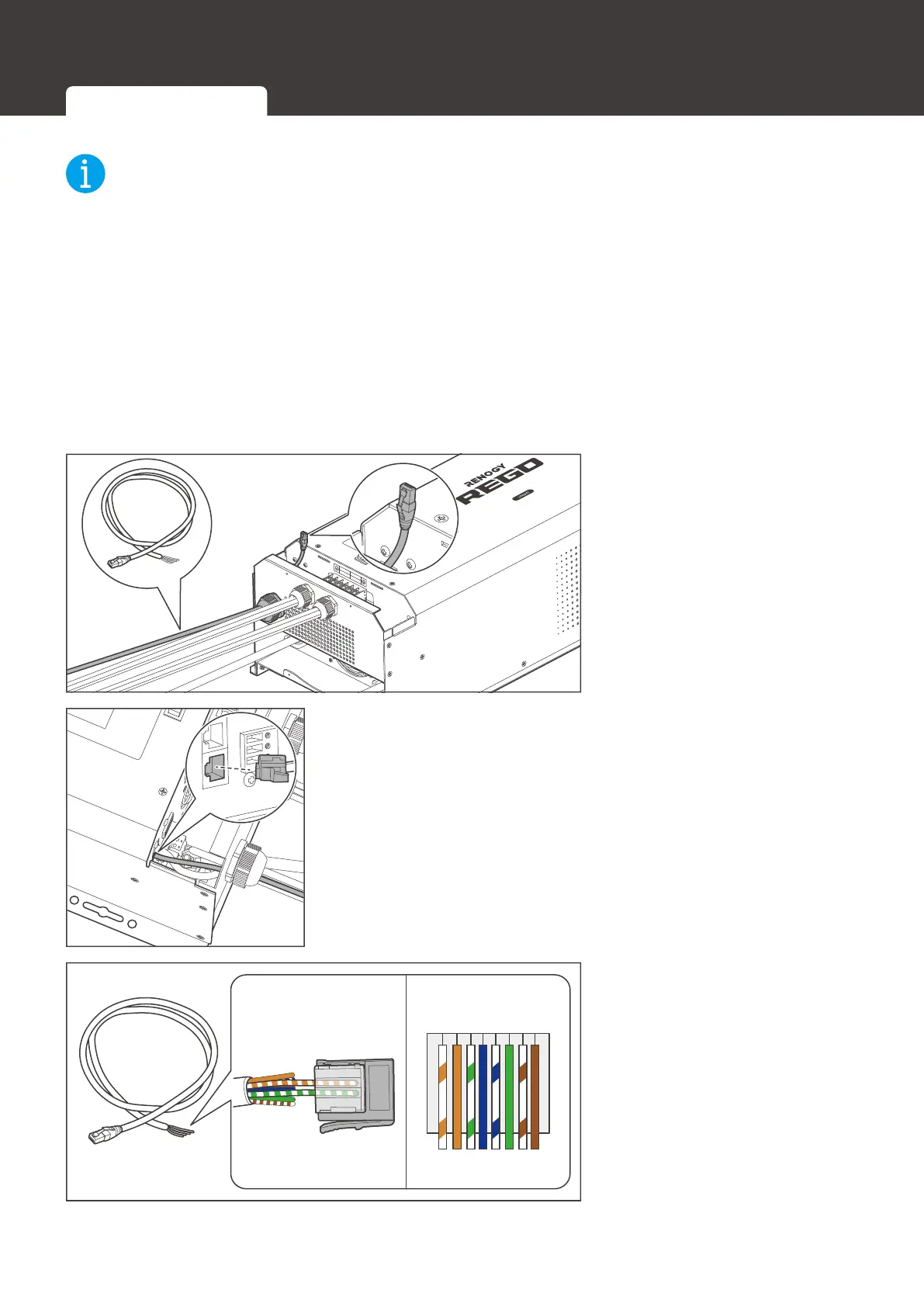
1. Insert the RJ45 connector
RI5-3OXJWRWKH%DUH
'URS&DEOHWKURXJKWKH
Remote & Accessory
&DEOH(QWU\
ON
BTS
CAN
REMOTE
DRY
CONTACT
NC
C
NO
2. Connect the RJ45 connector to the Communication Port
&$1%XV
4 3 2 1
1 2 3 4 5 6 7 8
3. The white green CAN_H
wire goes to pin 2 and the
white orange CAN_L wire
goes to pin 3. Leave pin 1
and pin 4 empty.
Inter-Device Communication Monitoring Device Communication





 To Next Page