53
Communication
Monitoring Device Communication
'HSHQGLQJRQWKHDSSOLFDWLRQWKHVKRUWUDQJHRUORQJUDQJHFRPPXQLFDWLRQFRQQHFWLRQVFDQEH
HVWDEOLVKHGEHWZHHQWKHLQYHUWHUFKDUJHUDQGPRQLWRULQJGHYLFHV7KHPRQLWRULQJGHYLFHDOORZV
for the monitoring and programming of the inverter charger or even the complete system.
NOT
z
0DNHVXUHWKH%OXHWRRWKRI\RXUSKRQHLVWXUQHGRQ
z
Scan the QR code on the last page of the user manual to download the DC Home app.
z
7KHYHUVLRQRIWKH'&+RPHDSSPLJKWKDYHEHHQXSGDWHG,OOXVWUDWLRQVLQWKHXVHUPDQXDO
DUHIRUUHIHUHQFHRQO\)ROORZWKHLQVWUXFWLRQVEDVHGRQWKHFXUUHQWDSSYHUVLRQ
z
0DNHVXUHWKDWWKHLQYHUWHUFKDUJHULVSURSHUO\LQVWDOOHGDQGSRZHUHGRQEHIRUHLWLVSDLUHG
with the DC Home app.
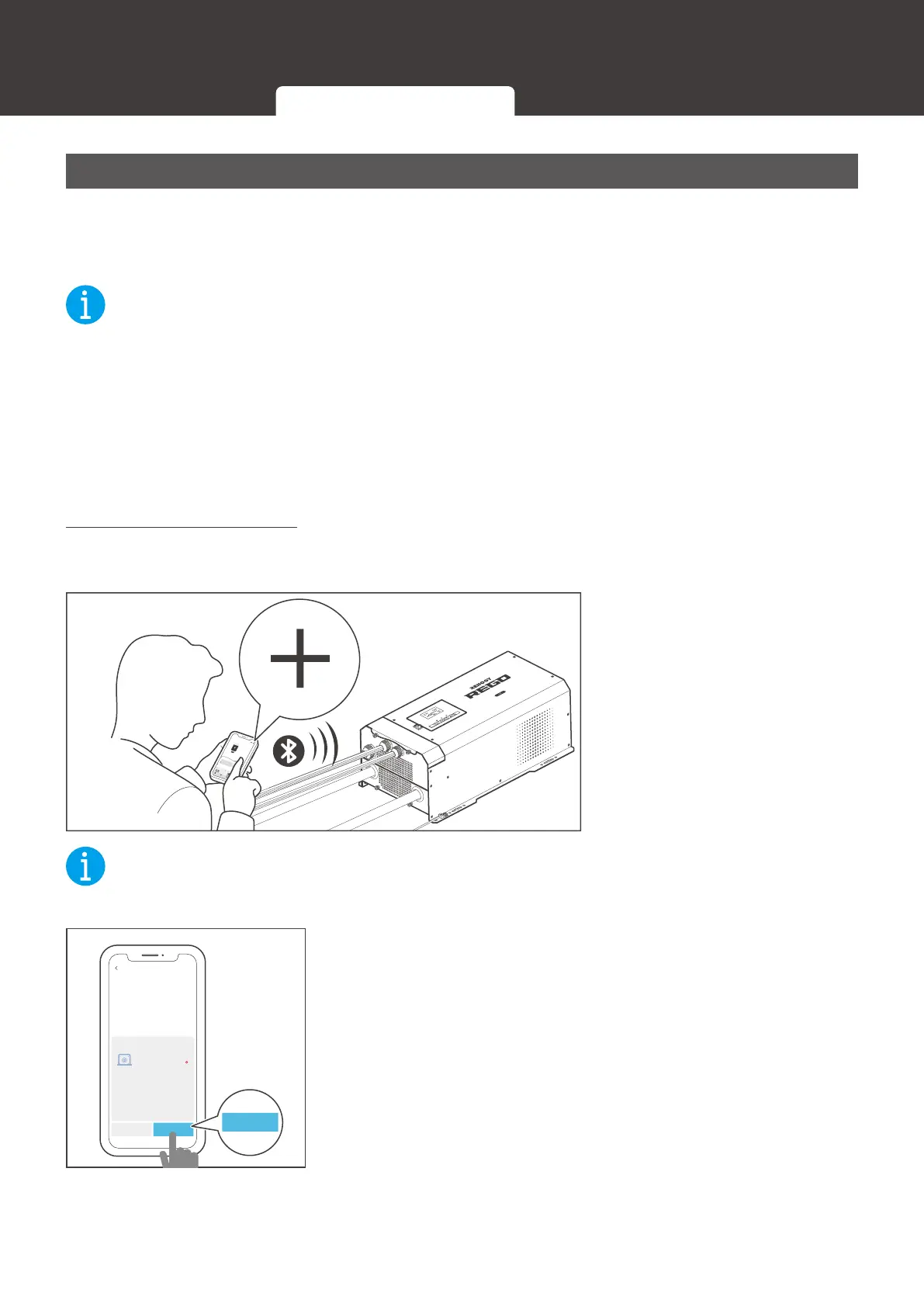
Short-Range Monitoring
,IRQO\VKRUWUDQJHPRQLWRULQJLVUHTXLUHGFRQQHFWWKHLQYHUWHUFKDUJHUWRWKH'&+RPHDSS
GLUHFWO\WKURXJKWKH%OXHWRRWKRI\RXUSKRQH
AC / INV
CHC
OFF
ON
FAULT
please read the instructions carefully
Before working on this product.
High voltage,in order to avoid risks,
Pure Sine Wave Inverter Charger
CHARGING
LI
OUTPUTBATT
INPUTBATT
100%
25%
BYPASS
Short-Range Monitoring
My Renogy
75%
A
Device
Devices
Battery
RBT12400LFPL-...
Controller
Scene Community Personal
Commonly
RCC60RVRU
%
25
A
0 0
W
0
10
h left
Security
Night
1. Open the DC Home app.
Tap + to search for new
devices.
NOT
z
Keep the phone within 10 feet (3 m) of the inverter charger.
Cancel Confirm
BT-TH-161CFF52
RIV1230RCL-1SS
Found Devices
ConfirmConfirm
2. Tap &RQ¿UPto add the newly found device to the device
list.
Inter-Device Communication Monitoring Device Communication





 To Next Page