UG-OPUS® 5-80R
OPUS® 5-80R Pre-packed Chromatography Columns
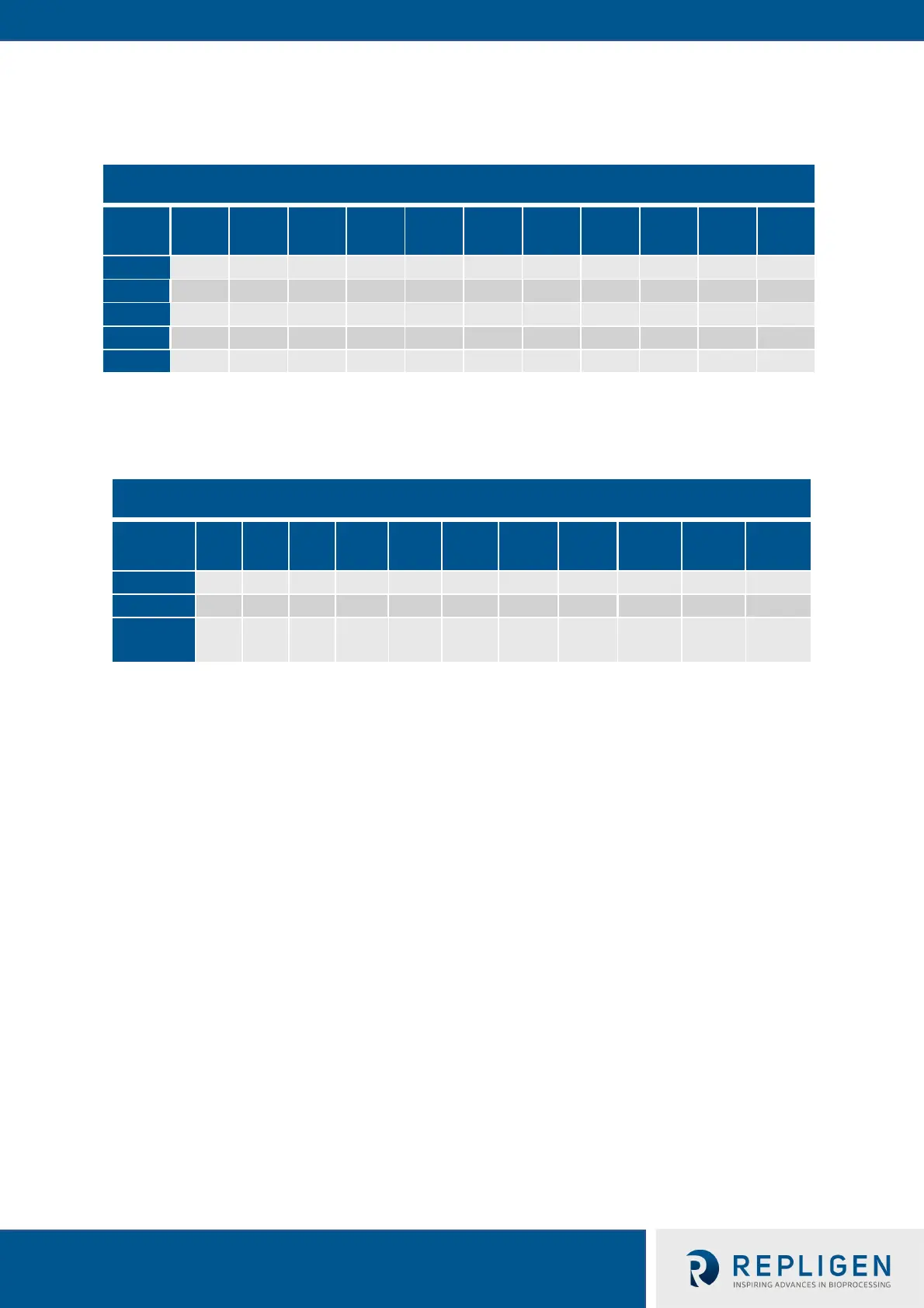
2.8 Column Mass Table
Table 6. Approximate Column Weight
Column Diameter
Height
cm
cm
cm
cm
cm
cm
cm
cm
cm
cm
cm
2.9 OPUS® Column Handling
Table 7. Column Handling Features
Column Diameter
cm
cm
cm
cm
cm
cm
cm
cm
cm
cm
cm
Lifted
Yes Yes Yes Yes Yes Yes Yes Yes No No No
Preparing to Use Your OPUS® Column 3
1. Reference the technical specifications below when using your OPUS® Column during
processing:
a. Minimum Packing Pressure
i. Chromatography skid pressure alarms should be set based on the packing pressure
for your particular OPUS® column
b. Temperature:
i. Column construction is designed to support a working temperature range of 2
o
- 40°C.
2. Upon receipt of the box/crate:
a. Inspect the outside of the heavy-duty cardboard carton (for OPUS® 5 – 30 Columns) or
wooden crate (for OPUS® 45R, 60R and 80R Columns) for any unusual signs of damage. If
significant damage has occurred, please contact Repligen immediately.
b. Locate the shipping delivery documents attached to the outside of the box.
c. Locate the Certificate of Analysis (CoA) for the column inside the box.
d. Remove the top layer of protective foam to expose the column.
e. For GMP Run Ready OPUS® Columns, locate the QC resin sample and store as specified
by the resin supplier.
f. In some cases, excess resin not used during column packing may also be shipped with
the column. This may be found in the column box/crate, or in a separate box.
3. Remove the column from the box/crate using the instructions in the guides as summarized
below:
a. For maximum cleanliness, keep the clear plastic bag containing the column intact for this
step. Please note there is no bag for the OPUS® 45R, 60R and 80R Columns.


 To Next Page