Revision 2.6 Page 49 of 53
Intuitive Mercury 6-5M Controller with TDB
Warning
Please Note
The specifications of the product detailed on this
Set-Up Guide may change without notice. RDM
Ltd. shall not be liable for errors or for incidental
or consequential damages, directly and indirectly,
in connection with the furnishing, performance or
misuse of this product or document.
Ensure that all power is
switched off before
installing or maintaining
this product
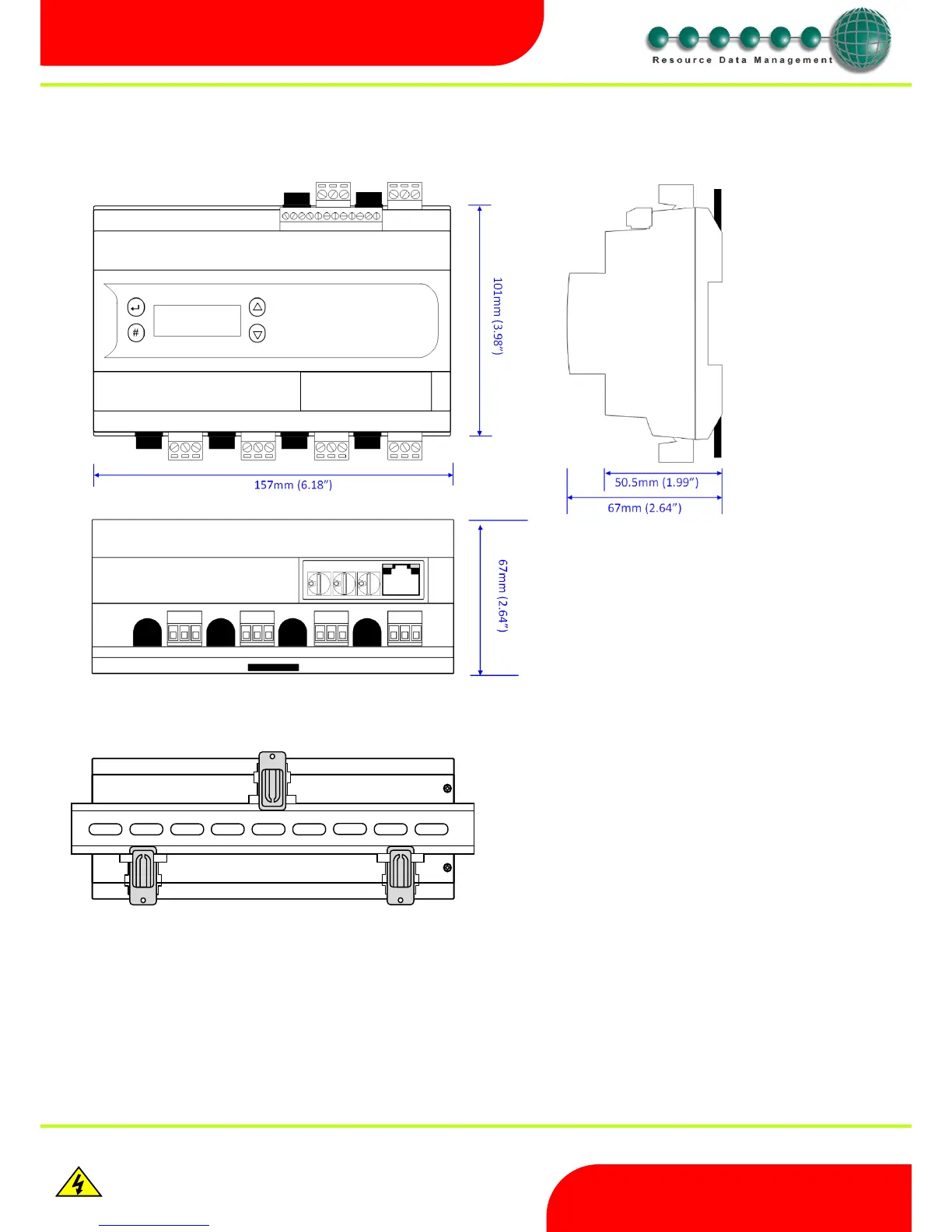
Dimensions
Intuitive Mercury TDB controller
Intuitive Mercury Mounting Instructions
Three clips fix the Intuitive Mercury TDB securely to DIN rail. Pull each clip until it “clicks” to remove the controller. Each clip has a mounting hole
to provide an alternative fixing mechanism to DIN mounting.
Clearances
The controller must have 10mm clearance above the top and 15mm clearance from the sides. Clearance at the front and rear is dependent on
the site wiring.
There is no requirement for forced cooling ventilation
Cleaning
Do not wet the controller when cleaning. Clean the front by wiping with a slightly damped lint free cloth.


 To Next Page