14 Detailed Operation
Calendar and Clock Settings
Note:
Setting the month to “00” disables the calendar and clock functions and
helps conserve battery life
.
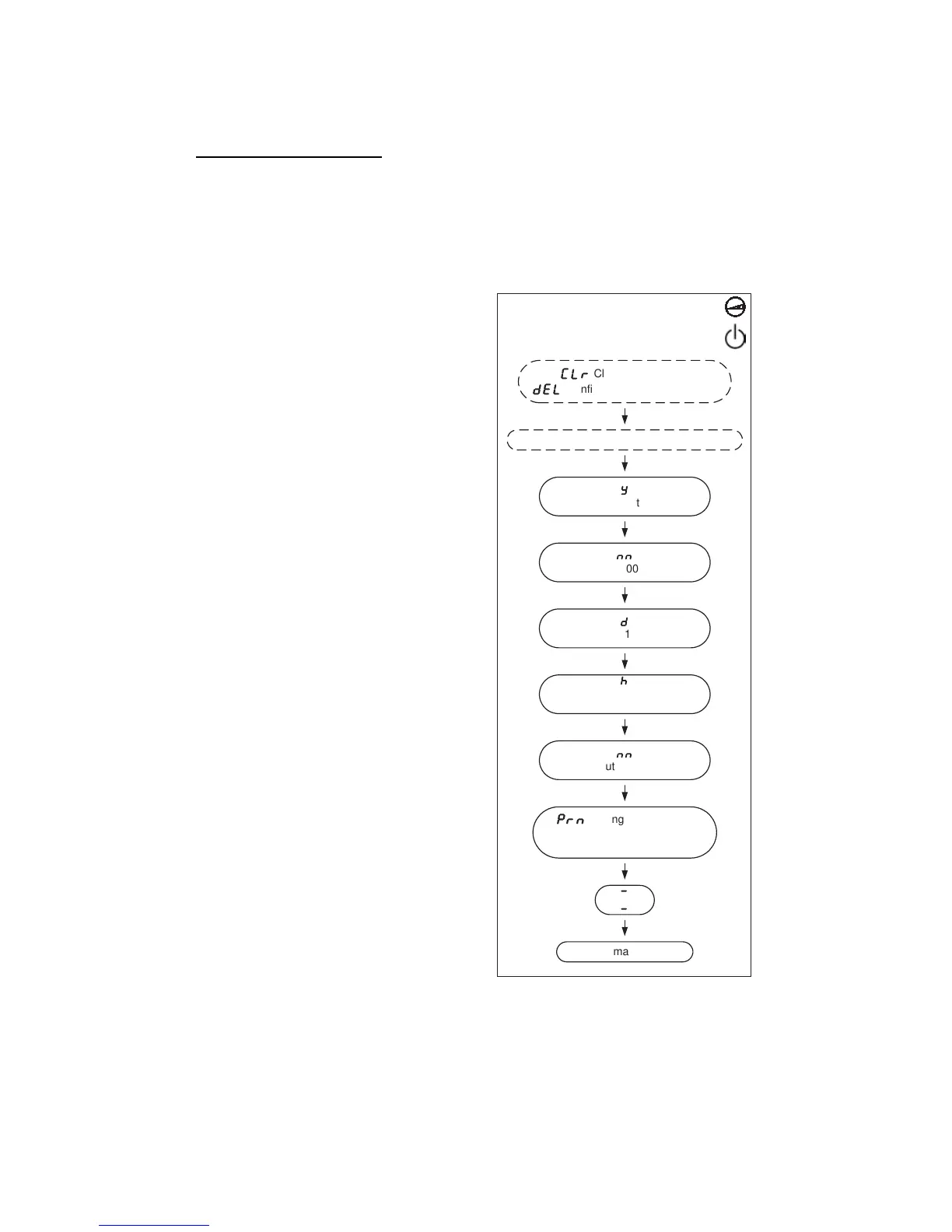
Refer to Figure 7 below for a diagram describing the calendar and clock
settings.
Choosing Calendar and Clock Settings:
1. After selecting “no” in the
memory clear settings, “y” will
appear in the SpO
2
display,
indicating the calendar year
setting.
2. Make the year, month, day, hour,
and minute selections. Use the
advance switch to scroll through
the values. Use the On/Standby
switch to accept a value and
move to the next setting.
3. After selecting the minutes,
“
Prn” will appear in the SpO
2
display. However, the “
Prn”
setting is not used at this time.
Press and release the On/Standby
switch to exit setup mode.
When the setting sequence has been
completed, the 920M PLUS displays
(two dashes). The unit is then ready
to begin normal operation.
Figure 7. Choosing calendar and clock settings.
CLr
Clear the memory?
del
Confirm clearing the memory?
prn
Setting not available.
Press and release the
on/standby switch to exit setup.
-
-
Begin normal operation.
Continue to the calendar and clock settings.
NO
(default)
nn
Set the minute, 00 through 59.
h
Set the hour, 00 through 23.
Note: This is a 24-hour clock.
d
Set the day, 01 through 31.
nn
Set the month, 00 through 12.
y
Set the year, 00 through 99.
Use the advance switch to scroll through
the values.
Use the on/standby switch to accept a value
and move to the next setting.
-
-
2




 To Next Page